

Every piece of a site, from a page to a plugin setting to a comment, ends up in one of the WordPress database tables, and knowing which table holds what is the difference between a developer who guesses and one who can debug. WordPress uses a deliberately small schema of twelve core tables in MySQL or MariaDB, with a few more on multisite. This guide explains each table, how they relate, how to query them safely with $wpdb, when to add your own, and which habits keep them fast.
The twelve core WordPress database tables
All table names carry the prefix set in wp-config.php, wp_ by default. The prefix is why you should never hard-code a name: $wpdb->posts and $wpdb->prefix . 'my_table' resolve correctly on any install, including a multisite subsite whose prefix is wp_7_.
| Table | Holds | Key columns |
|---|---|---|
wp_posts | Posts, pages, attachments, revisions, menu items, templates, every custom post type | ID, post_type, post_status, post_name |
wp_postmeta | Key/value pairs attached to a post | post_id, meta_key, meta_value |
wp_terms | Term names and slugs | term_id, name, slug |
wp_term_taxonomy | Which taxonomy a term belongs to, plus parent and count | term_taxonomy_id, taxonomy, parent |
wp_term_relationships | Links objects to terms | object_id, term_taxonomy_id |
wp_termmeta | Key/value pairs attached to a term | term_id, meta_key |
wp_users | Login, hashed password, email, display name | ID, user_login, user_email |
wp_usermeta | Roles, capabilities, profile fields, per-user settings | user_id, meta_key |
wp_comments | Comments, pingbacks, review data from plugins | comment_ID, comment_post_ID, comment_approved |
wp_commentmeta | Key/value pairs attached to a comment | comment_id, meta_key |
wp_options | Site settings, plugin options, transients, cron schedule, rewrite rules | option_name, option_value, autoload |
wp_links | Legacy blogroll, unused today | link_id |
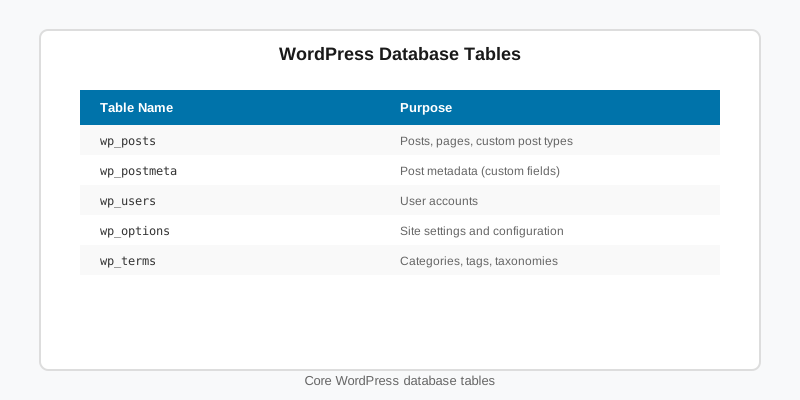
Notice the pattern: four “entity” tables (posts, terms, users, comments) each paired with a meta table. That entity-plus-meta design is the single most important idea in the WordPress database tables, and it explains both the flexibility and the performance characteristics of everything built on top.
How wp_posts and wp_postmeta hold almost everything
wp_posts is the busiest table on any site. The post_type column decides what a row is: post, page, attachment for media, revision for history, nav_menu_item for menus, and wp_template, wp_template_part, wp_navigation and wp_global_styles for block themes. Anything you register with register_post_type() lands here as well, which is why our custom post types guide spends so little time on storage.
post_status (publish, draft, future, private, trash, inherit, auto-draft) and post_parent do a lot of quiet work. Revisions and attachments are children of the post they belong to, with a status of inherit.
wp_postmeta is an entity-attribute-value store: one row per key per post, with meta_value as longtext. It is indexed on post_id and on the first 191 characters of meta_key, but not on meta_value. Filtering or sorting a large site by a meta value is therefore a full scan, and that single fact should shape how you model data. Anything you need to query by belongs in a taxonomy, a dedicated column, or your own table, not in meta.
Taxonomy tables: terms, term_taxonomy and relationships
Categories, tags and custom taxonomies use three tables together. wp_terms stores the name and slug once. wp_term_taxonomy says which taxonomy that term belongs to, its parent for hierarchical taxonomies, and a cached count. wp_term_relationships is the join table linking an object ID, usually a post, to a term_taxonomy_id.
Because the join runs on integer keys and term_taxonomy_id is indexed, taxonomy queries are fast even with hundreds of thousands of posts. That is the practical reason to prefer a taxonomy over post meta for anything you filter by, such as a team, a league, a season or a product attribute. A taxonomy filter touches three small tables; a meta filter scans one large one.
Querying WordPress database tables safely with $wpdb
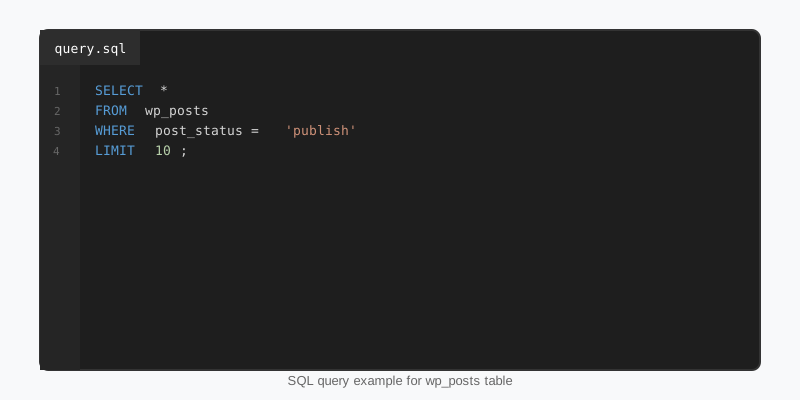
The wpdb class is the only sanctioned way to run SQL. Use WP_Query, get_posts(), get_terms() and the options API whenever they can express what you need, because they are cached and respect hooks. Drop to $wpdb for aggregates, reports and joins the high-level APIs cannot build. Every variable goes through $wpdb->prepare() with a typed placeholder, and every table name comes from a $wpdb property.
<?php
global $wpdb;

$post_type = 'sf_player';
$team_slug = 'chicago';

$sql = $wpdb->prepare(
    "SELECT p.ID, p.post_title, pm.meta_value AS jersey
       FROM {$wpdb->posts} p
       INNER JOIN {$wpdb->term_relationships} tr ON tr.object_id = p.ID
       INNER JOIN {$wpdb->term_taxonomy} tt ON tt.term_taxonomy_id = tr.term_taxonomy_id
       INNER JOIN {$wpdb->terms} t ON t.term_id = tt.term_id
       LEFT JOIN {$wpdb->postmeta} pm ON pm.post_id = p.ID AND pm.meta_key = %s
      WHERE p.post_type = %s
        AND p.post_status = 'publish'
        AND tt.taxonomy = %s
        AND t.slug = %s
   ORDER BY CAST( pm.meta_value AS UNSIGNED ) ASC
      LIMIT %d",
    'sf_jersey_number',
    $post_type,
    'sf_team',
    $team_slug,
    50
);

$players = $wpdb->get_results( $sql );

foreach ( $players as $player ) {
    echo esc_html( $player->post_title ) . ' #' . (int) $player->jersey . '<br>';
}%s, %d and %f are the placeholders; %i for identifiers arrived in WordPress 6.2 for the rare case where a column name is dynamic. For writes, the helper methods add quoting and formatting for you and are much harder to get wrong than hand-built statements.
global $wpdb;
// INSERT with explicit formats: %d for integers, %s for strings.
$wpdb->insert(
$wpdb->prefix . 'sf_game_events',
array(
'game_id' => 4412,
'minute' => 67,
'event_type' => 'goal',
'player_id' => 918,
),
array( '%d', '%d', '%s', '%d' )
);
$event_id = $wpdb->insert_id;
// UPDATE with a WHERE clause and matching formats.
$wpdb->update(
$wpdb->prefix . 'sf_game_events',
array( 'minute' => 68 ),
array( 'id' => $event_id ),
array( '%d' ),
array( '%d' )
); SQL query example for wp_posts
Multisite prefixes and custom tables
On a multisite network the main site keeps the plain prefix and every other site gets a numbered one, so site 7 stores content in wp_7_posts and wp_7_options. Users and their meta are shared network-wide in wp_users and wp_usermeta, and the network itself adds wp_blogs, wp_blogmeta, wp_site, wp_sitemeta, wp_signups and wp_registration_log. $wpdb->prefix switches with the current site while $wpdb->base_prefix stays fixed, which matters as soon as you call switch_to_blog(). The multisite setup guide covers the network side.
Custom tables are justified when you have high-volume rows with a fixed shape that you need to query by several columns: play-by-play events, analytics hits, an import queue. Create them with dbDelta() on activation, store a schema version in an option, and let dbDelta() handle upgrades by re-running with the new definition. It is picky about formatting: two spaces after PRIMARY KEY, one column per line, and the KEY name before its column list.
register_activation_hook( __FILE__, 'sf_events_install' );

function sf_events_install() {
    global $wpdb;
    $table   = $wpdb->prefix . 'sf_game_events';
    $charset = $wpdb->get_charset_collate();

    $sql = "CREATE TABLE {$table} (
        id bigint(20) unsigned NOT NULL AUTO_INCREMENT,
        game_id bigint(20) unsigned NOT NULL,
        player_id bigint(20) unsigned NOT NULL,
        minute smallint(5) unsigned NOT NULL DEFAULT 0,
        event_type varchar(32) NOT NULL,
        created_at datetime NOT NULL DEFAULT CURRENT_TIMESTAMP,
        PRIMARY KEY  (id),
        KEY game_id (game_id),
        KEY player_event (player_id, event_type)
    ) {$charset};";

    require_once ABSPATH . 'wp-admin/includes/upgrade.php';
    dbDelta( $sql );
    update_option( 'sf_events_db_version', '1.0.0', false );
}
The StepFox sports plugins keep teams, players and games as custom post types with taxonomies for league and season, because editors need to open them in the block editor and the StepFox themes need to render them with Query Loop blocks.
Keeping the tables fast
wp_options deserves special attention. Every row with autoload set to yes (or on since 6.6) is loaded into memory on every request, so a plugin that autoloads a 2 MB import log slows every page on the site. Pass false as the fourth argument to add_option() for anything large or rarely read, and audit autoloaded size occasionally with SELECT SUM(LENGTH(option_value)) FROM wp_options WHERE autoload IN ('yes','on').
Expired transients also pile up in wp_options when no persistent object cache is installed; WordPress cleans them only opportunistically. Revisions grow wp_posts without limit unless WP_POST_REVISIONS is set. And orphaned wp_postmeta rows survive when plugins delete posts with raw SQL instead of wp_delete_post(). A quarterly cleanup, a persistent object cache, and the habits in our performance guide keep the WordPress database tables lean without heroics.
Key takeaways
- The WordPress database tables follow an entity-plus-meta pattern: posts, terms, users and comments, each with a key/value companion table.
wp_postsholds every post type including block templates;post_typeandpost_statusdecide what a row is.meta_valueis not indexed, so filter by taxonomies or dedicated columns and keep meta for display data.- Always use
$wpdb->prepare()with typed placeholders and$wpdbtable properties; prefer the high-level APIs when they fit. - Create custom tables with
dbDelta()only for high-volume, fixed-shape data, and version the schema in an option. - Watch autoloaded options, expired transients and revisions; they are the usual reasons a site’s database gets slow.

