


The WordPress REST API turns a site into a JSON data source that any client can read and, with the right credentials, write to. The block editor itself runs on it, so every modern site already has a working API whether or not anyone has looked at it. This tutorial covers how the API is organised, how to read and filter data efficiently, how authentication works, how to register your own endpoints correctly, and how to expose custom content types without leaking anything you should not.
How the WordPress REST API is organised
Every route lives under /wp-json/, and the API is discoverable: a GET to https://example.com/wp-json/ lists every namespace and route the site knows about, with the arguments each accepts. Core routes sit in the wp/v2 namespace, plugins add their own such as wc/v3 for WooCommerce, and the namespace plus version is what lets an endpoint change without breaking clients.
Requests are ordinary HTTP. GET reads, POST creates, PUT or PATCH updates, DELETE deletes, and responses are JSON with standard status codes. On hosts without pretty permalinks the same routes are reachable through ?rest_route=/wp/v2/posts. The REST API Handbook documents every core route and argument, and it is worth keeping open while you work.
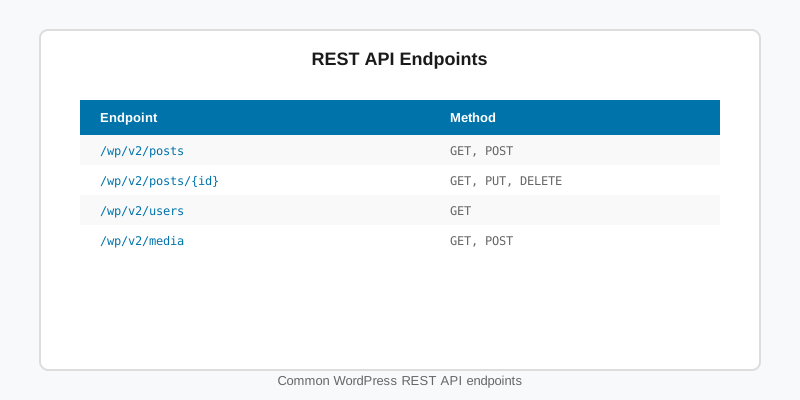
| Route | Returns | Useful arguments |
|---|---|---|
/wp/v2/posts | Published posts | per_page, page, categories, search, orderby, _embed |
/wp/v2/posts/{id} | One post | _fields, context=edit when authenticated |
/wp/v2/pages | Pages | parent, slug, menu_order |
/wp/v2/media | Attachments | media_type, parent |
/wp/v2/categories, /wp/v2/tags | Terms | post, hide_empty |
/wp/v2/users | Authors with published content | slug, search |
/wp/v2/{post_type} | Any custom post type registered with show_in_rest | Same filters as posts, plus registered meta |
Reading data: parameters, embedding and field selection
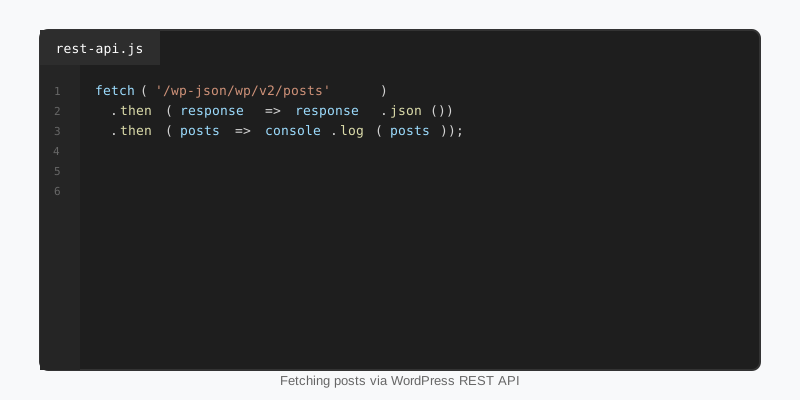
A bare request for /wp/v2/posts returns ten posts with every field, and each post references its author, featured image and terms only by ID. Two arguments fix that. _embed inlines those related objects under _embedded so one request replaces four. _fields trims the response to the properties you name, which can cut payload size by 80 percent on content-heavy sites. Pagination totals arrive in the X-WP-Total and X-WP-TotalPages headers, not the body.
const params = new URLSearchParams({
    per_page: 6,
    categories: 12,
    orderby: 'date',
    order: 'desc',
    _embed: 'wp:featuredmedia,author',
    _fields: 'id,link,title,excerpt,date,_links,_embedded'
});

fetch(`/wp-json/wp/v2/posts?${params}`)
    .then(response => {
        const total = response.headers.get('X-WP-Total');
        console.log(`${total} matching posts`);
        return response.json();
    })
    .then(posts => {
        posts.forEach(post => {
            const media = post._embedded?.['wp:featuredmedia']?.[0];
            const thumb = media?.media_details?.sizes?.medium?.source_url ?? '';
            console.log(post.title.rendered, thumb);
        });
    })
    .catch(error => console.error('REST request failed', error));
Note that title.rendered and excerpt.rendered contain HTML that has already been passed through the usual filters, so render them as HTML, not as text. Inside WordPress itself, the @wordpress/api-fetch package wraps fetch with the root URL and nonce pre-configured, which is what the editor uses.
Authentication: cookies, nonces and application passwords
Unauthenticated requests see exactly what a logged-out visitor sees: published content only, and no context=edit fields. To act as a user you need one of two mechanisms. In the browser, on the same site, WordPress uses the existing login cookie plus a nonce sent in the X-WP-Nonce header; without the nonce the API deliberately treats the request as anonymous, which prevents cross-site request forgery.
For external clients, scripts and mobile apps, use Application Passwords, built into core since 5.6. A user generates a password under their profile, and the client sends it with HTTP Basic authentication over HTTPS. Each password can be revoked independently, so a leaked integration key never becomes a leaked account. Pass the nonce to front-end scripts with wp_localize_script() or wp_add_inline_script() using wp_create_nonce( 'wp_rest' ).
Creating a custom WordPress REST API endpoint
Custom WordPress REST API routes are registered on rest_api_init with register_rest_route(). Three parts are non-negotiable. A permission_callback is required on every route; return __return_true for public data or a capability check for anything else, and since WordPress 5.5 omitting it triggers a notice. An args array with sanitize_callback and validate_callback entries turns raw query strings into typed, safe values before your callback runs. And the callback should return a WP_REST_Response or a WP_Error, never echo.
<?php
add_action( 'rest_api_init', 'sf_register_standings_route' );

function sf_register_standings_route() {
    register_rest_route( 'sf-stats/v1', '/standings/(?P<league>[a-z0-9-]+)', array(
        'methods'             => WP_REST_Server::READABLE,
        'callback'            => 'sf_get_standings',
        'permission_callback' => '__return_true',
        'args'                => array(
            'league' => array(
                'required'          => true,
                'sanitize_callback' => 'sanitize_title',
            ),
            'season' => array(
                'default'           => (int) gmdate( 'Y' ),
                'sanitize_callback' => 'absint',
                'validate_callback' => function ( $value ) {
                    return $value >= 2000 && $value <= (int) gmdate( 'Y' ) + 1;
                },
            ),
        ),
    ) );
}

function sf_get_standings( WP_REST_Request $request ) {
    $league = $request->get_param( 'league' );
    $season = $request->get_param( 'season' );

    $term = get_term_by( 'slug', $league, 'sf_league' );
    if ( ! $term ) {
        return new WP_Error( 'sf_unknown_league', 'Unknown league.', array( 'status' => 404 ) );
    }

    $cache_key = "sf_standings_{$term->term_id}_{$season}";
    $rows      = get_transient( $cache_key );

    if ( false === $rows ) {
        $rows = sf_build_standings_table( $term->term_id, $season );
        set_transient( $cache_key, $rows, 10 * MINUTE_IN_SECONDS );
    }

    $response = new WP_REST_Response( $rows, 200 );
    $response->header( 'Cache-Control', 'public, max-age=300' );
    return $response;
}
The route pattern uses a named capture group, so league arrives as a normal parameter. WP_REST_Server::READABLE is the constant for GET; CREATABLE, EDITABLE and DELETABLE cover the rest. Returning a WP_Error with a status in its data array produces a correct HTTP status and a JSON error body clients can parse. The custom endpoints chapter of the handbook lists every option register_rest_route() accepts.
Exposing custom post types, meta and extra fields
Often you do not need a custom route at all. A post type registered with show_in_rest => true gets a full CRUD endpoint at /wp/v2/{rest_base} with pagination, filtering and the same permission model as posts. Meta registered with register_post_meta() and show_in_rest appears under a meta key in the response and can be written back. That is how the Yardline football theme and its stats plugin expose players and games: the custom post types are the API, and the theme’s blocks read from it.
When a computed value belongs on an existing resource, add it with register_rest_field() instead of forcing clients to call a second endpoint.
add_action( 'rest_api_init', 'sf_add_reading_time_field' );

function sf_add_reading_time_field() {
    register_rest_field( 'post', 'reading_time', array(
        'get_callback' => function ( $post_array ) {
            $words = str_word_count( wp_strip_all_tags( $post_array['content']['rendered'] ) );
            return max( 1, (int) ceil( $words / 220 ) );
        },
        'schema'       => array(
            'description' => 'Estimated reading time in minutes.',
            'type'        => 'integer',
            'context'     => array( 'view', 'embed' ),
            'readonly'    => true,
        ),
    ) );
}
Providing the schema is not decoration: it feeds the discovery document, lets _fields select the property, and tells the block editor’s data layer the value’s type.
Performance and security habits
Treat the WordPress REST API as a public surface. Every route that returns anything beyond published content needs a real capability check, and every argument needs a sanitiser. Do not disable the API wholesale to “harden” a site; the block editor and many plugins depend on it, and the right fix is to gate specific routes. If author enumeration through /wp/v2/users concerns you, filter rest_endpoints to require authentication on that route rather than removing it. Our security hardening guide covers the surrounding measures.
On performance, the API is uncached by default and a busy front end can hit it hard. Cache expensive responses in a transient or the object cache as the standings example does, send Cache-Control headers so browsers and CDNs can help, keep per_page at or below the maximum of 100, and use _fields aggressively. On shared hosting, remember that a page firing dozens of parallel REST calls competes with wp-admin for the same PHP workers, so batch where you can. Get those habits right and the WordPress REST API scales well beyond what most sites will ever ask of it.
Key takeaways
- The WordPress REST API lives under
/wp-json/, is self-describing, and is what the block editor already uses on every site. - Use
_embedto inline related objects,_fieldsto trim payloads, and read totals from theX-WP-Totalheaders. - Browser clients authenticate with the login cookie plus an
X-WP-Nonceheader; external clients use Application Passwords over HTTPS. - Every custom route needs a
permission_callback, typedargswith sanitisers, and aWP_REST_ResponseorWP_Errorreturn. - Prefer
show_in_rest,register_post_meta()andregister_rest_field()over bespoke endpoints when the data already maps to a post type. - Cache expensive responses, send cache headers, and gate sensitive routes instead of disabling the API.

