


The WordPress template hierarchy is the ordered list of template files WordPress tries for every request, from the most specific (a template for one exact page) down to the fallback of last resort, index. Knowing it tells you exactly which file to create to change one archive, one post type or one term, and it applies unchanged to block themes, where the candidates are HTML files instead of PHP. This guide walks through the resolution process, the main branches, the block-theme differences and the hooks that let you bend it.
How the WordPress template hierarchy resolves a request
Every front-end request passes through the same pipeline. WP::parse_request() turns the URL into query vars, the main WP_Query runs, and the conditional tags (is_singular(), is_tax(), is_404() and so on) become true or false. Then wp-includes/template-loader.php checks those conditionals in a fixed order and asks get_query_template() for a file.
That order is: embed, 404, search, front page, home, privacy policy, post type archive, taxonomy, attachment, single, page, singular, category, tag, author, date, archive, and finally index. The first conditional that is true and yields an existing template wins. locate_template() looks in the child theme first and the parent theme second, which is what makes child themes able to override any single file.
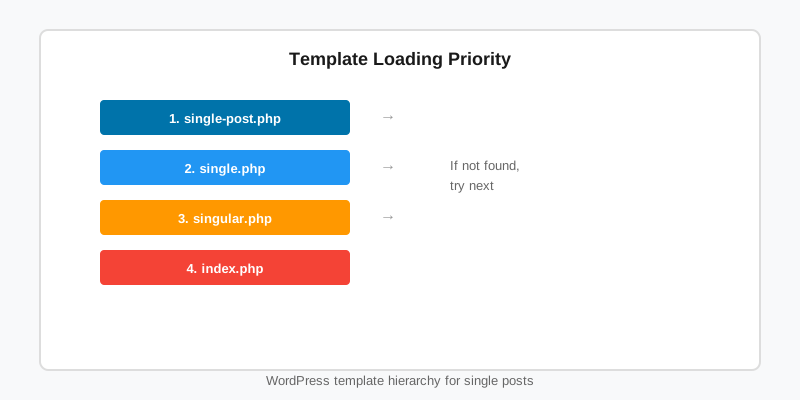
Two things follow from how the WordPress template hierarchy works. A request can satisfy several conditionals (a single post is both is_single() and is_singular()), but only the earliest branch is consulted. And index.php is the only file a classic theme strictly needs, because every branch ends there.
The main branches at a glance
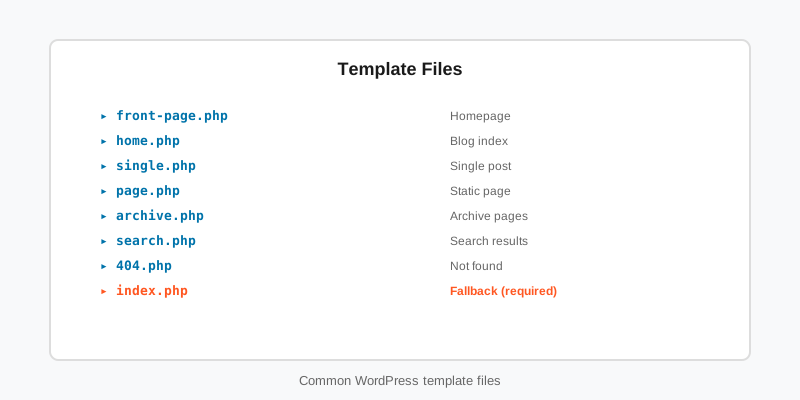
The table lists every major branch of the WordPress template hierarchy with its candidates in the order WordPress tries them. Replace .php with .html for a block theme; the names are identical.
| Request | Candidates, most specific first |
|---|---|
| Front page | front-page.php, then the home branch (posts) or the page branch (static page) |
| Blog index | home.php, index.php |
| Single post | custom template, single-{post_type}-{slug}.php, single-{post_type}.php, single.php, singular.php, index.php |
| Page | custom template, page-{slug}.php, page-{id}.php, page.php, singular.php, index.php |
| Category | category-{slug}.php, category-{id}.php, category.php, archive.php, index.php |
| Custom taxonomy | taxonomy-{taxonomy}-{term}.php, taxonomy-{taxonomy}.php, taxonomy.php, archive.php, index.php |
| Post type archive | archive-{post_type}.php, archive.php, index.php |
| Author | author-{nicename}.php, author-{id}.php, author.php, archive.php, index.php |
| Date | date.php, archive.php, index.php |
| Search / 404 | search.php or 404.php, then index.php |
| Attachment | {mime}-{subtype}.php, {subtype}.php, {mime}.php, attachment.php, then the single branch |
The canonical diagram is in the Theme Handbook’s template hierarchy page. Two branches surprise people: the front page uses front-page.php regardless of the Reading settings, and a static posts page uses home.php rather than page.php, no matter which page you chose for it.
Classic themes: files, custom templates and template parts
In a classic theme the candidates are PHP files in the theme root. To give a team post type its own layout, add single-team.php and nothing else changes. To style one specific page, page-about.php beats page.php. Custom page templates sit at the very top of the WordPress template hierarchy and are declared with a Template Name: header comment, and since WordPress 4.7 a Template Post Type: line makes them available to other post types.
Inside those files, get_template_part( 'template-parts/content', get_post_type() ) applies the same most-specific-first idea at a smaller scale: it tries content-team.php before falling back to content.php. That is how a well-structured classic theme keeps one loop file per post type without duplicating the surrounding template.
The WordPress template hierarchy in block themes
A block theme resolves the same names, so templates/single-team.html and templates/taxonomy-league.html behave exactly as their PHP counterparts. Two sources feed the lookup. Files under templates/ in the parent and child theme are the defaults; templates a user has edited in the Site Editor are stored as wp_template posts and override the file with the same slug. When a site “ignores” a template you just added, a customised database copy is almost always the reason. Our block themes guide covers the file layout and the template parts guide covers parts/.
Custom templates are declared in theme.json instead of a file header, with the post types they apply to.
{
    "version": 3,
    "customTemplates": [
        {
            "name": "match-centre",
            "title": "Match Centre",
            "postTypes": [ "match", "page" ]
        }
    ]
}
The matching file is templates/match-centre.html. Editors pick it from the Template panel in the post sidebar, and the Site Editor lists it under Templates alongside the hierarchy defaults. Every template in the StepFox block themes is shipped this way, so a client can override any of them in the Site Editor without a child theme.
Bending the hierarchy with filters
Each branch runs its candidate list through a {$type}_template_hierarchy filter before any file is looked up, where $type is single, archive, taxonomy, page and so on. That is the right place to add candidates, and it works for block themes too: WordPress strips the .php extension and looks for the same slugs among block templates.
// Let a team try single-team-{league} before single-team.
add_filter( 'single_template_hierarchy', function ( $templates ) {
    if ( ! is_singular( 'team' ) ) {
        return $templates;
    }

    $leagues = get_the_terms( get_queried_object_id(), 'league' );
    if ( ! $leagues || is_wp_error( $leagues ) ) {
        return $templates;
    }

    $extra = array();
    foreach ( $leagues as $league ) {
        $extra[] = 'single-team-' . $league->slug . '.php';
    }

    return array_merge( $extra, $templates );
} );
The last word belongs to template_include, which receives the chosen file path just before it is loaded. Use it to swap in a template that the hierarchy could never express, such as one keyed on a query var. Return the original value when your condition does not match, or you will blank out the entire site.
add_filter( 'template_include', function ( $template ) {
    if ( is_post_type_archive( 'player' ) && get_query_var( 'season' ) ) {
        $season_template = locate_template( 'archive-player-season.php' );
        if ( $season_template ) {
            return $season_template;
        }
    }

    return $template;
}, 20 );
On a block theme, template_include always receives template-canvas.php, the wrapper that renders the chosen block template, so returning a different PHP file there bypasses the block system entirely. Stick to the hierarchy filters when the theme is block-based.
Finding out which template actually loaded
When a page renders with the wrong layout, stop guessing which branch of the WordPress template hierarchy fired. In a classic theme the global $template holds the chosen path after template_include runs; print basename( $GLOBALS['template'] ) in an HTML comment on wp_footer while WP_DEBUG is on. Query Monitor shows the same value, plus the whole candidate list that was tried, in its Template panel.
In a block theme the Site Editor’s top bar names the template being edited, and the Templates list marks database overrides as Customized. From the command line, wp post list --post_type=wp_template --fields=post_name,post_modified lists every override on the site; delete the row (or use Reset in the Site Editor) and the theme file takes over again. When a custom post type has no archive at all, check that it was registered with has_archive, as the custom post types guide explains; no amount of template work fixes a query that never runs.
Key takeaways
- The WordPress template hierarchy checks conditionals in a fixed order and loads the first existing template from that branch’s most-specific-first list.
- Block themes use the same names with
.htmlundertemplates/, and a Site Editor override in the database always beats the file. - Declare custom templates with a
Template Nameheader in classic themes orcustomTemplatesintheme.jsonfor block themes. - Add candidates with the
{$type}_template_hierarchyfilters; reservetemplate_includefor classic themes and always return the original path when unmatched. - Debug with
$GLOBALS['template'], Query Monitor orwp post list --post_type=wp_templatebefore editing any file.

