

WordPress plugin development is how you add behaviour to a site without touching core or tying that behaviour to a theme. A plugin can be a twelve-line file that changes one filter or a full application with its own database tables, REST endpoints and editor blocks, and both follow the same rules. This tutorial builds a small, real plugin from the first file to a shippable package, and explains the conventions that separate plugins that survive updates from plugins that break them.
How WordPress finds and loads a plugin
On every request WordPress reads the active_plugins option, and for each entry it includes the plugin’s main file from wp-content/plugins/. That file is identified by its header comment, which the Plugins screen scans to display the name, version and description. Must-use plugins in wp-content/mu-plugins/ load earlier and cannot be deactivated, which makes them the right place for host-level guards but the wrong place for anything a site owner should control.
Because the main file is included on every page load, admin and front end alike, it should do almost nothing except register hooks. Heavy work belongs inside callbacks that run only when needed. Understanding the hook system is the foundation of WordPress plugin development, so if actions and filters are new to you, read our guide to WordPress hooks first.
The plugin header and file layout
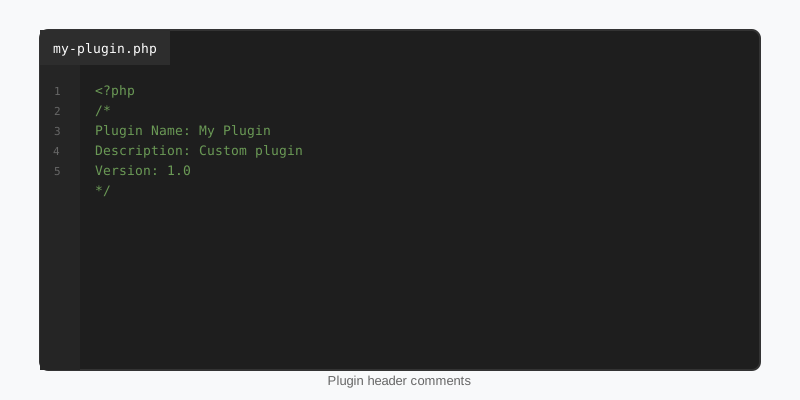
Only Plugin Name is strictly required, but a header that omits the version, text domain and minimum requirements will cause problems the moment you ship an update or a translation. The header requirements page in the Plugin Handbook lists every recognised field. A direct-access guard after the header prevents the file from running outside WordPress.
<?php
/**
 * Plugin Name:       Reading Time for Posts
 * Plugin URI:        https://stepfoxthemes.com/plugins/
 * Description:       Adds an estimated reading time above post content.
 * Version:           1.0.0
 * Requires at least: 6.4
 * Requires PHP:      7.4
 * Author:            StepFox
 * Author URI:        https://stepfoxthemes.com/
 * License:           GPL-2.0-or-later
 * License URI:       https://www.gnu.org/licenses/gpl-2.0.html
 * Text Domain:       sf-reading-time
 * Domain Path:       /languages
 */

if ( ! defined( 'ABSPATH' ) ) {
    exit;
}

define( 'SF_RT_VERSION', '1.0.0' );
define( 'SF_RT_PATH', plugin_dir_path( __FILE__ ) );
define( 'SF_RT_URL', plugin_dir_url( __FILE__ ) );

require_once SF_RT_PATH . 'includes/render.php';
require_once SF_RT_PATH . 'includes/settings.php';
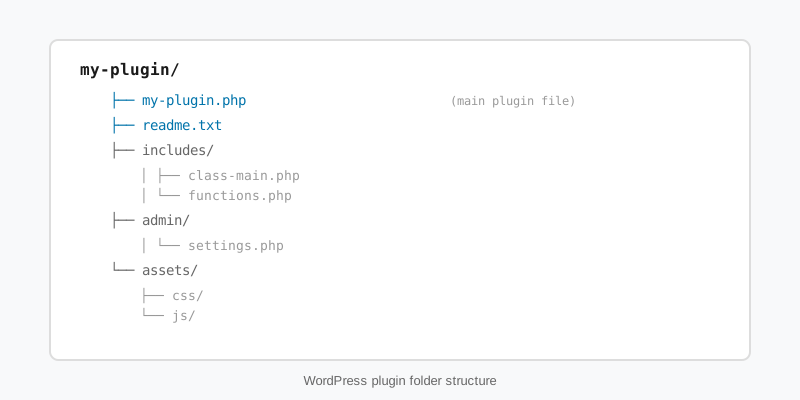
Keep the layout predictable: the main file at the root, PHP in includes/, CSS and JS in assets/, translations in languages/, and blocks in build/ if the plugin has any. A unique prefix on every function, class, option and constant is not optional; two plugins declaring function get_settings() will take the site down with a fatal error.
Your first WordPress plugin development project, step by step
Step 1: do the work in a filter
The reading-time feature needs no database and no admin page to be useful. It hooks the_content, counts words, and prepends a line. Hooking late, at priority 20, means shortcodes and blocks have already been rendered, so the count reflects what the reader sees.
<?php
// includes/render.php

add_filter( 'the_content', 'sf_rt_prepend_reading_time', 20 );

function sf_rt_prepend_reading_time( $content ) {
    if ( ! is_singular( 'post' ) || ! in_the_loop() || ! is_main_query() ) {
        return $content;
    }

    $wpm     = (int) get_option( 'sf_rt_words_per_minute', 220 );
    $words   = str_word_count( wp_strip_all_tags( $content ) );
    $minutes = max( 1, (int) ceil( $words / max( 1, $wpm ) ) );

    $label = sprintf(
        /* translators: %d: number of minutes */
        _n( '%d minute read', '%d minutes read', $minutes, 'sf-reading-time' ),
        $minutes
    );

    return '<p class="sf-reading-time">' . esc_html( $label ) . '</p>' . $content;
}
Step 2: add a setting the right way
The words-per-minute value should be editable. The Settings API handles the form, the nonce, the capability check and the save for you, and register_setting() attaches a sanitiser so a bad value never reaches the database. Registering with show_in_rest also makes the option available to a block editor sidebar later.
<?php
// includes/settings.php

add_action( 'admin_init', 'sf_rt_register_settings' );

function sf_rt_register_settings() {
    register_setting( 'reading', 'sf_rt_words_per_minute', array(
        'type'              => 'integer',
        'default'           => 220,
        'sanitize_callback' => 'absint',
        'show_in_rest'      => true,
    ) );

    add_settings_field(
        'sf_rt_words_per_minute',
        __( 'Reading speed (words per minute)', 'sf-reading-time' ),
        'sf_rt_render_wpm_field',
        'reading'
    );
}

function sf_rt_render_wpm_field() {
    $value = (int) get_option( 'sf_rt_words_per_minute', 220 );
    printf(
        '<input type="number" min="60" max="600" name="sf_rt_words_per_minute" value="%d" />',
        esc_attr( $value )
    );
}

register_activation_hook( SF_RT_PATH . 'reading-time.php', 'sf_rt_activate' );

function sf_rt_activate() {
    add_option( 'sf_rt_words_per_minute', 220 );
}
Adding the field to the existing Reading settings screen instead of creating a new menu is a small courtesy that site owners notice. The activation hook seeds the default once; add_option() does nothing if the option already exists, so reactivating the plugin never overwrites a saved value.
Security and data handling rules
Three habits cover most of the security side of WordPress plugin development. Sanitise on input with functions such as sanitize_text_field(), absint() and wp_kses_post(). Escape on output with esc_html(), esc_attr() and esc_url(), as late as possible. And verify intent before any state change with a nonce and a capability check: check_admin_referer() for forms, check_ajax_referer() for AJAX, and current_user_can() in every handler.
When a plugin needs to query the database directly, use $wpdb->prepare() for every value and $wpdb->prefix for every table name. Prefer the higher-level APIs where they exist: WP_Query, the options API, post meta and transients are all cached, whereas raw SQL is not. Our security hardening guide covers the common attack surfaces in more depth.
Blocks, REST endpoints and modern plugin architecture
Modern WordPress plugin development leans on three APIs. register_block_type() with a block.json file registers editor blocks, including server-rendered dynamic blocks that read live data. register_rest_route() exposes data to JavaScript and external apps, with a permission_callback on every route. register_post_type() and register_post_meta() give a plugin structured content that the editor understands.
The architectural lesson from larger WordPress plugin development projects is to ship many small blocks rather than one big one. The StepFox sports stats plugins that power themes such as Yardline expose standings, rosters and schedules as dozens of atomic blocks built from nested core blocks, so every piece stays editable in the Site Editor. A single mega-block wrapping hand-written HTML is faster to build and much worse to own. The same principle drives StepFox Looks, which extends every core block with per-device styling attributes rather than replacing any of them.
Packaging, updates and cleanup
Before release, bump the version in both the header and any define(), write a readme.txt if the plugin will be distributed, and generate a .pot file so the strings can be translated. Ship an uninstall.php that removes options and custom tables when the plugin is deleted, not on deactivation, because deactivation is often temporary.
Test with WP_DEBUG and WP_DEBUG_LOG enabled and with the minimum PHP version you claim to support. Activate the plugin alongside a block theme and a classic theme, check the front end logged out with caching cleared, and confirm that deactivating it leaves no fatal errors or orphaned output behind. The Plugin Handbook has a full release checklist, and it is worth running through it even for a plugin that only one client will ever use.
Key takeaways
- A plugin is a header comment plus hooks; the main file should register callbacks and nothing more.
- Prefix every function, class, option and constant, and guard the main file with an
ABSPATHcheck. - Use the Settings API with
register_setting()and a sanitiser instead of hand-rolled option forms. - Sanitise input, escape output, and pair a nonce with a capability check on every state change.
- Good WordPress plugin development favours many small blocks and registered data over one monolithic block.
- Clean up in
uninstall.php, not on deactivation, and test against the minimum versions you declare.

