


WordPress hooks are the reason you can change almost anything about a WordPress site without editing a single core file. Every plugin you have ever installed, every theme function you have written, and most of WordPress core itself is wired together through the same two primitives: actions and filters. This article explains how the hook system works internally, how to use priority and argument counts correctly, how to remove hooks other code has added, and which hooks matter most when you build block themes.
What WordPress hooks are and how core uses them
A hook is a named point in execution. When WordPress reaches that point it calls do_action( 'name' ) or apply_filters( 'name', $value ), and every callback that was registered against that name runs in priority order. Core contains more than two thousand of these calls, from muplugins_loaded at the very start of a request to shutdown at the end.
Internally all of this is stored in one global, $wp_filter, which is an array of WP_Hook objects keyed by hook name. There is no separate registry for actions: add_action() is literally a wrapper around add_filter(). The difference is purely conventional. An action is a hook whose return value is ignored, and a filter is a hook whose first argument is expected back, possibly modified.
The Plugin Handbook chapter on hooks is the canonical reference, and the function pages under the WordPress developer reference list every hook a given function fires. Reading core source is still the fastest way to find the exact hook you need, because the names are the same ones you see in the code.
Actions: run code at a specific moment
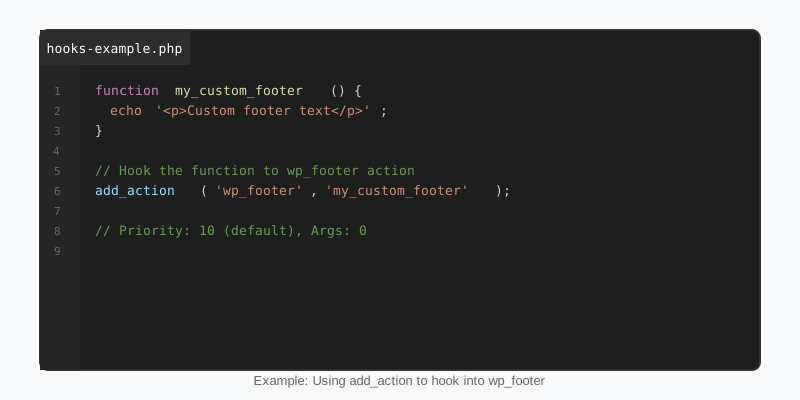
Use an action when you want something to happen: enqueue a stylesheet, register a post type, send an email after an order, write to a log. The callback receives whatever arguments the do_action() call passed, but only as many as you declare in the fourth parameter of add_action(). Forgetting that number is the most common beginner mistake with WordPress hooks, because the default is one and the extra arguments silently vanish.
<?php
/**
 * Runs after a post is saved. Fires with three arguments:
 * $post_id, $post (WP_Post) and $update (bool).
 */
add_action( 'save_post_sf_player', 'sf_sync_player_index', 10, 3 );

function sf_sync_player_index( $post_id, $post, $update ) {
    if ( wp_is_post_revision( $post_id ) || wp_is_post_autosave( $post_id ) ) {
        return;
    }
    if ( 'publish' !== $post->post_status ) {
        return;
    }
    $number = (int) get_post_meta( $post_id, 'sf_jersey_number', true );
    update_option( 'sf_last_indexed_player', array(
        'id'     => $post_id,
        'number' => $number,
        'update' => $update,
    ), false );
}
Notice the dynamic hook name. save_post_{$post->post_type} fires only for that post type, so the callback does not need its own type check. Many core hooks have dynamic variants like this, including render_block_{$name}, rest_prepare_{$post_type} and pre_option_{$option}, and they are the cleanest way to avoid running a callback on every request.
Filters: change a value on its way through
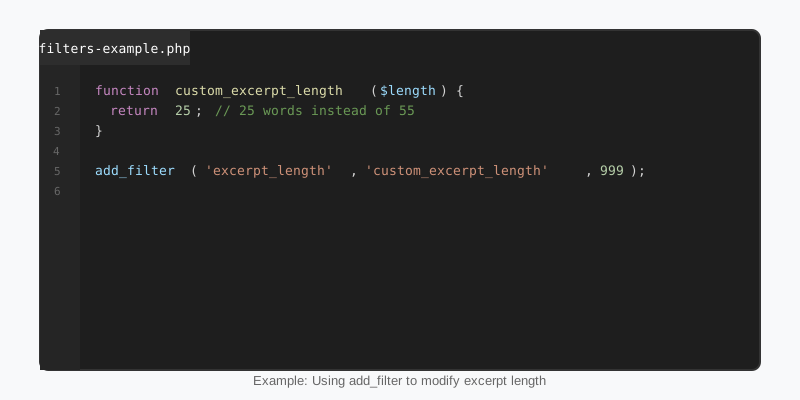
Use a filter when WordPress already has a value and you want a different one: the excerpt length, the list of allowed HTML tags, a REST response, the classes on the body element, a block’s rendered markup. The rule that must never be broken is that a filter callback returns something. Return nothing and every callback after yours receives null, which is how sites end up with blank content areas after a one-line “fix”.
add_filter( 'excerpt_length', 'sf_excerpt_length', 20 );

function sf_excerpt_length( $length ) {
    if ( is_post_type_archive( 'sf_player' ) ) {
        return 18;
    }
    return $length;
}

add_filter( 'body_class', 'sf_body_class_for_dark_sections' );

function sf_body_class_for_dark_sections( $classes ) {
    if ( is_singular( 'sf_player' ) ) {
        $classes[] = 'sf-has-dark-hero';
    }
    return $classes;
}
Both callbacks return the original value when their condition is not met. That pattern, change only what you mean to change and pass everything else through untouched, is what keeps filters composable when five plugins are hooked to the same name. The add_filter() reference documents the full signature including the priority and accepted-arguments parameters.
Priority, argument count and removing a hook
Priority is an integer, default 10, and lower numbers run first. Callbacks with the same priority run in the order they were added. Core uses priorities deliberately: wpautop runs on the_content at 10, do_shortcode at 11, and the block renderer do_blocks at 9. If your filter needs the finished HTML, hook at 20 or later; if it needs the raw block markup, hook at 8 or earlier.
Removing WordPress hooks requires the same three facts you used to add them: the hook name, the callback, and the priority. remove_action( 'wp_head', 'wp_generator' ) works because wp_generator was added at the default priority. Removing a method on an object instance is harder, since you need a reference to that exact instance, and removing an anonymous function is effectively impossible. That is a strong argument for named functions in anything you expect other developers to override.
Timing matters too. You cannot remove a hook before it has been added, so a theme that wants to strip a plugin’s action usually has to do it from after_setup_theme or init, after plugins_loaded has fired. Helpers such as has_action(), did_action(), doing_filter() and current_filter() let you inspect the state before deciding.
WordPress hooks that matter in block themes
Block themes have far less PHP than classic themes, but the hooks they do use are powerful. render_block receives every block’s final HTML together with its parsed attributes, which means a theme can add a wrapper, inject a class, or rewrite an attribute without a custom block type. The StepFox Looks plugin is built on exactly this idea: block attributes are turned into per-device CSS by a render_block filter, so themes ship with no stylesheet at all.
add_filter( 'render_block_core/post-title', 'sf_mark_live_game_titles', 10, 2 );

function sf_mark_live_game_titles( $block_content, $block ) {
    if ( empty( $block['attrs']['className'] ) ) {
        return $block_content;
    }
    if ( false === strpos( $block['attrs']['className'], 'sf-live-marker' ) ) {
        return $block_content;
    }
    $badge = '<span class="sf-live-badge" aria-label="Live">LIVE</span> ';
    return preg_replace( '/(<h[1-6][^>]*>)/', '$1' . $badge, $block_content, 1 );
}
A marker class plus a single render_block filter is far cleaner than wrapping hand-written HTML in a monolithic custom block, and it keeps the block editable by the site owner. Other hooks worth knowing in this context are wp_theme_json_data_theme, which lets you adjust theme.json data at runtime, block_type_metadata for changing a block’s registration, and enqueue_block_assets for scripts that must load in both the editor and the front end. Our block themes guide covers where each of these fits in a theme’s functions.php.
Finding the right hook and debugging
Most bugs with WordPress hooks come down to firing order. The table below lists the hooks a typical front-end request passes through, in sequence, with what is safe to do at each one.
| Hook | When it fires | Use it for |
|---|---|---|
muplugins_loaded | After must-use plugins load | Very early constants and guards |
plugins_loaded | After all active plugins load | Plugin bootstrap, checking for other plugins |
after_setup_theme | After the theme’s functions.php loads | add_theme_support(), removing plugin hooks |
init | After the current user is known | Post types, taxonomies, meta, blocks, shortcodes |
wp_loaded | After everything is loaded | Code that needs the full environment |
template_redirect | After the main query, before the template | Redirects, 404 handling, access checks |
wp_enqueue_scripts | Inside wp_head() | Front-end CSS and JS |
wp_footer | End of the page | Late output such as inline scripts |
When you are unsure whether a callback is running at all, drop a temporary error_log( current_filter() ) inside it with WP_DEBUG_LOG enabled. The special all hook fires for every action and filter and is useful for a short tracing session, but never leave it in production code because it runs thousands of times per request. For a broader view of where hooks sit in the WordPress architecture, our plugin development basics guide shows how a real plugin organises its callbacks.
Key takeaways
- WordPress hooks come in two flavours, actions and filters, but both are stored in the same
$wp_filterregistry and follow the same rules. - Always declare the accepted-arguments count when a hook passes more than one value, and always return the value from a filter.
- Priority decides order; hook after 10 on
the_contentfor finished HTML and before 9 for raw block markup. - Removing a hook needs the same name, callback and priority, and must happen after the hook was added.
- In block themes,
render_blockwith a marker class replaces most reasons to write a custom block.

