
Documentation · Pinch food delivery theme
Pinch, from the inside
Everything the Pinch bundle adds to wp-admin, WooCommerce, the Site Editor and Elementor: the live order board, the restaurant editor, menus as products, fees and ETAs, tracking, the plugin’s 80 blocks and 36 widgets, and the path from a fresh install to a working ordering site. Screenshots are from the live demo.
On this page
In the boxInstallwp-adminLive ordersRestaurantsDishesTaxonomiesReviews & leadsSettingsOrdering flowBlocksSite EditorElementorChecklistFAQ
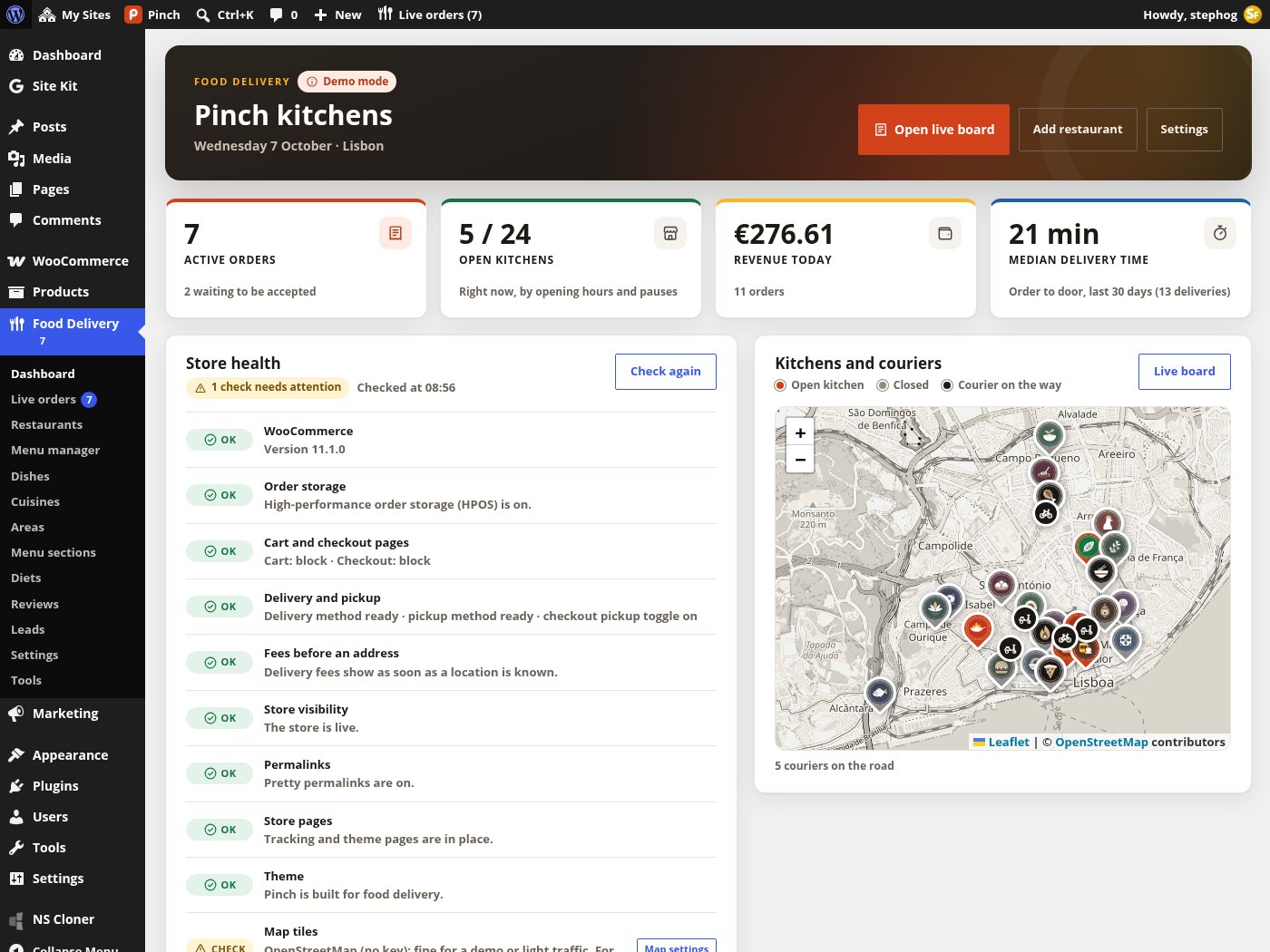
The Food Delivery › Dashboard: active orders, open kitchens, today’s revenue and median delivery time, the store-health panel with one-click fixes, and the live kitchens-and-couriers map.
What you get
Three pieces on WooCommerce
The download contains two themes and the plugin that powers both. WooCommerce holds the dishes, the basket, checkout and orders; the plugin turns that into restaurants, menus, delivery zones, fees, ETAs and live tracking.
Stepfox Food Delivery (plugin)
Required by both themes. Registers restaurants, leads, reviews and the four taxonomies, adds the Food Delivery menu with the live order board, menu manager, settings and tools, two WooCommerce shipping methods, the quote engine, order tracking, REST routes, WP-CLI commands, 80 editor blocks, 36 Elementor widgets and 3 dynamic tags, dark mode, JSON-LD and the Lisbon demo.
Pinch (block theme)
26 templates, 25 template parts and 6 patterns over a theme.json palette. It ships no CSS of its own: every colour, gap and breakpoint is a block attribute edited in the Site Editor. Needs Stepfox Looks (included) and WooCommerce.
Pinch Elementor (classic theme)
The same design as native Elementor widgets, with PHP fallback templates for every route, four menu locations, a WooCommerce cart override and an Appearance › Pinch Setup wizard. Needs Elementor 3.20+ and WooCommerce; Elementor Pro is optional.
Lisbon demo + updates
24 illustrated kitchens, 221 dishes with option groups, coupons, reviews, six journal stories, a demo customer and orders that keep moving on the board, installed and removed in one click. All packages check stepfoxthemes.com for updates; there is no licence key.
Requirements
- WordPress 6.7 or newer, PHP 8.0 or newer, WooCommerce 9.6 or newer (tested up to 11.1). The plugin declares compatibility with High-Performance Order Storage and the Cart and Checkout blocks.
- Pretty permalinks (Settings › Permalinks › Post name) for
/restaurants/,/restaurant/…/,/cuisine/…/and/area/…/. - Maps work without a key on OpenStreetMap tiles for light traffic; a keyed provider (CARTO, Stadia, MapTiler, Mapbox) is recommended for a real store. Address search uses Photon or Nominatim without a key, or Mapbox / MapTiler with one.
- Block edition: Stepfox Looks. Elementor edition: Elementor 3.20 or newer; Elementor Pro only if you want the Theme Builder templates to be editable.
First run
Install and first run
Activating either theme takes you to a one-click installer that handles the plugins, the WooCommerce setup and the Lisbon demo. Everything it creates is stamped and removable.
Activate the theme
Upload Pinch or Pinch Elementor under Appearance › Themes and activate it. You land on Appearance › Install Demo; a dismissible notice points there until the demo is installed. A dependency notice lists what is missing in the right activation order (WooCommerce, then Stepfox Looks or Elementor, then Stepfox Food Delivery) with an Install and activate all button.
Demo path
Press Install the demo. It installs and activates the plugins, runs “Configure WooCommerce for delivery”, imports the Lisbon kitchens with menus, coupons, reviews, stories and demo orders, creates the pages every template expects, sets the logo and site icon, switches permalinks to post name and sets the tagline. The Elementor edition also builds its kit, pages, menus and templates.
Clean path
Install the plugins from the dependency notice, then Food Delivery › Tools › Configure WooCommerce. Open the Dashboard’s Store health panel and press the fix buttons (Create pages and friends) until every row reads “All good”. Elementor edition: also run Appearance › Pinch Setup › Install the layout.
Correct the store basics
The configure step hard-codes a Lisbon address, Portugal as the selling country, EUR and taxes off. Change store address, currency, countries and taxes under WooCommerce › Settings before you take real orders.
Turn demo mode off
Food Delivery › Settings › General › Demo mode. While it is on, customer e-mails are off, checkout is pre-filled with a fictional guest, orders are rate-limited and visitor orders are purged after 24 hours.
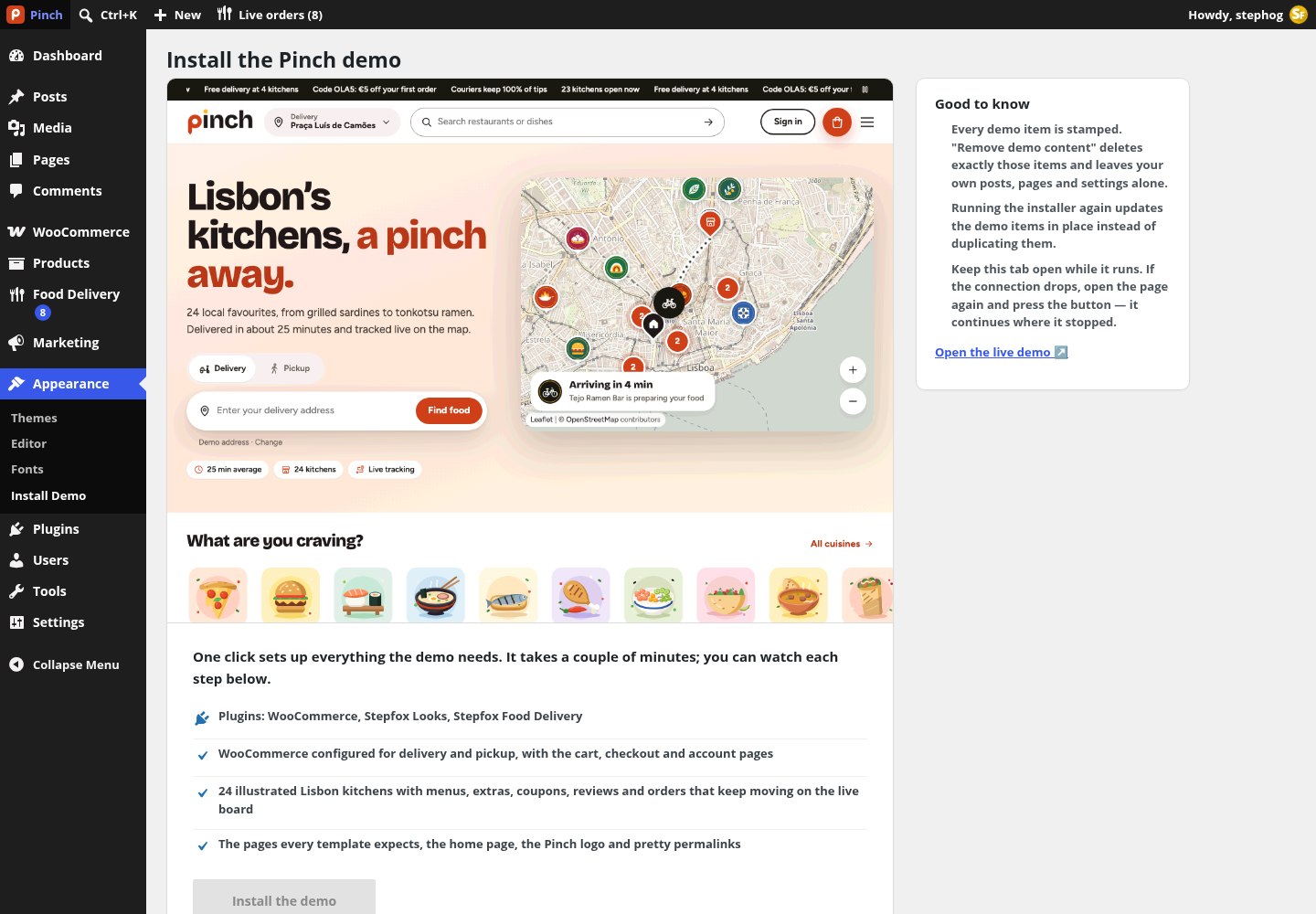
The Appearance › Install Demo screen of the block theme. The steps are plugins › WooCommerce + Lisbon kitchens › logo and icon › finishing up. It runs in slices, logs every step, resumes if the tab is closed, and can reinstall or remove everything it created.
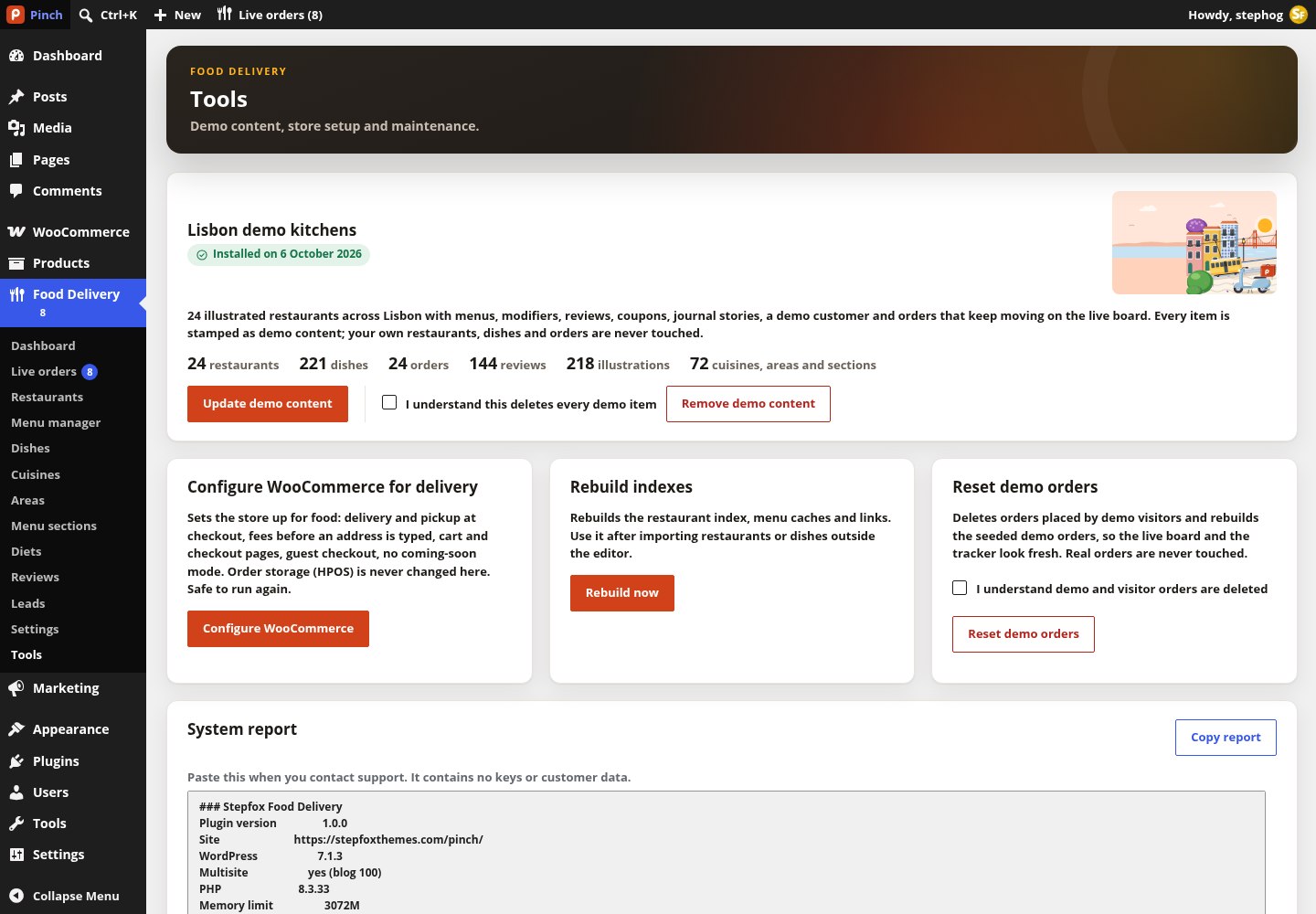
Food Delivery › Tools: the demo panel (install, update or remove the Lisbon kitchens), Configure WooCommerce, Rebuild indexes after importing data outside the editor, Reset demo orders, and a copyable system report for support that contains no keys or customer data.
What “Configure WooCommerce for delivery” changes: delivery and pickup as zone-less shipping methods, fees shown before an address, cart and checkout pages (blocks on block themes, shortcodes on classic ones), guest checkout and account creation, phone required, “Cash on delivery” and “Card on delivery” gateways, coming-soon mode off, analytics and onboarding quietened. It never touches order storage (HPOS). It is safe to run again and also runs as wp sfd woo configure.
The back office
One Food Delivery menu
Restaurants, dishes, orders, taxonomies, reviews, leads, settings and tools all sit under one menu with a fork-and-knife icon. The menu title carries a red bubble with the number of active orders.
What the Dashboard shows
- Four cards: Active orders (with how many wait to be accepted), Open kitchens as “N / M” by opening hours and pauses, Revenue today, and the Median delivery time from order to door over the last 30 days.
- Store health: WooCommerce version, order storage, cart and checkout pages, delivery and pickup methods, fees before an address, store visibility, permalinks, store pages, theme, map tiles, address search, background tasks, restaurant locations, opening hours, unlinked dishes and demo content. Failed rows get a fix button or a link to the right settings tab.
- Kitchens and couriers: a live map with open and closed kitchens and couriers on the way, plus a button to the live board.
- The admin bar shows “Live orders (N)” on every page, front end included, for anyone who may manage orders.
Roles
Administrators and shop managers get every capability. A new Restaurant partner role sees only the restaurants it owns (set via the restaurant’s Partner account field) and their dishes, can run the live board and the menu manager, and can never delete anything. Delivery-zone and fee fields stay locked for partners unless Partners may edit delivery zones and fees is switched on in Settings › Advanced.
Operations
The live order board
A kanban view of every order in flight. It refreshes every ten seconds, can chime on new orders, and is where staff accept, prepare and hand over.
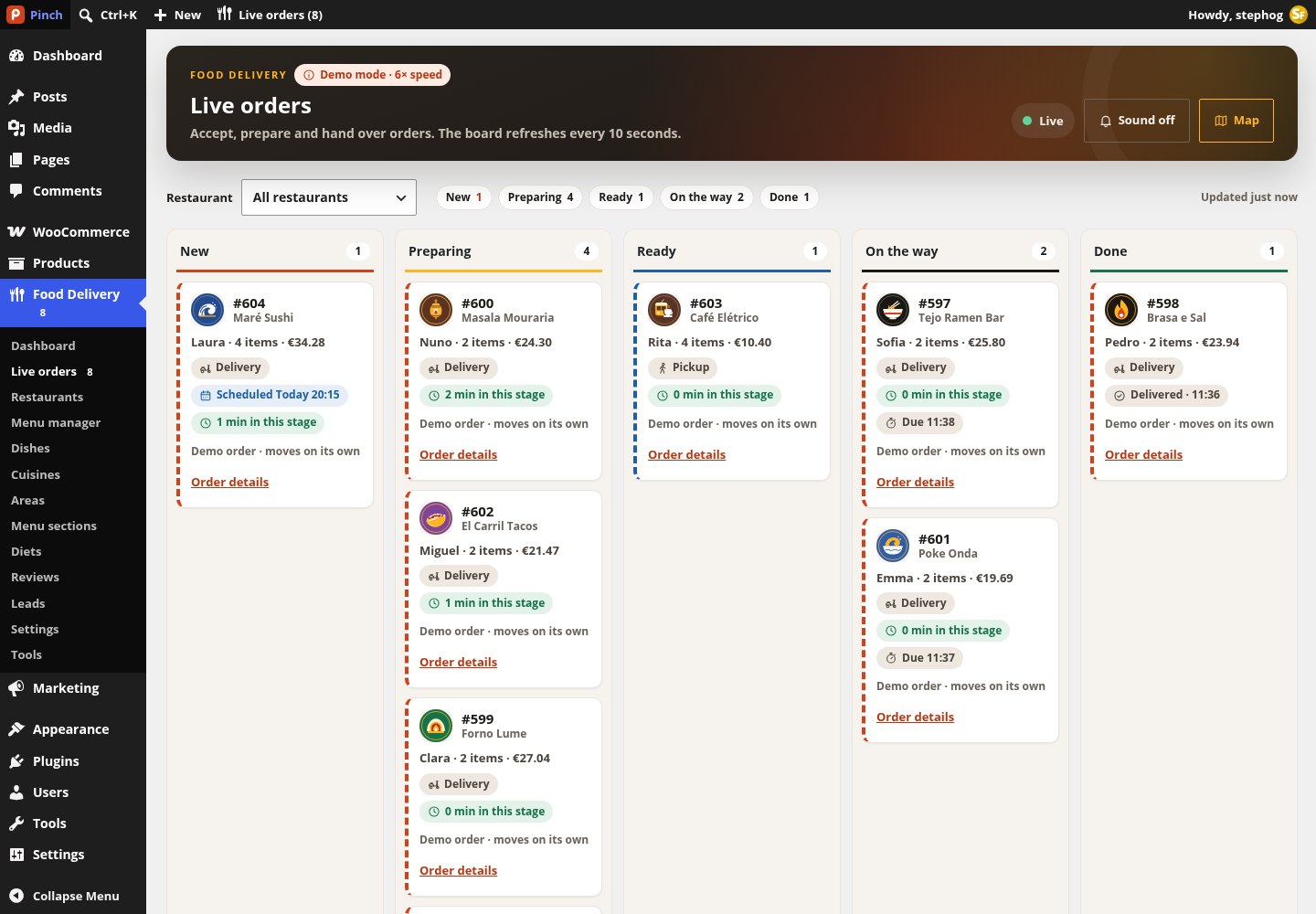
Food Delivery › Live orders: columns New, Preparing, Ready, On the way and Done; a restaurant filter, a sound toggle and a map toggle. On the demo the board runs at 6× speed and some orders are marked “Demo order · moves on its own”.
| Order is… | Main button | Then |
|---|---|---|
| Received or Scheduled | Accept | Moves to Preparing; the customer’s tracker shows “Preparing your food” |
| Preparing (delivery) | Handed to courier | Moves to On the way; the tracker follows the courier on the map |
| Preparing (pickup) | Ready | Moves to Ready; the tracker says “Ready for pickup” |
| Ready | Collected | Done; the WooCommerce order completes |
| Picked up or Arriving | Delivered | Done; the WooCommerce order completes and the customer can rate it |
| Any stage | Cancel | Asks “Cancel this order?”; sets the WooCommerce order to cancelled |
How tracking works
- When an order turns Processing, the plugin plans a timeline: a courier name from a fixed roster, a route, and a planned time per stage computed from the acceptance delay, the kitchen’s preparation and busy minutes, and travel time at the configured courier speed. Background jobs (Action Scheduler) advance the stage on schedule. Every order starts in this simulated mode.
- The first time staff press a board button, the order switches to manual mode: from then on it only advances when staff stamp a stage, and an order note records who did it.
- Stage sequences: delivery = received › preparing › picked up › arriving › delivered; pickup = received › preparing › ready › collected; scheduled orders start with a scheduled stage.
- Delivered or Collected sets the WooCommerce order to Completed when Complete orders when delivered is on. Cancelled, refunded or failed orders drop their jobs and show “This order was cancelled”.
- A real courier position can replace the simulated one for two minutes at a time through
POST /stepfox-food/v1/orders/{id}/courier-location(capabilitysfd_update_courier). No courier app is included.

The WooCommerce order screen gains a Delivery & tracking side box: order type, time slot, current stage with the planned time per stage, the destination with a map link and distance, extras such as cutlery or an 18+ confirmation, the courier, stage buttons and links to the live board and the customer’s tracking page. The orders list gets a Stage column.
If nobody touches the board, orders keep advancing on their simulated schedule with a fictional courier name. On a real store either work the board, or switch off Show the courier’s first name under Settings › Tracking.
Kitchens
The restaurant editor
A restaurant is a post of type sfd_restaurant that opens in the classic editor: the story is the content, the tagline is the excerpt, and everything else lives in one tabbed “Restaurant” box right under the title.
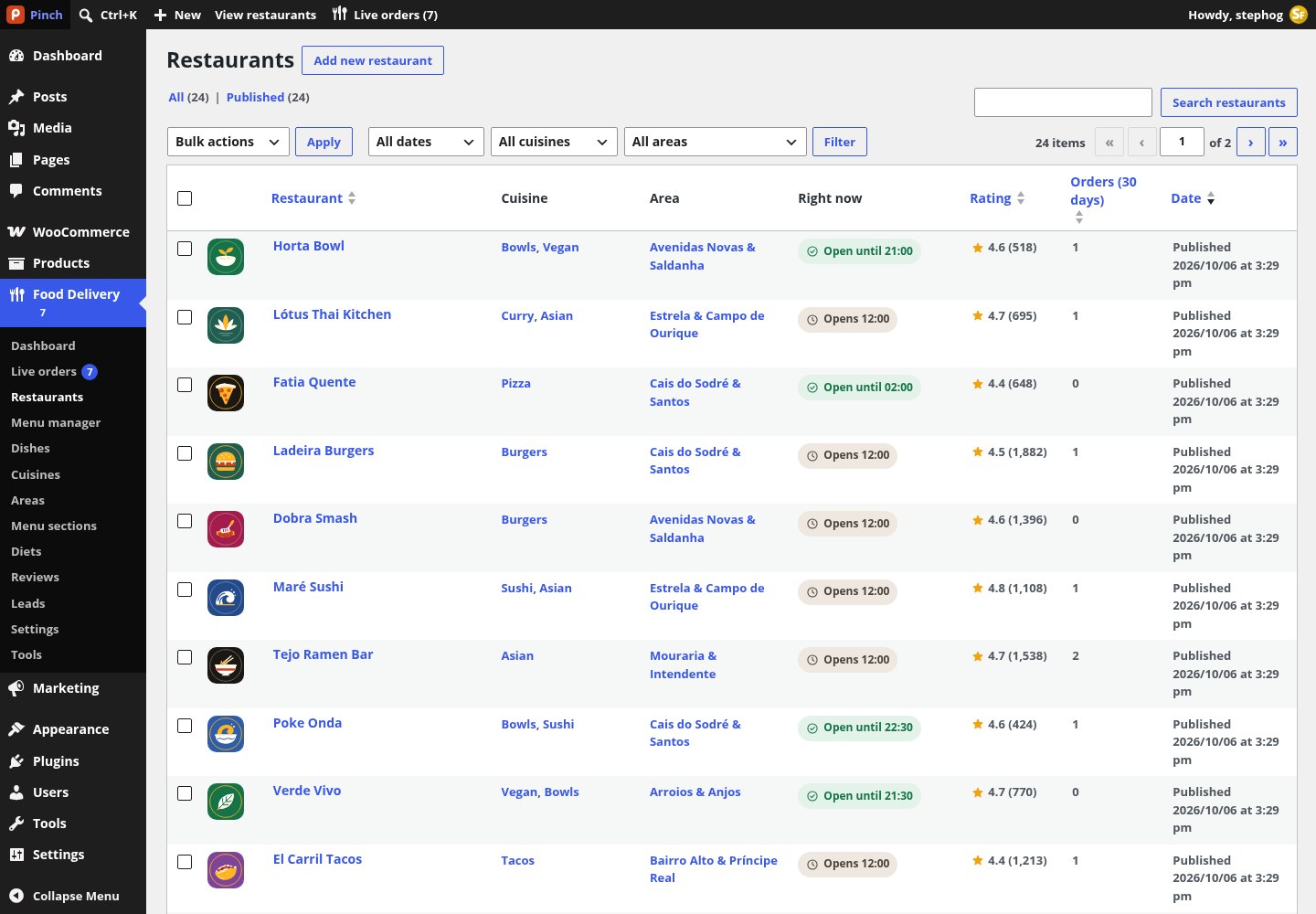
The Restaurants list: Logo, Restaurant, Cuisine, Area, Right now (the live open state computed from hours and pauses), Rating (“4.6 (128)” or “New”) and Orders over 30 days, with cuisine and area filters. Health links can filter it to kitchens with no pin or no hours.
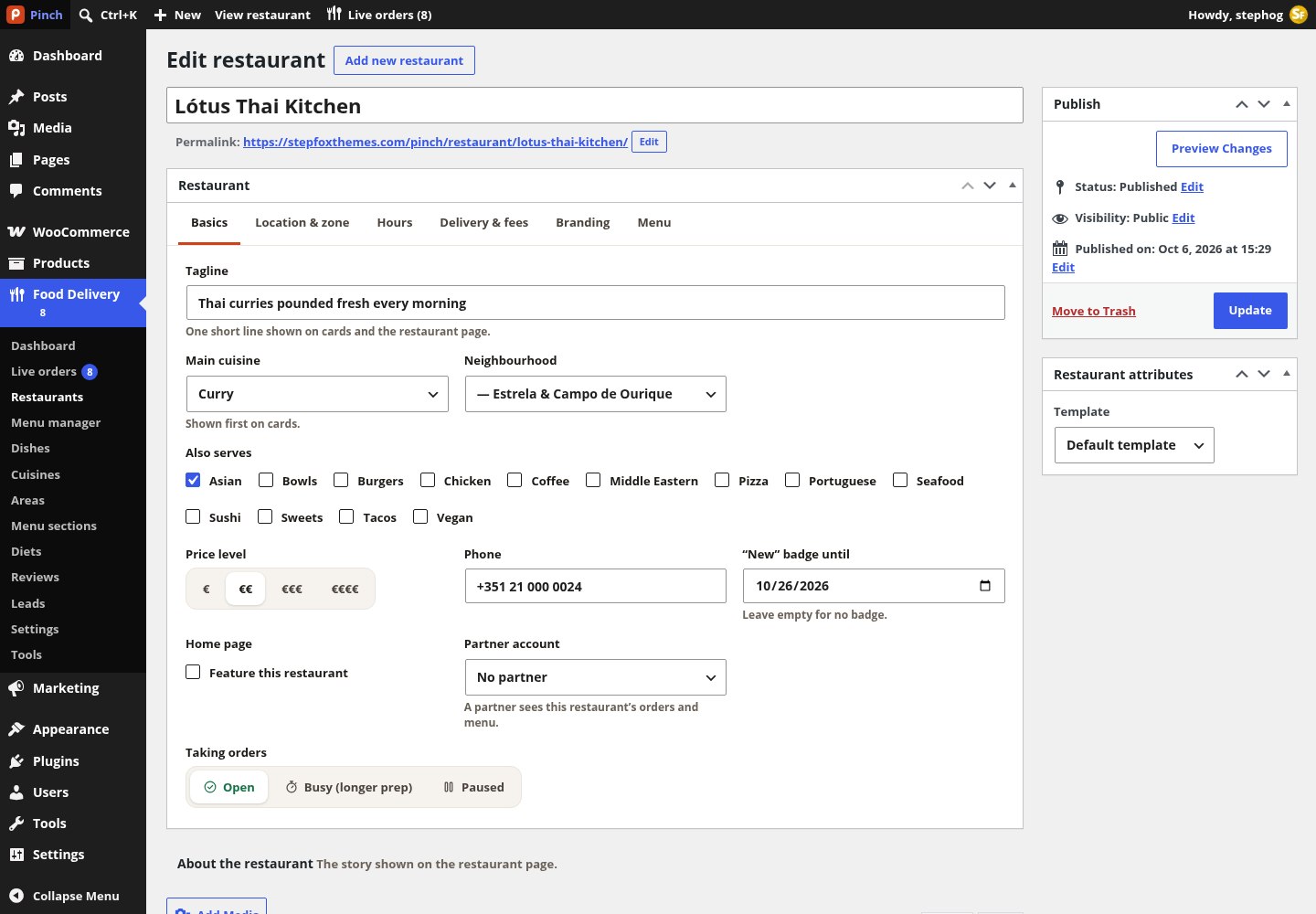
A restaurant open in the editor. The Restaurant box has six tabs: Basics, Location & zone, Hours, Delivery & fees, Branding and Menu. The editor below it is headed “About the restaurant”.
Tab: Basics
| Field | Stored as | Notes |
|---|---|---|
| Tagline | excerpt (≤160 chars) | One short line shown on cards and the restaurant page. |
| Main cuisine / Also serves | sfd_cuisine_primary + cuisine terms | The main cuisine is shown first on cards; extra cuisines are tick boxes. |
| Neighbourhood | sfd_area term | A dropdown nested by city. |
| Price level | sfd_price_level 1–4 | Segmented €, €€, €€€, €€€€. |
| Phone | sfd_phone | Shown on the page and in the tracker. |
| “New” badge until / Home page / Partner account | sfd_new_until, sfd_featured, sfd_owner | Store staff only. The partner account is the user with the Restaurant partner role who runs this kitchen. |
| Taking orders | sfd_status, sfd_paused_until | Open, Busy (longer prep) or Paused, with presets of 15, 30 or 60 minutes, until tomorrow, or until reopened. |
Tab: Location & zone
- Find the address autocompletes through the configured geocoder and fills Street address, Postcode, City and Country code. Latitude and longitude are stored with six decimals; drag the map to put the pin on the restaurant door.
- Delivery zone: a Radius slider from 1 to 10 km (or the store default of 4.5 km), or a Drawn area: click the map to add corners, undo, clear, start from the radius, or paste and copy GeoJSON. Stored as a Polygon or MultiPolygon.
- Test an address answers “Delivers here” or “Outside the delivery zone” before you publish.
Tab: Hours
Weekly ranges in 24-hour time, up to three a day (a closing time earlier than the opening time runs past midnight; 00:00–24:00 is open all day), with Add hours, 24 h and Copy Monday to all days. Special dates cover holidays and one-off changes: a date without hours is closed all day. The front end computes “open now”, “opens at” and the dinner-clock fallback from these.
Tab: Delivery & fees
| Field | Meta key | Notes |
|---|---|---|
| Order types | sfd_accepts_delivery / _pickup / _scheduled | Delivery, Pickup and Orders for later; all on by default. |
| Preparation time / Extra time when busy | sfd_prep_min 15, sfd_busy_extra_min 10 | Feed the ETA. |
| Minimum order | sfd_min_order | Checkout stays blocked below this subtotal; 0 = none. |
| Free delivery from / Sponsored delivery | sfd_free_over, sfd_free_delivery | Free above a subtotal, or always free. |
| Delivery fee | sfd_fee_mode + sfd_fee_base, _per_km, _included_km, _min, _max | Store default, or custom values for this kitchen; empty fields fall back to the store default shown in grey. A fee calculator previews the result. |
Tabs: Branding and Menu
- Logo and Cover: upload from the Media Library or pick one of the bundled “Pinch Flat” illustrations, with an illustration background (cream, peach, rose, mint, sky, lilac, butter, sage) and a brand colour used behind the logo in admin previews. A live card preview sits beside the fields.
- Menu: drag the sections into the order you want, then Add dish to this restaurant (opens a new product already linked to it) or Open in the menu manager.
- Computed, not edited: rating average and count (blended with imported seeds), orders in the last 30 days, the union of the menu’s diet labels and a menu version used for caching.
Menus
Dishes are WooCommerce products
A dish is a simple product with a restaurant set on its Food tab. Price, photo, stock and sales come from WooCommerce; section, options, diets, allergens and availability come from the plugin.
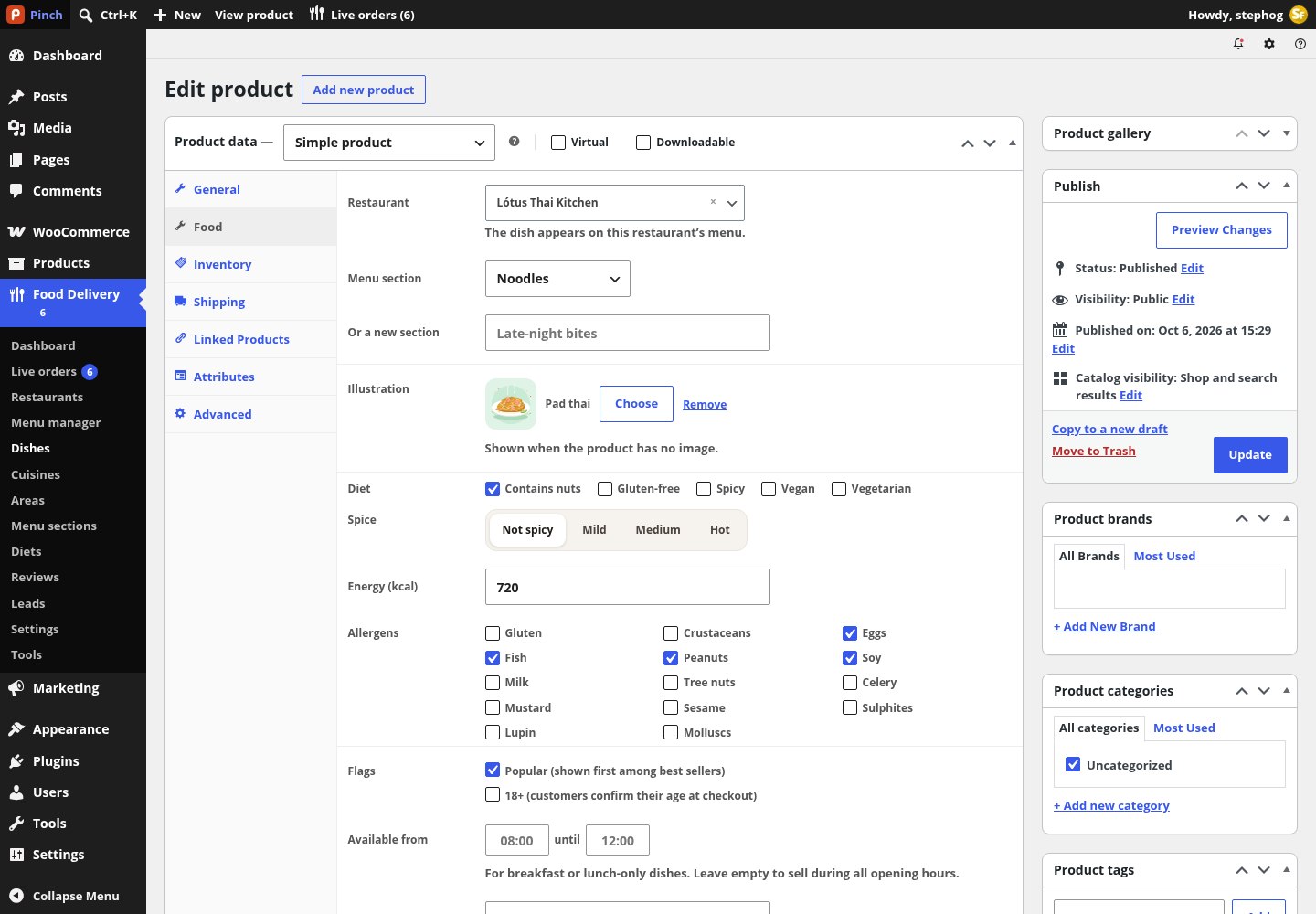
A dish open in the product editor with the Food tab selected: Restaurant, Menu section, Illustration, Diet, Spice, Energy, Allergens, Popular and 18+ flags, availability window, name language and the visual builder for option groups.
| Field | Meta key | Notes |
|---|---|---|
| Restaurant | _sfd_restaurant | Searchable select. “Not a dish (regular product)” keeps it an ordinary shop product. |
| Menu section / Or a new section | sfd_menu_section term | Exactly one section; this restaurant’s sections are listed first. |
| Illustration | _sfd_art | Shown when the product has no image. |
| Diet | sfd_diet terms | Tick boxes (Vegan, Vegetarian, Gluten-free, Spicy, Contains nuts in the demo). |
| Spice / Energy | _sfd_spice 0–3, _sfd_kcal | Not spicy, Mild, Medium, Hot; kcal. |
| Allergens | _sfd_allergens | The EU-14 list: Gluten, Crustaceans, Eggs, Fish, Peanuts, Soy, Milk, Tree nuts, Celery, Mustard, Sesame, Sulphites, Lupin, Molluscs. |
| Flags | _sfd_popular, _sfd_age_restricted | Popular dishes sort first among best sellers; 18+ dishes make customers confirm their age at checkout. |
| Available from … until | _sfd_available_from / _to | For breakfast or lunch-only dishes; empty = all opening hours. |
| Name language | _sfd_name_lang | Helps screen readers pronounce “Bacalhau à Brás” (pt). |
| Options customers choose | _sfd_option_groups (JSON) | See below. |
Option groups (modifiers)
- Each group has a name (“Size”, “Extras”, “Spice level”), a type (Pick one or Pick several), a required flag, at-least / at-most counts, and choices with a label, a price change (negative allowed), a preselected flag and a sold-out flag.
- Limits: 12 groups per dish and 20 choices per group. Insert from the library copies one of the demo templates into the dish; it is a copy, so changes affect this dish only. There is no shared modifier library.
- Prices are always recalculated on the server when a dish is added to the basket, so the JSON cannot be tampered with from the browser.
[{"id":"size","label":"Size","type":"single","required":true,"min":1,"max":1,
  "choices":[{"id":"reg","label":"Regular 30 cm","price":0,"default":true},
             {"id":"lg","label":"Large 36 cm","price":3.5}]}]
How a menu is assembled
- Sections are the Menu section terms used by the restaurant’s published dishes, ordered by the restaurant’s own section order, then each term’s order, then name. Dishes inside a section follow the product menu order, then title.
- A virtual Popular section appears first when at least two dishes qualify (ranked by units sold, then the Popular flag). Dishes without a section go into a final More dishes section.
- The assembled menu is cached for twelve hours and refreshed whenever a dish, section or order changes. Tools › Rebuild indexes rebuilds it after imports.
- Dish product pages redirect to the restaurant menu with the dish sheet open, and the shop page redirects to the restaurant list (both switchable under Settings › Advanced). Products are noindex and left out of sitemaps.
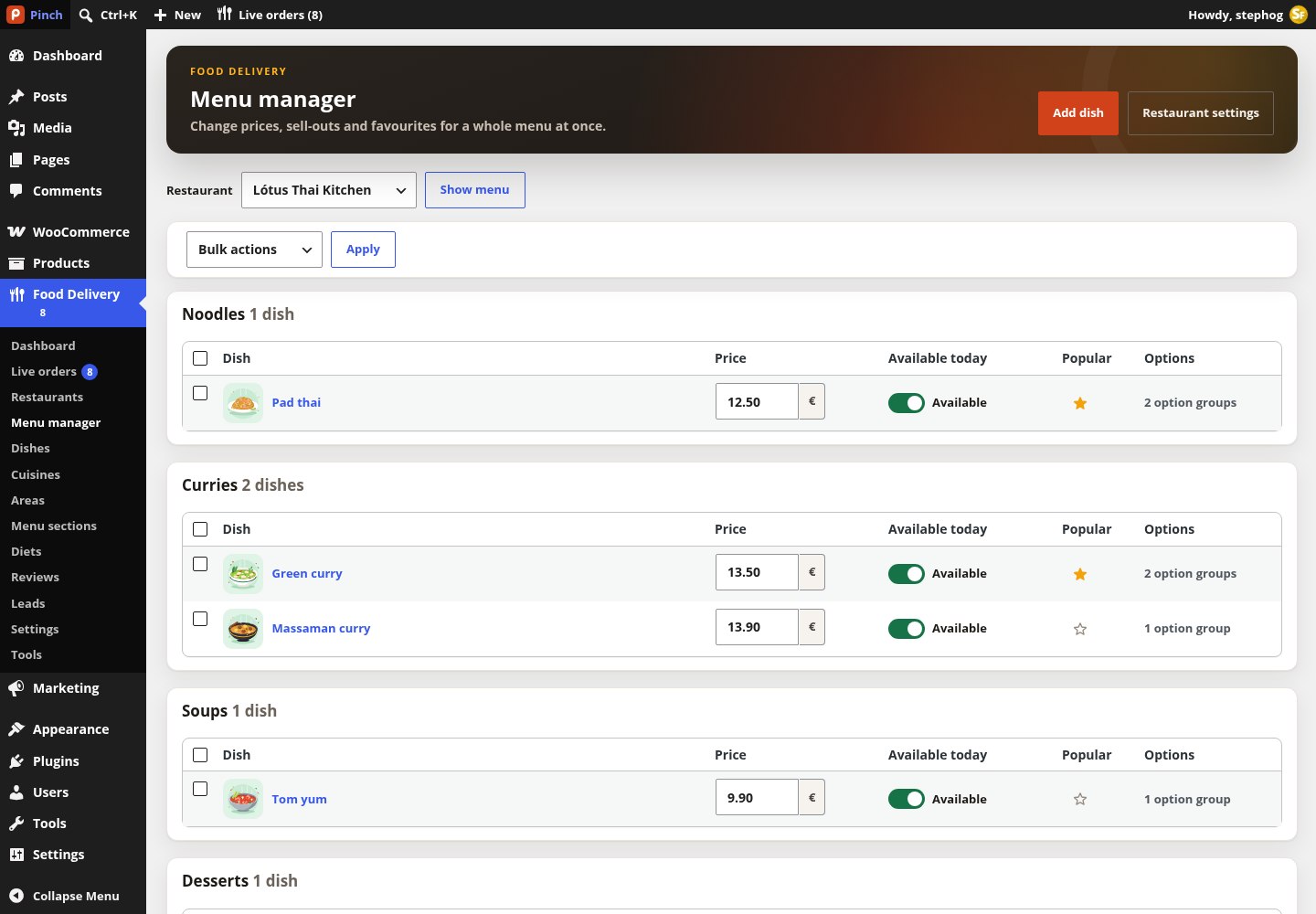
The Menu manager for one kitchen: inline price edits (saved as the WooCommerce regular price), an Available today switch per dish, a Popular star and the count of option groups, plus bulk actions Sold out today, Back in stock and Move to section.
Coupons
WooCommerce coupons gain four Food fields: Restaurants (the code works only for orders from these kitchens), Order type (delivery and pickup, pickup only, delivery only), First order only (valid when the billing e-mail has no completed order yet) and Maximum discount for percentage codes. The demo ships OLA5, PINCHFREE, PICKUP10 and LISBOA20.
Vocabulary
Cuisines, areas, sections and diets
Two taxonomies on restaurants, two on dishes. They drive the cuisine rail, the area pages, the menu sections and the diet badges.
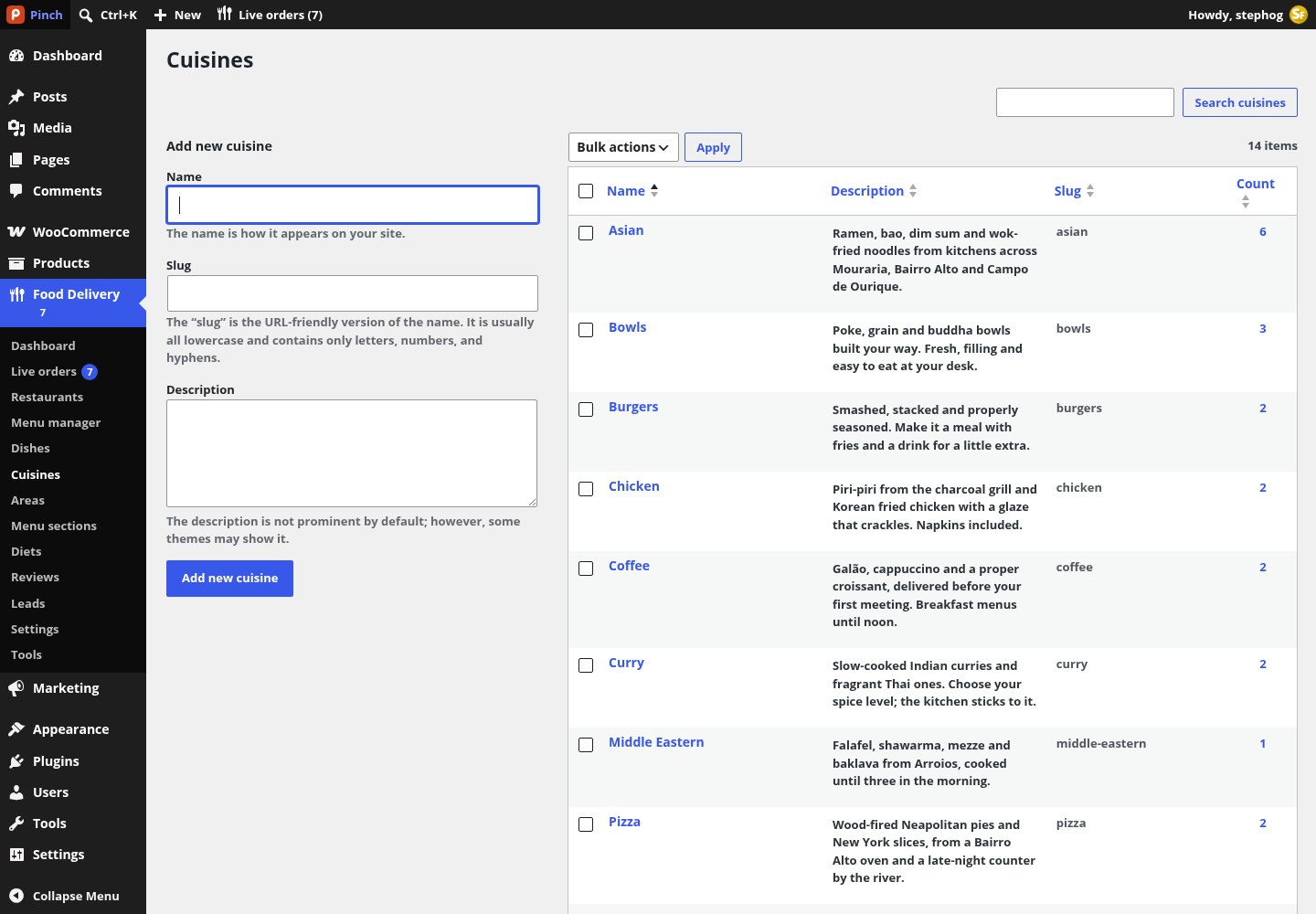
The Cuisines screen. The demo seeds Pizza, Burgers, Sushi, Asian, Portuguese, Chicken, Bowls, Tacos, Curry, Middle Eastern, Sweets, Coffee, Vegan and Seafood, each with a bundled illustration.
| Taxonomy | On | Hierarchical | Public URL | Term meta |
|---|---|---|---|---|
Cuisines (sfd_cuisine) | restaurants | No | /cuisine/pizza/ | Bundled art, icon image, order, art background |
Areas (sfd_area) | restaurants | Yes (city › neighbourhood) | /area/lisbon/alfama-graca/ | Latitude, longitude, map zoom, outline (GeoJSON) |
Menu sections (sfd_menu_section) | dishes | No | not public | Order |
Diets (sfd_diet) | dishes | No | not public | Icon |
Version 1.0.0 has no fields for term meta on the add and edit term screens: cuisine illustrations and order, area coordinates and outlines, and diet icons can be set through the REST API, WP-CLI or the demo seeder only. The demo terms arrive fully filled in, and the plugin falls back gracefully (areas without coordinates simply have no map centre).
Inboxes
Reviews and leads
Customers rate delivered orders; partners, couriers and app sign-ups arrive as leads. Both are ordinary WordPress objects you can filter, export and purge.
Reviews
- A review is a comment of type
sfd_reviewon the restaurant with a 1–5 star rating, optional tags (Hot & fresh, Generous portions, Well packed, Friendly courier, Fast, Great value, Authentic, Would order again), the order id and a verified flag. - Customers rate from the tracker’s Rate order block or the Rate action in My Account. Reviews are auto-approved unless they hit the WordPress disallowed-words list.
- The rating shown on cards blends the imported seed average with real stars and is recalculated whenever a review is added, approved or deleted.
- Food Delivery › Reviews is the comments screen filtered to reviews, with a sortable Rating column.
Leads
- Three forms: Restaurant partner (restaurant name, your name, e-mail, phone, address, cuisine, message, consent), Courier (name, e-mail, phone, vehicle, areas, message, right to work, consent) and Get the app (e-mail, consent).
- Protected by a honeypot and a limit of five sign-ups per IP per hour. Each becomes a private
sfd_leadpost and an e-mail to the site admin (Reply-To the applicant). In demo mode nothing is sent. - Food Delivery › Leads: Lead, Type, Contact, Details, an inline Status select (New, Contacted, Won, Lost) and Received, with views per kind and an Export CSV button. Old leads are purged after the retention period in Settings › Advanced.
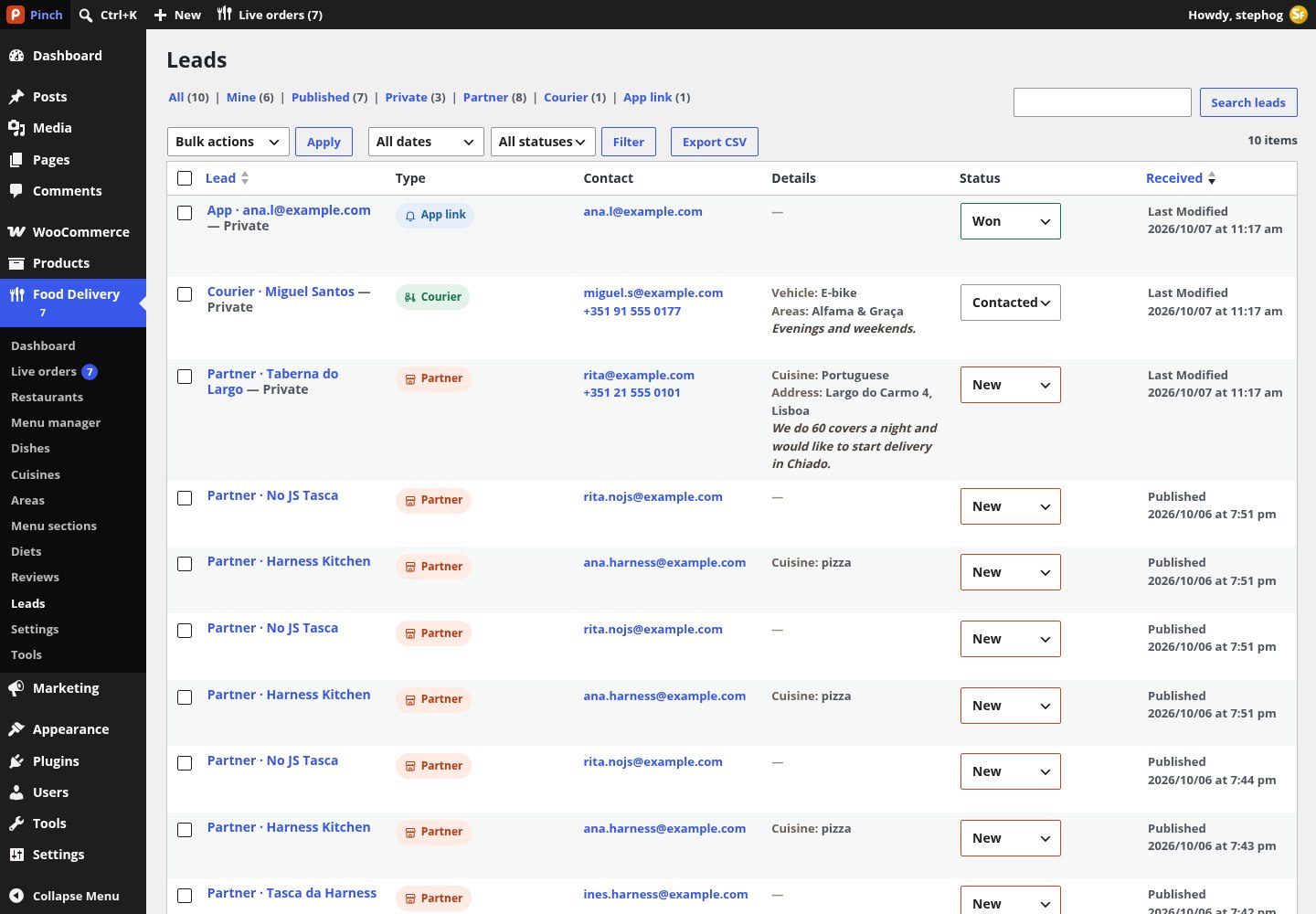
The Leads list with the three kinds and inline status changes.
Privacy: the plugin adds suggested privacy-policy text and registers personal-data exporters and erasers for saved delivery places, favourite restaurants, and partner and courier applications.
Configuration
Food Delivery › Settings
Ten tabs in one option (stepfox_food_settings). Fees, timing and tracking define the numbers every card, basket and checkout shows; map and geocoding decide which providers run.
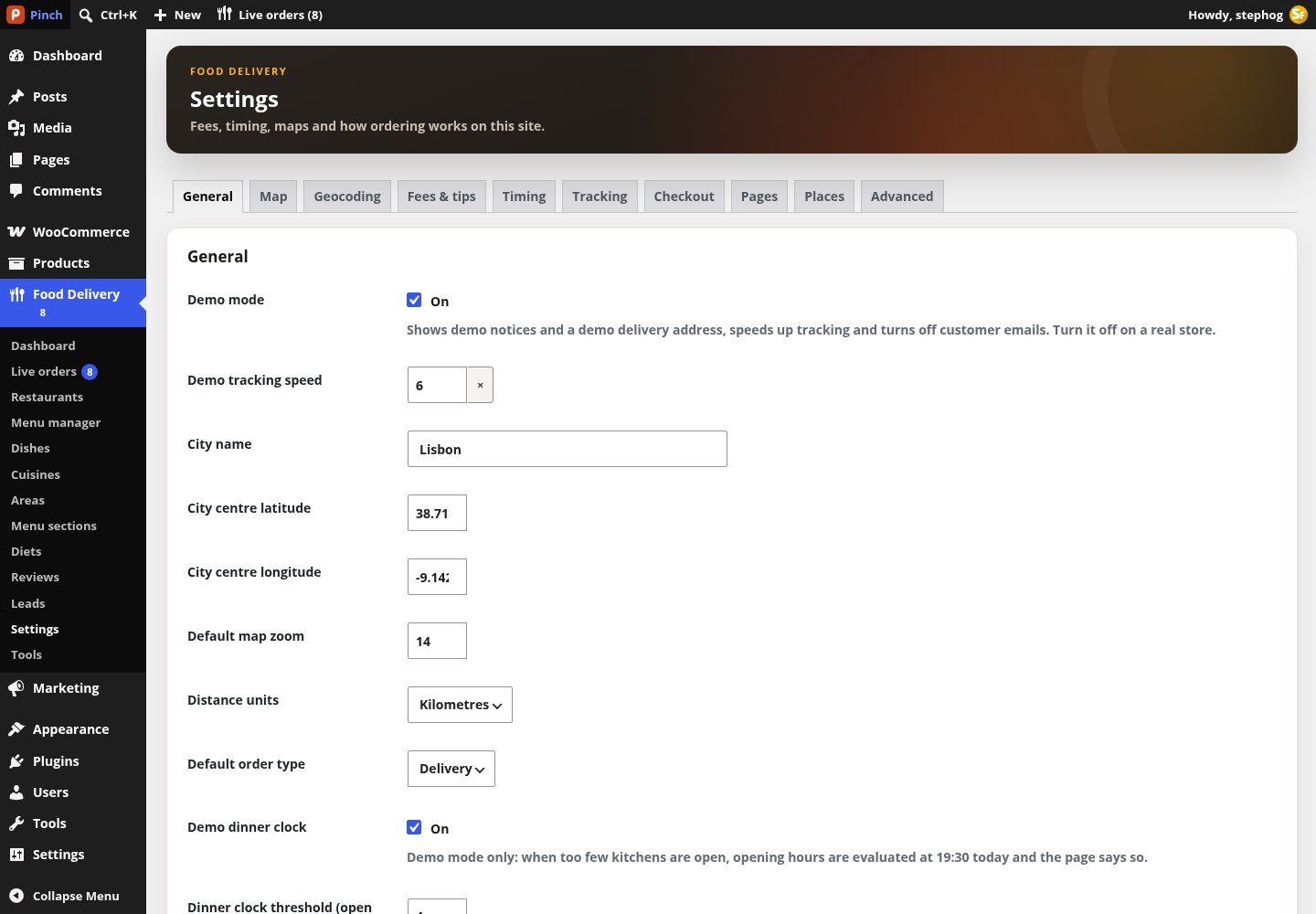
The Settings screen. Tabs: General, Map, Geocoding, Fees & tips, Timing, Tracking, Checkout, Pages, Places and Advanced. The Map, Geocoding and Fees tabs carry a live side panel (map preview, search test, fee calculator) that previews unsaved values.
General, Map and Geocoding
| Setting | Default | What it does |
|---|---|---|
| Demo mode / Demo tracking speed | off / 6× | Demo notices, a demo address, faster tracking, no customer e-mails. Off on a real store. |
| City name, centre latitude / longitude, default zoom | Lisbon, 38.7190 / −9.1420, 14 | Where maps start and what the site calls your city. |
| Distance units / Default order type | km / delivery | Kilometres or miles; delivery or pickup selected first. |
| Demo dinner clock + threshold | on / 4 | Demo only: when fewer kitchens are open, hours are evaluated at 19:30 and the page says so. |
| Tile provider + key, style ids | OpenStreetMap | OpenStreetMap (no key, light use), CARTO Voyager or Positron, Stadia, MapTiler, Mapbox or a custom tile URL with {z}/{x}/{y}. A keyed provider without a key falls back to OpenStreetMap and says so. Check the provider tests it. |
| Warm tint on map tiles | on | Tints the map to match the theme. |
| Address search / Pin to address | Photon / Nominatim | Forward and reverse geocoders: Photon or Nominatim without a key, Mapbox or MapTiler with one (the key stays on the server), or none (popular places only). Results are cached 30 days. |
| Limit to countries / Prefer results near the city | pt / on | Comma-separated ISO codes; bias results to the city. |
Fees & tips, Timing, Tracking, Checkout
| Setting | Default | What it does |
|---|---|---|
| Base delivery fee, Fee per km, Distance included, Minimum, Maximum | 0.99, 0.45, 1 km, 0.99, 4.99 | Fee = base + per-km beyond the included distance, clamped between minimum and maximum. |
| Round delivery fees to .x9 | on | “Charm” rounding of the computed fee. |
| Small order threshold / cap / on pickup | 10 / 3 / off | Adds the difference to the threshold as a fee, capped. |
| Service fee % / minimum / maximum / delivery only | 5% / 0.39 / 2.49 / on | A percentage of the subtotal held between the two bounds. |
| Fees are taxable | off | Whether WooCommerce taxes the fee lines. |
| Tip presets, custom tip, maximum, default | 0, 1, 2, 3 / on / 20 / 0 | Up to six amounts; 0 means “No tip”. |
| Road distance factor / Courier speed | 1.35 / 16 km/h | Road distance = straight line × factor; travel time = road km ÷ speed. |
| Acceptance buffer / Pickup buffer / ETA window | 2 / 4 / 10 min | ETA = prep + busy + acceptance (+ pickup buffer + travel for delivery); the window adds the width. |
| Scheduled slot length / Days ahead / Default delivery radius | 15 min / 2 / 4.5 km | Order-for-later slots and the zone used by kitchens on the store default. |
| Simulated acceptance delay / Tracker refresh / while arriving | 120 s / 15 s / 5 s | How the customer tracker polls. |
| Complete orders when delivered / Show the courier’s first name | on / on | See the live board section. |
| Require a phone number / Cutlery ticked by default / Demo checkout banner | on / off / text | Checkout behaviour. |
Pages, Places and Advanced
- Pages: which page is the order tracking, terms, map, cuisines, offers, partners, couriers, app, help centre, about and journal page. “Automatic” finds the page by its stamped role or by slug; the screen shows which page it found.
- Places: the popular squares and landmarks offered in the address search before anything is typed (name, latitude, longitude, postcode; up to 100). Replace the Lisbon list with your own; never list private addresses.
- Advanced: partners may edit zones and fees, dish-page and shop redirects, lead retention days, demo visitor-order purge hours, hide WooCommerce’s thank-you paragraph, delete all plugin data on uninstall. Two more settings are command-line only: rate-limit exemptions and a QA clock that pins the time used for opening hours.
Under the hood
From basket to doorstep
What the plugin does inside WooCommerce between “Add” and “Delivered”. One rule set lives on the server and is mirrored to the browser, so cards, the bag and checkout always agree.
Address first
The visitor sets a delivery address (or picks pickup) in the location sheet: saved places, recent places, popular landmarks or a typed search. The address is kept in the WooCommerce session and a cookie, and every card immediately shows its distance, fee and ETA.
One kitchen per basket
Adding a dish from another restaurant raises a conflict dialog (“Your basket has items from … Start a new order from …”). The current basket is kept until the new dish is really added.
Fees and ETA
The quote engine computes the road distance, the delivery fee, the small-order and service fees and the ETA window from the settings and the kitchen’s own values. The cart drawer shows a progress bar towards free delivery or the minimum order.
Checkout
Delivery and pickup are zone-less shipping methods, so the Checkout block’s own Delivery / Pickup toggle switches the mode. The panel adds a When slot (as soon as possible, or 15-minute slots up to two days ahead), tip radios and, for delivery, drop-off (hand it to me, leave at the door, meet outside), cutlery, a 140-character note for the courier and an 18+ confirmation when needed.
Checks before placing
Checkout is blocked when the basket is below the minimum order, the kitchen is closed or paused or does not offer the chosen mode, the address is outside the zone or unconfirmed, the slot has expired or the 18+ confirmation is missing.
Order received
The order is stamped with restaurant, mode, slot and quote. The block theme’s order-confirmation template shows the live tracker; on classic themes the plugin prints it above WooCommerce’s thank-you text. The processing e-mail adds a “Track your order” link of the form /track/?sfd_order=ID&key=….
After delivery
The order completes, the customer can rate it and reorder from My Account, which also gains Favourites and Saved places endpoints. Guests’ favourites live in a cookie and merge into the account at sign-in.
REST API and WP-CLI
| Route (namespace stepfox-food/v1) | Purpose |
|---|---|
GET /restaurants, /restaurants/{id}, /restaurants/{id}/menu, /dishes/{id} | Kitchens, one kitchen, its assembled menu, one dish |
GET /quote, /search, /geocode, /geocode/reverse, /places | Fee and ETA quote, search, address search, pin to address, popular places |
/me/favorites, /me/places, /me/orders/active | The signed-in customer’s favourites, saved places and active order |
GET /track/{id}, /track/demo; POST /orders/{id}/rating, /orders/{id}/reorder | The tracker, the public demo delivery, rating and reorder |
GET /board, POST /board/orders/{id}/stage, POST /orders/{id}/courier-location | The live board, stage changes, real courier positions |
POST /leads, POST /demo, GET /view, POST /render-batch | Sign-ups, the demo installer, partial re-renders, editor previews |
wp sfd demo install            # or: wp sfd demo remove --yes / wp sfd demo status
wp sfd woo configure           # the same as Tools › Configure WooCommerce
wp sfd index rebuild           # after importing restaurants or dishes
wp sfd quote --restaurant=lotus-thai-kitchen --lat=38.71 --lng=-9.14 --subtotal=24
wp sfd orders simulate --count=3
wp sfd settings get fees.base  # or: wp sfd settings set advanced.qa_now 19:30
Background work runs through Action Scheduler in the sfd group: an hourly job and a daily job at 04:00 site time (order counts, diet unions, review blending, lead purge), plus one job per planned order stage. SEO fallbacks (meta description, Open Graph, Restaurant and Menu JSON-LD) switch themselves off when Yoast, Rank Math or AIOSEO is active.
Block editor
The 80 blocks
All blocks sit in the “Food” inserter category and are prefixed “Food —”. They render real data in the canvas, and they are small: a field, an image, a button, a loop, a sheet. Cards and dialogs are built by nesting them.
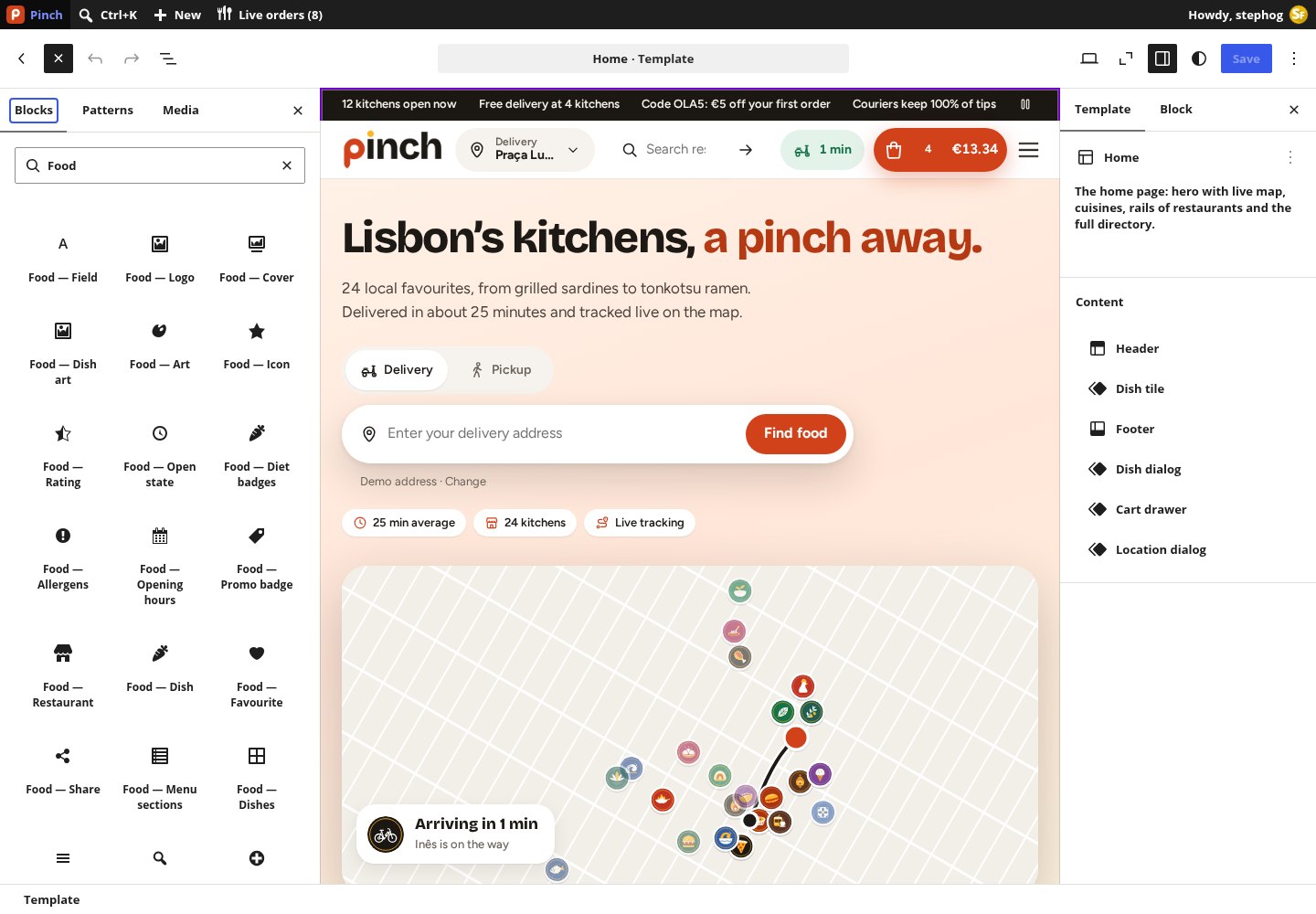
The block inserter filtered to Food inside the Site Editor. Every block shares the Stepfox Looks attributes (per-device styles, custom id), a Specific item ID, an empty-state text and device visibility.
How a block knows which item to show
- Blocks that expect a restaurant work in the single-restaurant template, inside a restaurant Query Loop, inside a Food — Restaurant wrapper, or with a Specific item ID.
- Blocks that expect a dish need a Food — Dish wrapper, the Food — Dishes loop or the Food — Dish dialog. Blocks that expect an order need the Food — Order wrapper; term blocks need the Food — Terms loop.
- Loops repeat their inner blocks per item: Menu sections, Dishes, Reviews, Cart lines, Terms, Order steps and Order lines. The Field block then reads one value of the current item, with a prefix such as
line.*,step.*orreview.*telling you which loop it belongs in.
Fields and media (12)
| Block | Item | Inspector controls |
|---|---|---|
| Field | any | Field (see the list below); HTML element (span, p, div, h1–h4, strong, small); text before / after / when empty; Link (none, its page, open the dish sheet, edit the bag item); Format (default, short, long) |
| Logo, Cover | restaurant | Size and link; aspect ratio (16/9, 3/1, 2/1, 4/3, 1/1), link, lazy or eager loading |
| Dish art | dish | Aspect ratio; link (none / open the dish sheet); show the quantity in the bag |
| Art, Icon | — | A bundled illustration (chosen, or the cuisine / area / dish / cover / logo / order stage / courier of the item), width, height, alt, link; an icon name, size and label |
| Rating | restaurant | Style (badge, stars, score, summary); show the number of ratings |
| Open state | restaurant | Style (pill, text, dot); show the next change; hide while open |
| Diet badges, Allergens | dish | Icons, labels or both; inline or expandable |
| Opening hours | restaurant | Highlight today; compact |
| Promo badge | restaurant | Style (ribbon, pill, text); the most important badge or all |
Menu and ordering (17)
| Block | What it does | Inspector controls |
|---|---|---|
| Restaurant, Dish (wrappers) | Provide the item for the blocks inside | Source (current page, bag, order, dish, a specific id; or from the address); id; empty text |
| Menu sections | Loop over sections | Start with a Popular section; its title and size; hide empty |
| Dishes | Loop over dishes | Source (menu section, whole restaurant, popular, across the city, related, add-ons for the bag, chosen ids, search results); how many; order (menu order, popularity, price); hide sold-out; layout (grid, rail, list); item size |
| Menu navigation, Menu search | The sticky section bar and search box | Scroll sideways or collapse into “More”; include search; placeholder |
| Add button | The + / Add / price button on a dish | Style (plus button, button, price); label |
| Dish dialog, Dish options, Quantity, Item note, Add to order button | The dish sheet and its parts | Options as list or chips with price deltas; min and max quantity; note length and labels; add / editing / scheduling / sold-out labels |
| Favourite, Share | Heart and share buttons | Icon or icon + label |
| Reviews | Loop over reviews | How many; most recent or rating; minimum stars; only reviews with text |
Cart and location (19)
| Block | What it does | Inspector controls |
|---|---|---|
| Cart button, Cart bar, Cart drawer, Cart view | Header button with count and total; the fixed “View order” bar on phones; the slide-in bag; the full cart page body | Show count / total; where the bar shows; drawer title |
| Cart lines, Cart totals, Fee progress, Checkout button | The bag’s lines, the totals rows, the free-delivery / minimum-order bar, the button | Rows; explain each fee; which bar (automatic, small-order fee, free delivery, minimum order); label |
| Order time | ASAP or a scheduled slot | Style (summary, inline, dropdown) and labels |
| Address button, Address bar | The header “Deliver to …” button; the hero search bar | Text before; show delivery or pickup; placeholder; button; offer “use my location”; go-to URL |
| Location dialog + Location search, Use my location, Location list, Location details, Confirm address | The address sheet and its parts | Saved / recent / popular lists with headings; My Account mode; labels for home, work, other, save, edit, delete, skip |
| Delivery / pickup toggle, Zone check | Mode switch; “delivers here” line | Labels; show the delivery time; bag line or summary |
Discovery, map and forms (18)
| Block | What it does | Inspector controls |
|---|---|---|
| Map | One map block for every situation | Mode (all restaurants, whole restaurant, area, delivery coverage, order, showcase, address picker, static preview); cluster pins; show zone and address; interaction (full, click to activate, static); synced list; fit to results / city / address; tile provider; labels |
| Terms | Loop over cuisines, areas or diets | Taxonomy; parent; only these slugs; order (custom, name, count); how many; hide empty; mark current; layout |
| Filter form + Filter chip, Filter terms, Filter sort, Filter reset, View toggle, Load more | The filter bar of the directory | Apply instantly; regions to update; chip filter (open now, free delivery, rating, price level, diet, delivery time, mode); taxonomy chips with an “All” chip; labels; query id |
| Search | Restaurant and dish search with suggestions | Placeholder; accessible name; search in (all, restaurants, dishes); suggest as you type |
| Promo strip, Promo code | Scrolling messages; copyable coupon | Messages; automatic messages; speed; code; labels; terms |
| Show when | Shows its content only when a condition holds | Address set / not set; no kitchen delivers; bag empty / has items; logged in / out; at least N kitchens open; demo mode; dinner clock; order found / stage / mode; restaurant closed or out of range; time between; invert |
| Lead form + Form field, Form submit | Partner, courier and app sign-up forms | Kind; success message; consent text; field type (text, e-mail, phone, long text, dropdown, one choice, checkbox, area, cuisine or vehicle picker); label; required; choices |
| Earnings calculator, FAQ search | The partner page calculator; the help-centre search | Commission; default orders per day and basket; labels; questions to search; placeholder |
Order tracking and UI (14)
| Block | What it does | Inspector controls |
|---|---|---|
| Order (wrapper) | Provides the order for the tracker | Source (automatic, My Account order page, from the address, demo delivery, active order, latest order, a specific id); map to follow the courier on |
| Order steps + Step marker, Order lines, Order progress, Countdown, Stage art, Courier avatar | The timeline, the lines, the bar, minutes left or arrival time, the stage illustration, the courier | Vertical or horizontal; format (minutes left, arrival time, both); labels; size |
| Rate order, Reorder, Order lookup, Active order | Star rating with tags and comment; reorder button; order number + e-mail lookup; the header pill or bottom bar for an order in flight | Tags; questions; labels; demo link label; pill or bar |
| Sheet close, Sheet panel, Scheme toggle, Demo notice | Dialog chrome; the bottom sheet; light / dark switch; demo chips and banners (print nothing outside demo mode) | Resting heights; mobile only; label; style (chip, banner, clock, address, speed) |
What the Field block can read
- restaurant (26): name, tagline, cuisine(s), area, city, address, phone, price level, rating and count, preparation / delivery / pickup time, time caption, delivery fee (short and long), distance, minimum order, free-delivery threshold, today’s hours, open status, next opening, delivers to you, pickup address, link.
- dish (13): name, description, price, price from, calories, spice level, menu section, restaurant name and link, sold out, popular, availability, link.
- order (27): number, stage, stage message and hint, arrival and quoted time, minutes left, placed at, item count, items, subtotal, each fee, tip, discount, total, order type, drop-off, time slot, destination, restaurant and phone, courier, vehicle, tracking link, demo label.
- cart (15), line (6), step (3), review (7), section (2), term (6), location (3) and site (9: restaurants, open now, cuisines, areas, median delivery time, city, results, year, copyright).
Block theme
Templates, parts and patterns
Pinch is a full-site-editing theme: every page type, sheet and card is a template or template part of ordinary blocks. There is no theme options screen.
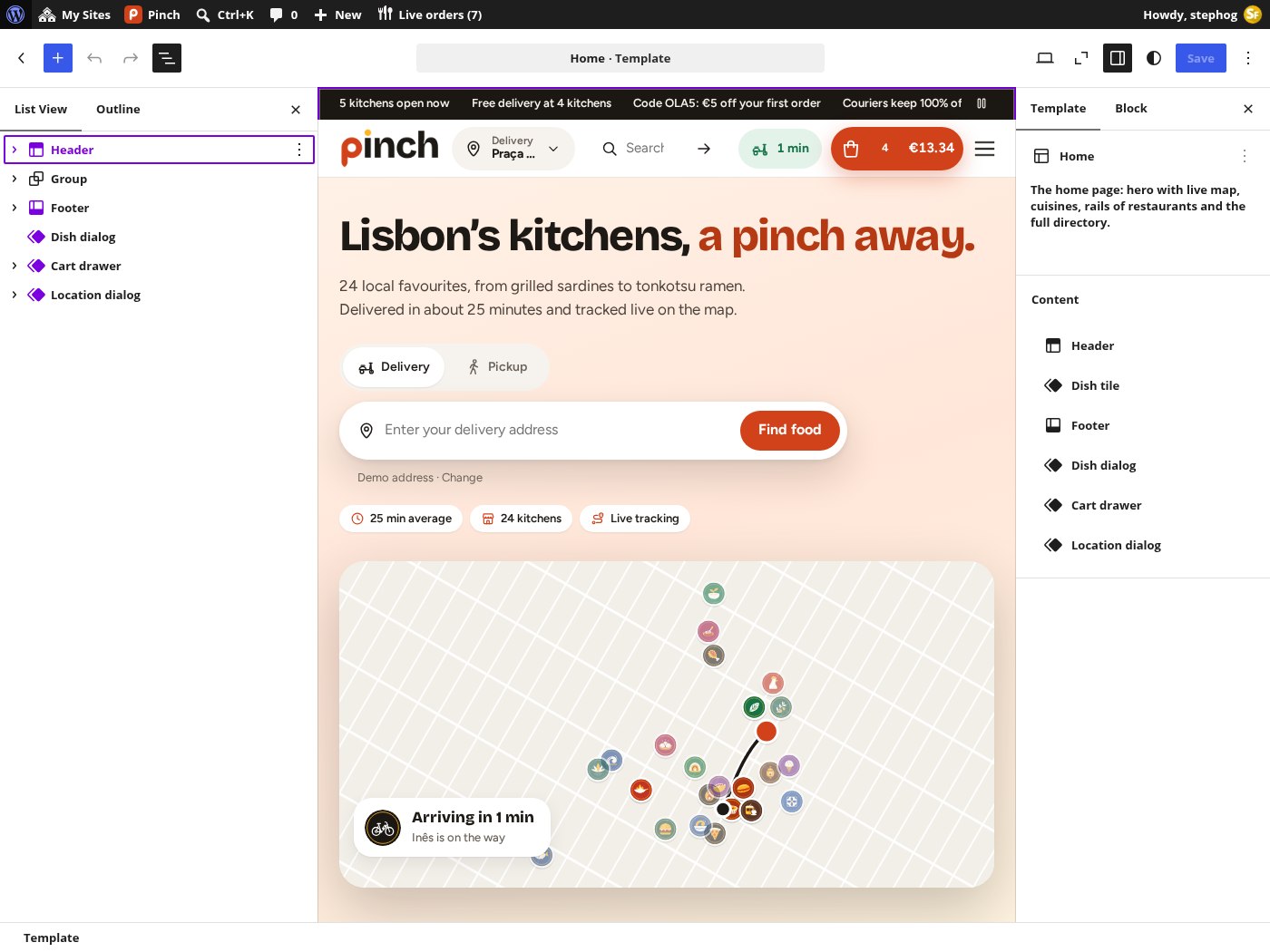
The demo front page open in the Site Editor: List View reaches every block inside every card, and the Stepfox Looks sidebar holds desktop, tablet and mobile values for spacing, colours and typography.
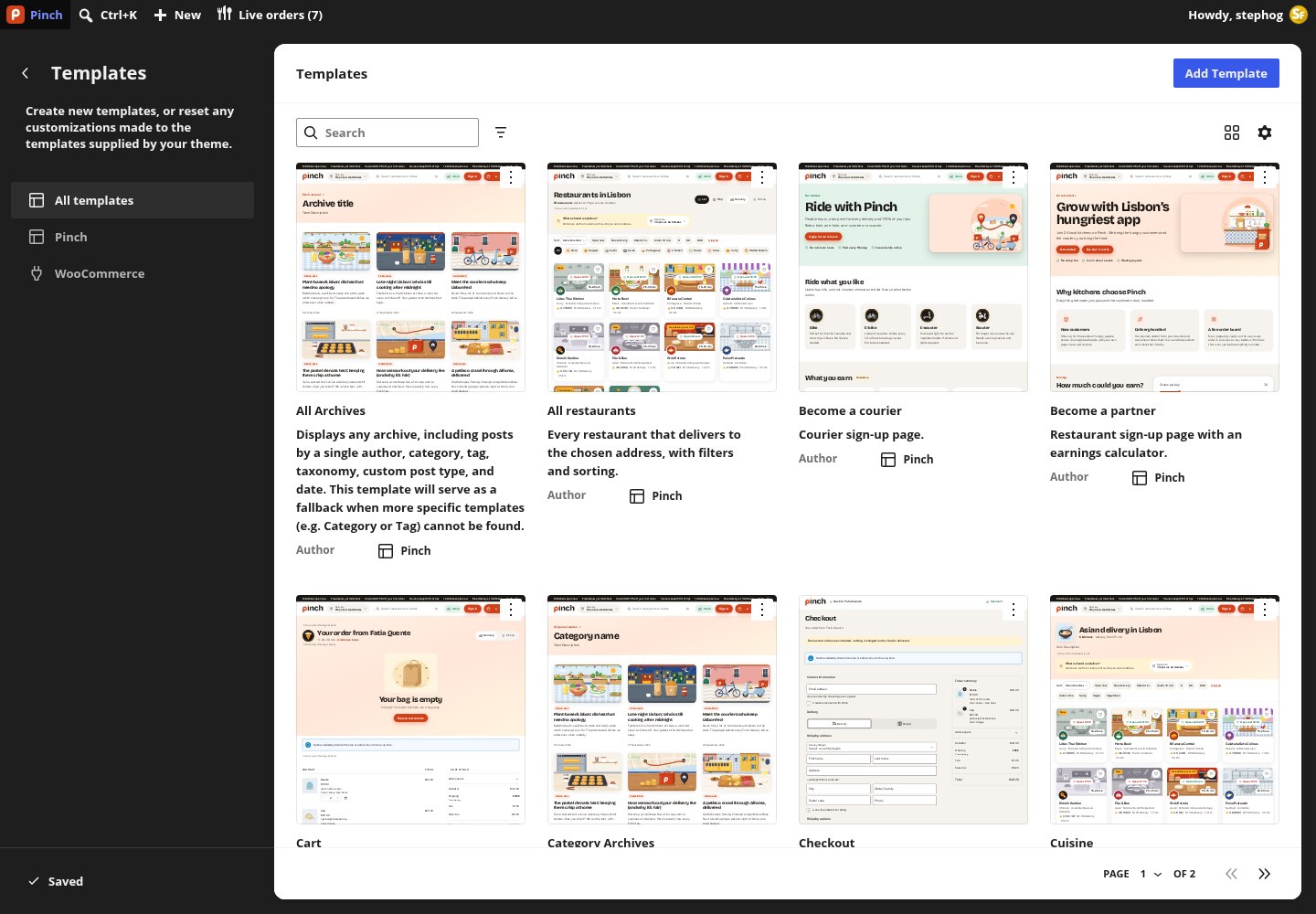
The Templates list with the theme’s names and descriptions. Page templates are matched by page slug and also offered in the page editor’s Template picker.
| Template | Serves | Built from |
|---|---|---|
| Home | The static front page | Hero with a live map, cuisine rail, Popular / Favourites / Fastest / New rails, most-ordered dishes, the full directory |
| All restaurants | /restaurants/ | Filter form, sort, result grid and Load more |
| Restaurant | /restaurant/…/ | Cover and hero facts, menu with the live bag beside it, reviews, hours, similar kitchens |
| Cuisine, Neighbourhood | /cuisine/…/, /area/…/ | Results, a Popular fallback when few match, most-ordered dishes; “Also delivering to …” |
| Map, Cuisines, Offers | Pages with slug map, cuisines, offers | Full-screen map with a synced list; every cuisine as a tile; promo codes, free-delivery deals, deals at new kitchens |
| Cart, Checkout, My account, Order confirmation | The WooCommerce pages | Cart block with a restaurant header and show-when states; a minimal header and the Checkout block; My Account plus guest Favourites and Saved places; the tracker above the WooCommerce confirmation blocks |
| Track order | Page with slug track | The tracker part, or the Order lookup form when no order is in the address |
| Become a partner, Become a courier, Get the app, Help centre | Pages with slug partners, couriers, app, help | Sign-up forms with the earnings calculator; app promo with an e-mail-me-the-link form; FAQ search, topics and contact |
| Journal, Single, Archive, Category, Search, 404, Page, Index | The editorial layer and fallbacks | Story cards; “Kitchens in this story”; restaurants, dishes and stories in search |
Template parts
- Header (promo strip, logo, address button, search, active order, account, cart button and a burger menu with Restaurants, Map, Offers, Cuisines, Journal, Track an order, My account, Become a partner, Become a courier, Help) and a Header — Checkout; Footer (app band, link columns, areas, scheme toggle, demo notice, cart bar, active order) and Footer — Slim.
- Ten copies of the restaurant card: Restaurant card, and one each for the Popular, Fastest, New and Favourites rails, Free delivery deals, Deals at new kitchens, Also delivering here, Similar kitchens and Kitchens in this story. Each loop uses its own copy, so restyling one rail never changes another.
- Item parts: Restaurant row (map list), Dish row (menu), Dish tile (rails), Review card, Story card. Sheets: Dish dialog, Cart drawer, Location dialog. Order: Order tracker, Account — Favourites, Account — Saved places.
- Links are written for the demo and rewritten to your own site at render time. There are no classic menu locations; edit the navigation blocks in the header and footer parts.
Patterns (category “Pinch”)
App bandFAQHow it worksPromo cardsPartner and courier CTAValue props
theme.json: palette, type and spacing
| Setting | Values |
|---|---|
| Layout | Content 1280 px, wide 1440 px |
| Palette | Plate, Card, Linen, Sand, Hairline, Edge; Espresso, Roast, Pepper; Paprika #D2421A with deep, ink and tint; Saffron #FFB423 with tint; Basil #157347 with ink and soft; Chili with ink and soft; Star; Night, Night 2, Night text, Night meta; white, transparent; eight illustration backgrounds (cream … sage) |
| Gradients | Brand, Sunrise, Saffron pop, Basil fresh, Night, Scrim, Shimmer |
| Fonts (self-hosted, OFL) | Bricolage Grotesque (display), Figtree (body) |
| Font sizes / spacing | Extra small … Jumbo; Hair, Tight, Snug, Base, Roomy, Loose, Section, Band, Hero |
| Shadows | Hairline lift, Card, Lift, Float, Pop, Paprika glow, Ring |
| Dark mode | A colour remap under settings.custom.sfdScheme.dark; the Scheme toggle block switches at runtime and remembers the choice |
Because the theme has no stylesheet, restyling is done per block: select a card in List View, open the Stepfox Looks panel and change the value for desktop, tablet or mobile. The change becomes a block attribute, so there is no child theme to maintain.
Elementor edition
Pinch for Elementor
The Elementor theme renders the same kitchens, menus and orders through 36 plugin widgets, 7 theme widgets and 3 dynamic tags. With Elementor Pro the layouts are editable Theme Builder templates; without it, every route has a PHP fallback built from the same widget markup.
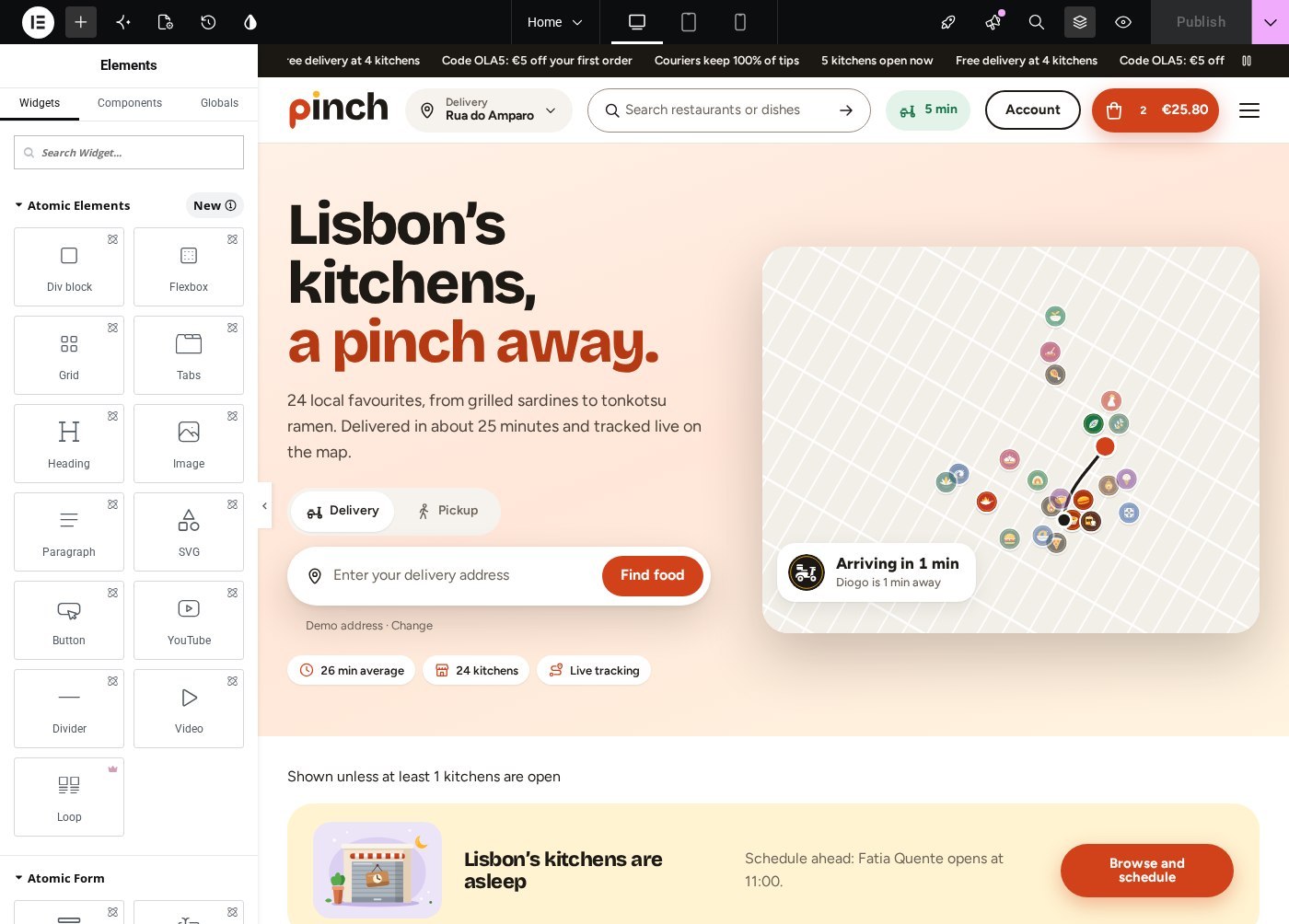
The demo front page open in the Elementor editor. Widgets live in a “Food” panel category; most have an Empty state section, an Entity source section (the current page, or one you choose) and a Style tab with accent, text, surfaces, lines and corner radius.

The Appearance › Pinch Setup wizard: a system check (Elementor 3.20+, WooCommerce, the plugin, Elementor Pro optional), a link to the Food dashboard and Install the layout, which creates the pages as Elementor documents, the “Pinch Kit”, four menus and, with Pro, fourteen Theme Builder templates. It never overwrites content you edited and rolls back if a step fails.
Widgets (category “Food”)
| Widget | Content controls |
|---|---|
| Address bar, Address button, Delivery or pickup | Placeholder, button label, use-my-location, results page; prefix and labels; mode labels, show times, apply button |
| Food search, Cart button, Cart drawer, Cart bar, Active order | Search scope and suggestions; count and total; title, time picker, “Goes well with”; where the bar shows; pill or bar |
| Promo strip, Promo code, Promo cards | Live and custom messages, speed; code, labels, terms; a repeater of cards |
| Cuisine rail, Area grid | Rail or grid, order, number, hide empty, counts, “All cuisines” tile; every neighbourhood, inside or next to the current area, card or link |
| Restaurant grid, Restaurant carousel, Restaurant list | 16 sources (all with filters and sort, this archive, popular near you, fastest, new, free-delivery deals, deals at new kitchens, favourites, similar, kitchens in this story, one cuisine, one area, also delivering here, map list, search results, popular fallback); cuisine or area; per page; Show more; filters above; out-of-range last; columns; cards in view |
| Restaurant filters | Sort, open now, free delivery, rated 4.5+, price levels, under 30 min, cuisines, diets; one or two rows; list / map toggle; apply instantly; stick under the header |
| Food map | Map shows (every restaurant with a synced list, this restaurant and its zone, this area, delivery coverage, the order on its way, a live demo delivery, address picker, static preview); interaction; clustering; zone and address; frame; tiles; height |
| Restaurant hero, Restaurant menu, Dish rail, Reviews, Restaurant info | Delivery facts and zone map; menu search, Popular count, bag beside the menu; dish sources and layout; summary bars, order, minimum stars; address, small map, hours and allergy note |
| Order tracker, Order lookup | Order source (automatic, order-received page, tracking link, active order, live demo); map side; details; lookup labels and demo link |
| Sign-up form, Earnings calculator, FAQ search | Form kind, button, thank-you, consent; commission and starting values; FAQ to search |
| Open state, Favourite button, Delivery zone check, Food field, Food illustration, Food icon, Dark mode switch, Demo notice | Style and labels; field with tag, before, after, fallback, link and format; illustration or icon with size; accessible labels; notice kind |
| Pinch — Home hero, Section head, How it works, Partner and courier cards, App band, Journal stories, Dynamic value (theme widgets) | Title, highlighted words, text, live map card; section titles with counts and “See all” links; steps repeater; two CTA cards; the app band; story layouts; a live value (year, copyright, city, restaurant counts, open now, typical delivery time…) |
Dynamic tags (group “Food”)
- Food field: any of the Field block’s values (restaurant, dish, order, cart, site…) with a format.
- Food image: restaurant cover or logo, dish picture, cuisine illustration, order-stage illustration or courier vehicle, with a fallback.
- Food link: the restaurant, the dish (opens its sheet), order tracking, the cuisine, the area, cart, checkout, map, all restaurants, favourites.
Templates, menus and options
| Where | What |
|---|---|
| Theme Builder (Elementor Pro) | Pinch Header, Header (checkout), Footer, Footer (slim), Restaurant, Restaurants, Cuisine, Neighbourhood, Journal, Archive, Story, Page, Search, 404. Without Pro the PHP templates render the same routes. |
| Page templates by slug | app, couriers, cuisines, help, map, offers, partners and track render from PHP when the page is not built with Elementor; the wizard builds them as Elementor documents. |
| Appearance › Menus | Four locations: Primary navigation (menu overlay), Footer: Pinch, Footer: Work with us, Footer: Legal. The wizard creates Pinch Primary, Pinch Footer, Pinch Work With Us and Pinch Legal; fallback links print until menus exist. [pinch_navigation] prints a location inside Elementor. |
| WooCommerce | Classic cart and checkout shortcodes (the configure step picks classic checkout on non-block themes); the cart button reads “Go to checkout”; the tracker prints on the order-received page. |
| Appearance › Customize | Logo and site icon. There is no separate theme options screen; colours and fonts live in the Elementor kit. |
Go live
From zero to first order
The order that avoids rework: store basics, then providers and fees, then kitchens and menus, then a test order worked through the board.
Install
Theme, then Install the demo (or the clean path through Tools and Store health). Elementor edition: also Pinch Setup › Install the layout.
Store basics
WooCommerce › Settings: your address, currency, selling countries and taxes. Food Delivery › Settings › General: demo mode off, city name, centre, zoom, units, default order type.
Providers
Settings › Map: a keyed tile provider and its key, then Check the provider. Settings › Geocoding: address search and pin-to-address providers, server key, countries, then Test. Settings › Places: your own landmarks.
Fees, timing, tracking
Settings › Fees & tips (use the calculator), Timing (radius, courier speed, slots, days ahead), Tracking and Checkout. Check Pages if your slugs differ.
Remove the demo
Tools › tick the confirmation › Remove demo content (or from Appearance › Install Demo). Your own content is never touched.
Vocabulary
Cuisines, Areas (the city as parent, neighbourhoods under it), Menu sections and Diets.
Kitchens
Restaurants › Add restaurant: Basics, Location & zone (find the address, drop the pin, radius or drawn zone, test an address), Hours and special dates, Delivery & fees, Branding. Publish.
Menus
From the Menu tab, Add dish to this restaurant; or Products › Add new and the Food tab. Price and photo as the product’s; options, diets, allergens, availability on the Food tab; section order on the Menu tab; bulk prices and sell-outs in Menu manager.
Coupons, payments, partners
Optional: WooCommerce coupons with the Food fields; a real payment gateway next to Cash and Card on delivery; a Restaurant partner user per kitchen.
Test and run an order
Set an address, add a dish, check out with a slot, tip and drop-off. Watch the tracker, then open Live orders: Accept › Handed to courier or Ready › Delivered or Collected. The order completes, the customer rates it, the review appears under Reviews.
Good to know
Questions, answered
Is there a licence key?
No. The plugin and both themes check stepfoxthemes.com through the normal WordPress update check (results cached twelve hours) and show the standard “Update available” rows. Only the slug and version are sent.
Do I need a map or geocoding key?
Not to start: OpenStreetMap tiles and the Photon / Nominatim geocoders need no key and suit light traffic. For a real store pick CARTO, Stadia, MapTiler or Mapbox tiles and, if you like, Mapbox or MapTiler geocoding; the geocoder key never leaves the server.
Is there a courier app?
No. Tracking is simulated from the kitchen’s prep time and the courier speed, and becomes manual when staff use the board. A real GPS feed can post positions to the courier-location endpoint.
What happens to orders if nobody works the board?
They keep advancing on the simulated schedule and complete by themselves. Either work the board (the first button press makes an order manual) or switch off the courier name under Settings › Tracking.
Can a restaurant manage its own menu?
Yes. Create a user with the Restaurant partner role and choose it as the kitchen’s Partner account. The partner sees Live orders and Menu manager for their own kitchens only and can never delete anything.
What does uninstall remove?
Always: options, scheduled jobs, roles, user meta and every demo-stamped item (including demo products and orders). Only when ticked under Advanced: restaurants, leads, reviews and the plugin’s taxonomies. Your own products and orders are never deleted.
Does Elementor need Pro?
No. Pro makes the Theme Builder templates editable; without it the same routes come from the theme’s PHP templates and the widgets work on any Elementor page.
Can I import kitchens and dishes?
Restaurants and dishes are ordinary posts and products with registered meta exposed in the REST API, so importers can create them. Run Tools › Rebuild indexes (or wp sfd index rebuild) afterwards.
Ready to take orders?
Two themes, one ordering engine on WooCommerce, a Lisbon demo with 24 kitchens and live tracking on the map. Get the Pinch bundle for a one-time $99.
