
Documentation · Doorstep real estate theme
Doorstep, from the inside
Everything the Doorstep bundle adds to wp-admin, the Site Editor and Elementor: what each screen does, which fields exist, how the plugin’s 73 blocks and 28 widgets fit together, and the path from a fresh WordPress install to a working property portal. Screenshots are from the live demo.
On this page
In the boxInstallwp-adminPropertiesAgentsTaxonomiesEnquiriesSettingsHow it worksBlocksSite EditorElementorChecklistFAQ
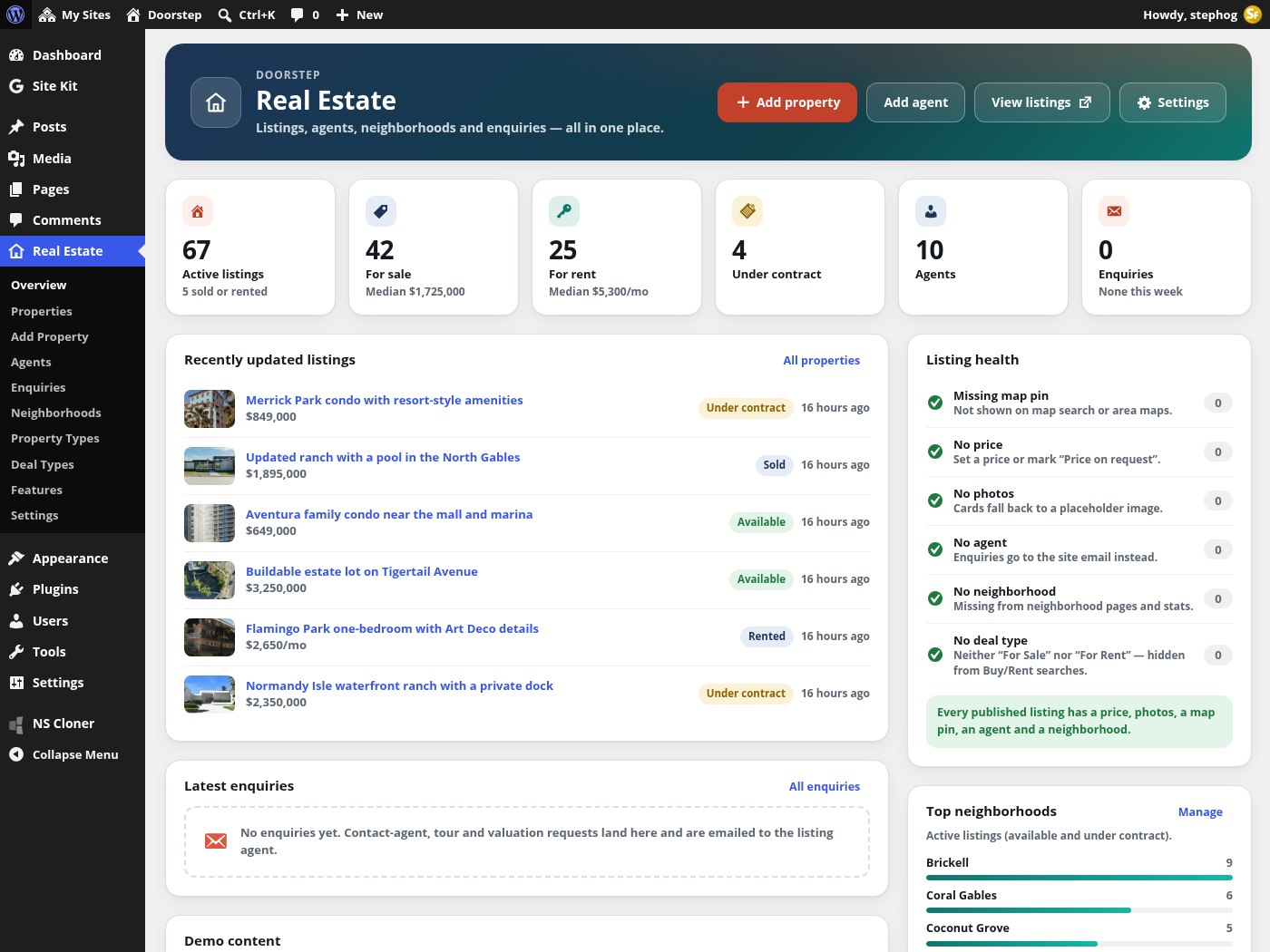
The Real Estate › Overview screen: at-a-glance tiles, recently updated listings, the latest enquiries, listing health checks and the one-click demo importer.
What you get
Three pieces, one portal
The download contains two themes and the plugin that powers both. The plugin owns the data and the logic; each theme only decides how it looks.
Stepfox Real Estate (plugin)
Required by both themes. Registers properties, agents, enquiries, the four taxonomies and every listing field, and adds the Real Estate menu, the map search, enquiries, REST routes, 73 editor blocks, 28 Elementor widgets and 4 dynamic tags, dark mode, JSON-LD and the demo importer.
Doorstep (block theme)
23 templates, 2 template parts, 15 patterns, a theme.json palette and a “Night” style variation. It ships no CSS of its own: every colour, gap and breakpoint is a block attribute you edit in the Site Editor. Needs the Stepfox Looks plugin (included).
Doorstep Elementor (classic theme)
The same design as native Elementor widgets, with PHP fallback templates for every route, a Customizer section for the header and footer, three menu locations and an Appearance › Doorstep Setup wizard. Needs Elementor; Elementor Pro is optional.
Miami demo + updates
72 listings, 10 agents, 18 neighbourhoods and 12 journal posts, installed and removed in one click. All three packages check stepfoxthemes.com for updates and show the normal “Update available” rows in wp-admin. There is no licence key to enter.
Requirements
- WordPress 6.7 or newer and PHP 8.0 or newer.
- Pretty permalinks (Settings › Permalinks › Post name). The plugin needs them for
/properties/,/property/…/,/agents/and/area/…/. - No map API key. Maps run on MapLibre GL with free OpenFreeMap vector tiles. A MapTiler or Stadia style URL can be pasted in later if you prefer.
- Block edition: the Stepfox Looks plugin. Elementor edition: Elementor 3.x, with Elementor Pro optional (Theme Builder templates become editable with Pro; without it every route keeps a PHP fallback).
First run
Install and first run
Activating either theme takes you straight to a one-click installer. You can let it do everything, import only the listings, or start from scratch.
Install the plugin(s)
Upload stepfox-real-estate.zip under Plugins › Add New › Upload and activate it. Activation seeds the Deal, Type and Feature vocabularies and flushes rewrite rules. Block edition: also install Stepfox Looks. Elementor edition: install Elementor (and optionally Pro).
Activate the theme
Upload and activate Doorstep or Doorstep Elementor under Appearance › Themes. You are redirected once to Appearance › Install Demo, and a dismissible notice (“Doorstep is active. Make your site look like the demo in one click”) stays until the demo is installed. If a required plugin is missing, the theme says which one and offers to install it with the demo.
Choose a route
Full demo: press Install the demo. It installs the missing plugins, imports the Miami dataset, writes the demo settings, creates the ten pages, sets the front page and posts page, and switches permalinks to post name. Data only: Real Estate › Overview › Import demo listings imports listings, agents and neighbourhoods but touches neither settings nor pages. From scratch: skip the demo and add your own agents, neighbourhoods and listings (see the checklist at the end of this page).
Check permalinks and timezone
Confirm Settings › Permalinks is on Post name, and set Settings › General › Timezone, because open-house dates and tour requests use site time.
Review Real Estate › Settings
Currency and symbol, area unit, default search, map centre and zoom, mortgage defaults and the address enquiries are sent to. All of it is covered in the Settings section below.
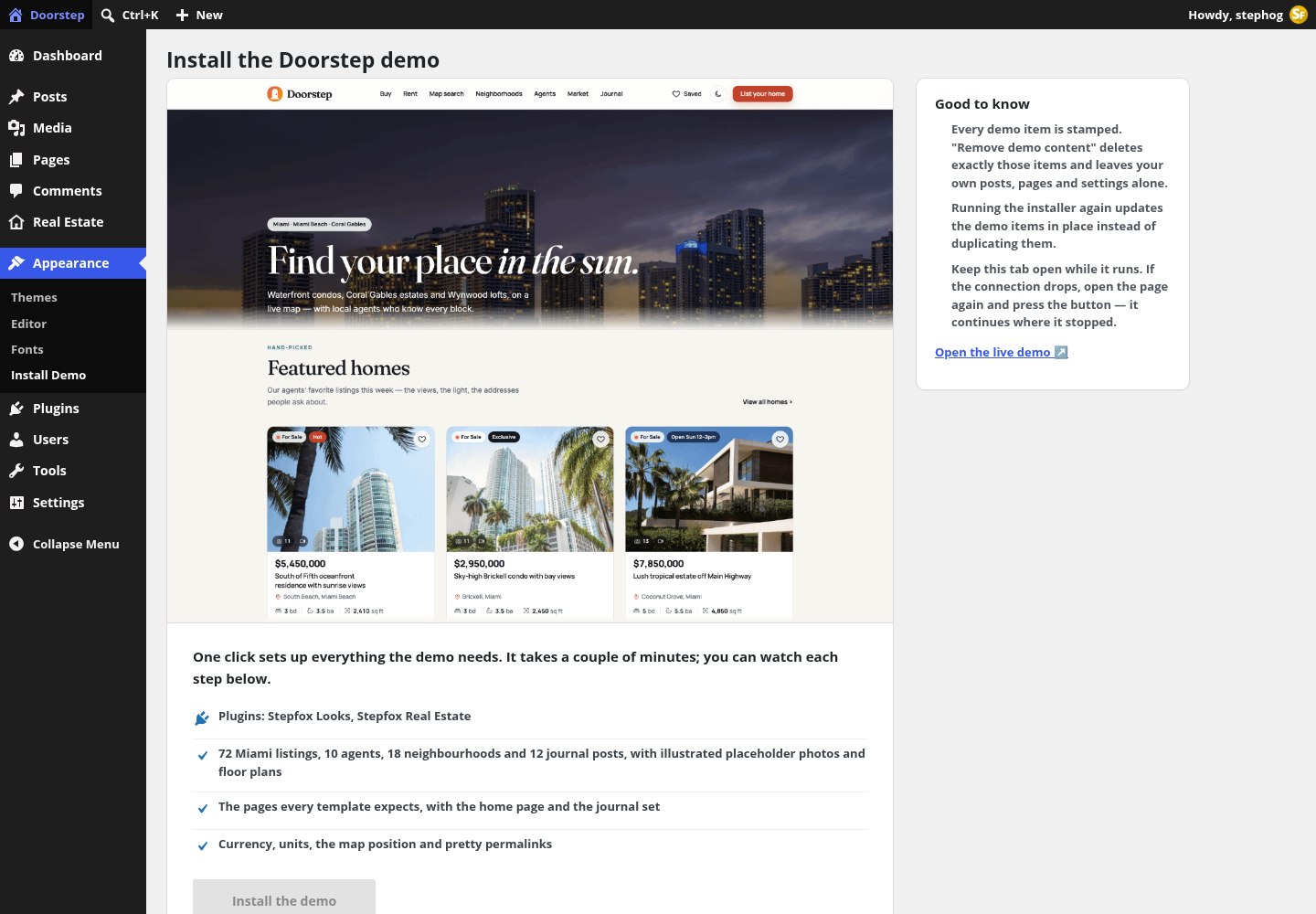
The Appearance › Install Demo screen of the block theme. It runs in 12-second slices, keeps a log, resumes if the tab is closed, and can reinstall or remove everything it created. On stepfoxthemes.com it is shown locked, for reference only.
Everything the installer creates is stamped. Remove demo content deletes only stamped items (listings, agents, posts, images and the demo pages), restores the reading settings and tagline, and never touches content you added yourself. Terms are removed only when nothing else uses them.
The back office
One Real Estate menu
The plugin pulls its post types out of the usual sidebar and groups everything under a single menu with a house icon, in a fixed order.
What the Overview shows
- At a glance tiles: active listings (with drafts and sold/rented counts), for sale and for rent with their median prices, under contract, agents, and this week’s enquiries. Every tile links to the matching filtered list.
- Recently updated listings and latest enquiries (administrators only).
- Listing health: counts of published listings with no map pin, no price, no photos, no agent, no neighbourhood or no deal type, each linking to that filtered list. When all pass it reads “Every published listing has a price, photos, a map pin, an agent and a neighborhood.”
- Top neighborhoods bar chart (active listings, top 8) and a Getting started checklist: pretty permalinks, add agents, create neighbourhoods with pin and photo, publish a listing, review currency, units and map settings.
| Health row | Help text shown | Why it matters |
|---|---|---|
| Missing map pin | Not shown on map search or area maps. | The listing has no latitude/longitude, so the map search and area maps skip it. |
| No price | Set a price or mark “Price on request”. | Cards and sorting need a price or the explicit on-request flag. |
| No photos | Cards fall back to a placeholder image. | Neither a cover photo nor a gallery. |
| No agent | Enquiries go to the site email instead. | Contact and tour requests fall back to the address in Settings. |
| No neighborhood | Missing from neighborhood pages and stats. | Medians and area pages are computed per Location term. |
| No deal type | Neither “For Sale” nor “For Rent” — hidden from Buy/Rent searches. | The Buy/Rent tabs filter on the Deal taxonomy. |
Two labels differ from their screen headings: the Neighborhoods menu item opens a screen headed “Locations” (the taxonomy name), and Deal Types opens “Deals”. There is no “Add Agent” submenu; use Add New on the Agents list, the Overview button or the admin bar.
Listings
Properties: the listing editor
A property is an ordinary post of type re_property that opens in the block editor. The description is the post content, the cover photo is the featured image, and every other fact lives in a tabbed “Listing details” meta box below it.

The Properties list. Columns: Photo, Property, Price (with price-drop and “On request” states), Deal, Type, Neighborhood, Beds, Baths, Area, Status, a clickable ★ Featured toggle, Agent and Date. Price and the beds/baths/area column are sortable; every chip links to the matching filter.
- Filters above the table: deal, type, neighbourhood, status (All / Active = available + under contract / each status), agent, and featured-only. A “Featured” view link sits next to All and Published.
- Arriving from a health row (
?sfre_health=…) shows an info notice with a “Show all listings” link. - There is no custom Quick Edit; open the listing to change its fields.
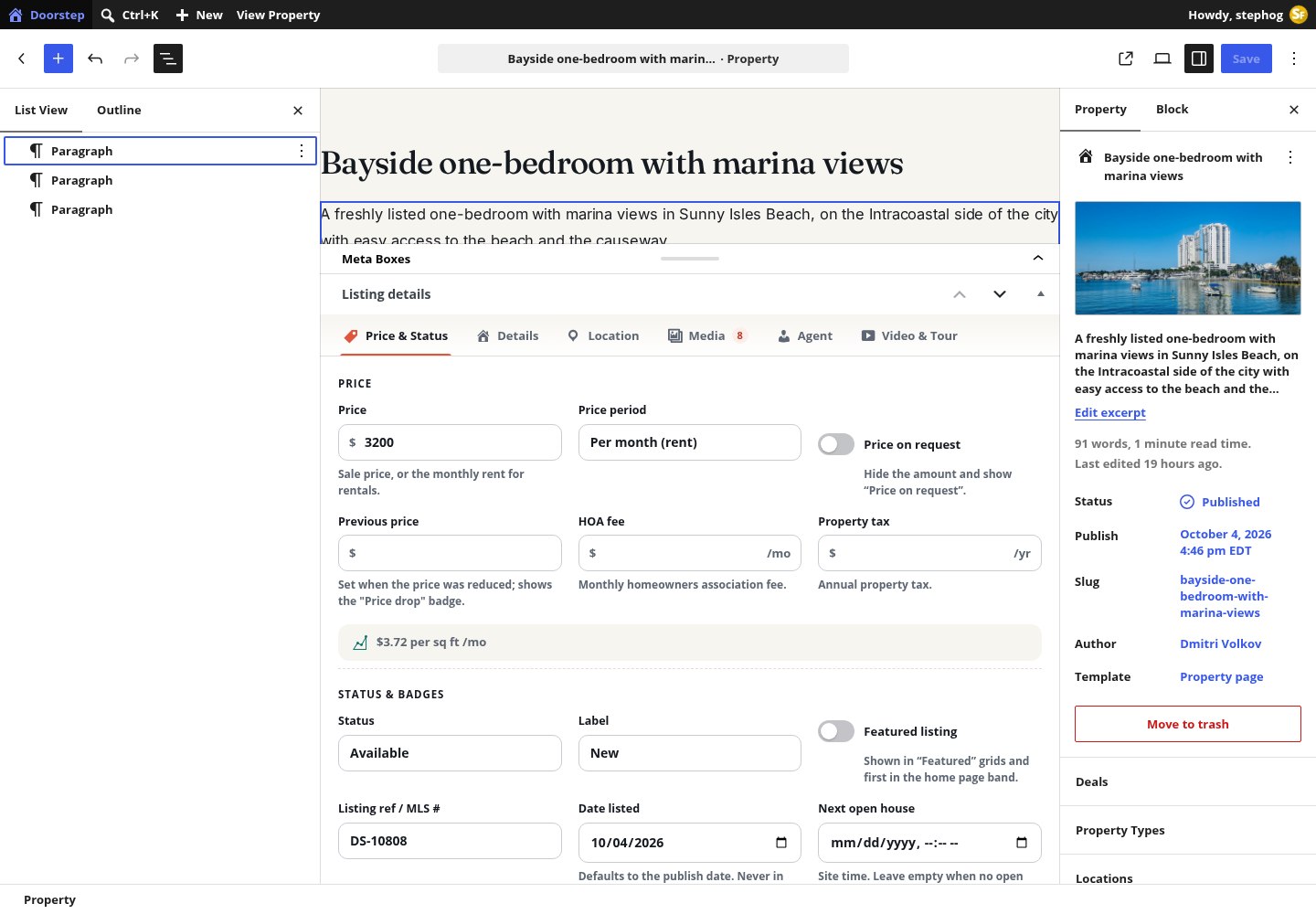
A listing open in the editor. The block editor holds the description; the Listing details box below is tabbed (Price & Status, Details, Location, Media, Agent, Video & Tour). The sidebar carries the Deals, Property Types, Locations and Features panels, plus the Listing summary completeness meter.
Tab: Price & Status
| Field | Meta key | Notes |
|---|---|---|
| Price | re_price | Sale price, or the monthly rent for rentals. A live readout below shows the price per area once a living area is entered. |
| Price period | re_price_period | Total price (sale) or Per month (rent). |
| Price on request | re_price_on_request | Switch. Hides the amount and shows “Price on request”. |
| Previous price | re_price_prev | Set when the price was reduced; shows the “Price drop” badge and the struck-through old price. |
| HOA fee / Property tax | re_hoa, re_tax_year | Monthly association fee and annual tax; both feed the mortgage calculator. |
| Status | re_status | Available (default), Under contract, Sold, Rented. Sold and rented homes leave the default searches but stay reachable. |
| Label | re_label | None, New, Hot, Open house, Exclusive, New construction. Rendered as a chip on cards. |
| Featured listing | re_featured | Shown in “Featured” grids and first in the home-page band. Also toggled from the list column. |
| Listing ref / MLS # | re_mls | Free text, e.g. DS-10234. |
| Date listed | re_listed | Defaults to the publish date; never in the future. Drives “days on site” and the New badge. |
| Next open house | re_open_house | Date and time in site time. Empty = no open house. |
Tab: Details
| Group | Fields | Meta keys |
|---|---|---|
| Size & rooms | Bedrooms (0 = studio), Bathrooms (half steps), Living area, Lot size | re_beds re_baths re_area re_lot_area |
| Building | Year built, Garage / parking spaces, Floor (0 = ground, negative allowed), Stories in building | re_year_built re_garage re_floor re_floors_total |
| Highlights | View (Ocean, Bay, City, Garden, Pool, Skyline), Energy rating (A+ to G, hidden when not rated), Waterfront, Pets allowed, Furnished | re_view re_energy re_waterfront re_pets re_furnished |
Tab: Location
Street address, City, State and ZIP (re_address, re_city, re_state, re_zip) plus a MapLibre pin picker: click the map or drag the pin to the exact building, or press Find address on map to geocode the typed address through OpenStreetMap Nominatim (it only runs when you click). The coordinates are stored in re_lat and re_lng; a listing without them is flagged by the health check and left off every map.
Tab: Media
- Photo gallery (
re_gallery): Add photos opens the Media Library; drag to reorder; the first photo becomes the cover when no featured image is set. Removing a photo here never deletes it from the library. - Floor plans (
re_floor_plans): a repeater with Title, Beds, Baths, Area and a plan image per row, with move up/down and remove.
Tabs: Agent, Video & Tour
- Listing agent (
re_agent_id): a select starting with “No agent (use the site contact)” and a preview card with Edit agent. The agent card, contact form and tour requests on this listing go to that agent. - Video URL (YouTube or Vimeo) and 3D tour URL (Matterport or any embeddable tour). The property video block renders nothing when both are empty.
- Two values are derived on save and not editable:
re_price_sortandre_ppa(price per area).
The Listing summary box in the sidebar shows a price preview and an “N% complete” meter with a checklist: price, 5+ photos, beds/baths/area, address and map pin, deal/type/neighbourhood, agent, and a description of 40+ words. Aim for 100% before publishing; the Overview health rows will then stay clean.
People
Agents and their profiles
An agent is a post of type re_agent: the bio is the content, the short bio is the excerpt, the headshot is the featured image, and the page-attributes order sets the directory order.
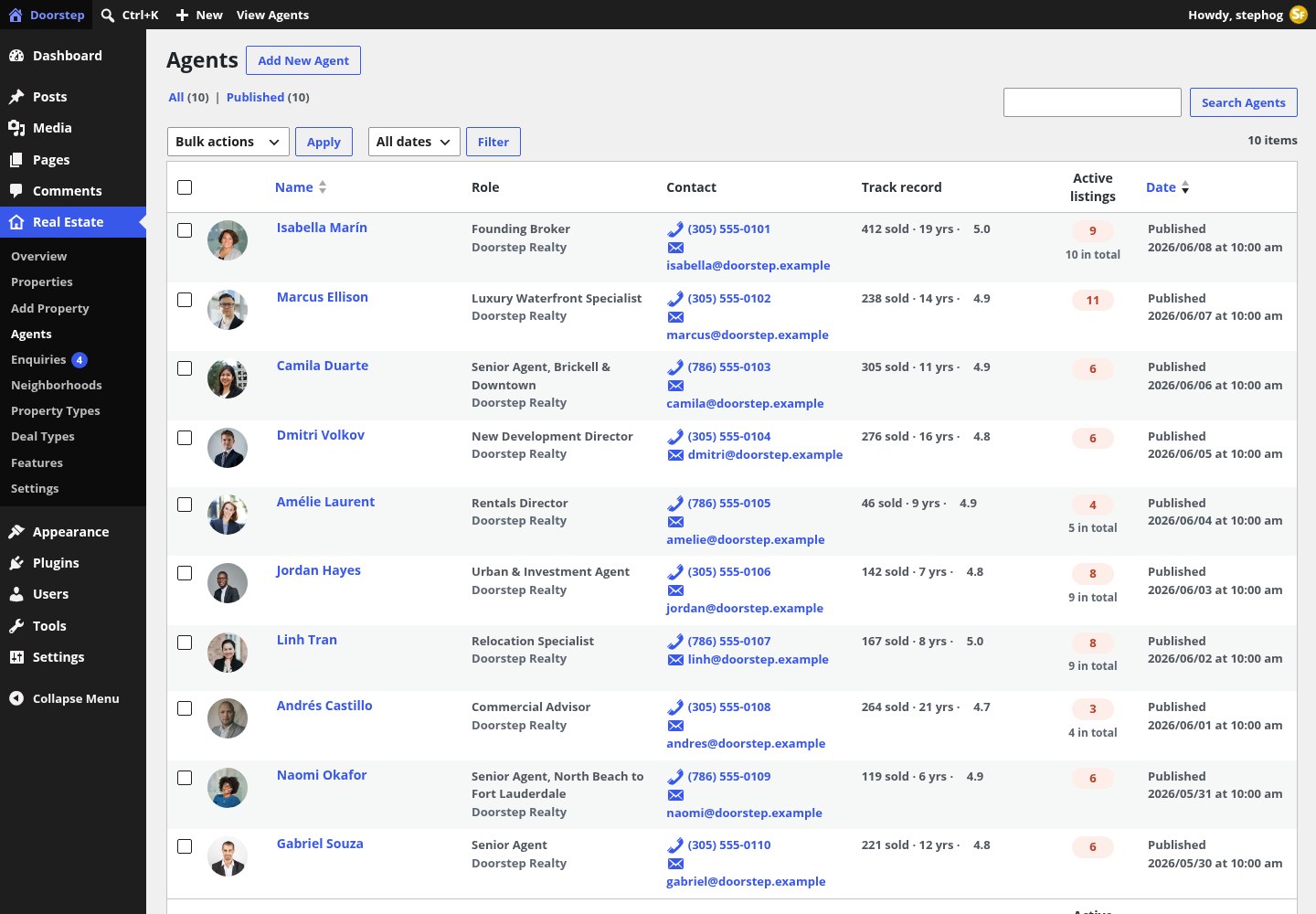
The Agents list: Photo, Name, Role, Contact, Track record (homes sold and rating) and Active listings, which links to that agent’s filtered property list and shows the lifetime total underneath.
| Tab | Fields | Meta keys |
|---|---|---|
| Profile | Role, Agency, License #, Years of experience (0–80), Languages (comma list) | re_role re_agency re_license re_years re_languages |
| Contact | Phone, Email (enquiries about this agent’s listings are emailed here), WhatsApp (international format) | re_phone re_email re_whatsapp |
| Track record | Homes sold, Rating (0–5), Reviews | re_sold re_rating re_reviews |
| Social | Instagram, LinkedIn, X, Facebook | re_social (JSON) |
| Areas served | Checkbox tree of neighbourhoods; shown on the profile and used to suggest agents on neighbourhood pages | re_areas (slugs) |
Agents are what makes enquiries route correctly: a listing with an agent that has an e-mail address sends contact and tour requests to that agent (with a copy to the office address in Settings). A listing with no agent, or an agent without an e-mail, falls back to the site address.
Vocabulary
Neighbourhoods, types, deals and features
Four taxonomies attached to properties. Deals and features are flat checkboxes in the editor; types and locations are hierarchical.
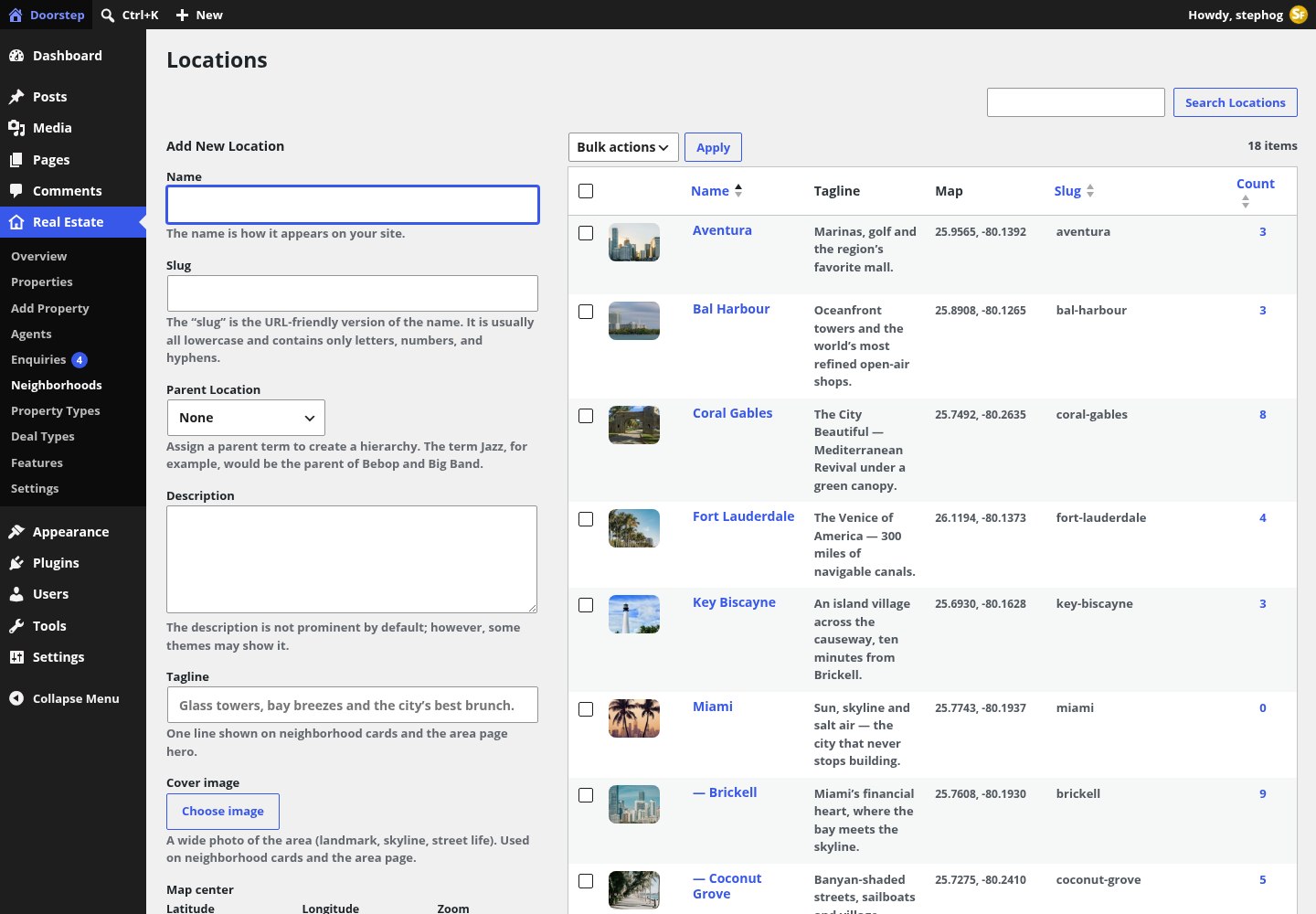
The Neighborhoods screen (taxonomy re_location). Cities are parents, neighbourhoods are children. Each term carries a tagline, a cover image and a map centre; the list shows a “No pin” chip where coordinates are missing.
| Taxonomy | Menu label | Hierarchical | Public URL | Term fields |
|---|---|---|---|---|
re_deal | Deal Types | No | /deal/for-sale/ | None. Seeded with For Sale and For Rent; the Buy/Rent tabs filter on it. |
re_type | Property Types | Yes | /property-type/condo/ | None in the admin. Seeded: Condo, Apartment, House, Townhouse, Villa, Penthouse, Loft, Land, Commercial. |
re_location | Neighborhoods | Yes (city › neighbourhood) | /area/miami/brickell/ | Tagline, Cover image, Map center (lat, lng, zoom) with the pin picker, and a read-only Median asking price computed in the background from active residential sale listings. |
re_feature | Features | No | /feature/pool/ | Icon: a searchable grid of the plugin’s icon set, or Auto. 26 features are seeded on activation (Pool, Ocean view, Waterfront, Boat dock, Garage, Gym, Doorman, Concierge, Balcony, Terrace, Rooftop deck, Smart home, Impact windows, Central A/C, Washer & dryer, Walk-in closet, Pet friendly, Furnished, Elevator, Spa, Wine cellar, Home office, Fireplace, EV charging, Gated community, 24/7 security). |
Locations are not seeded on activation; they come from the demo import or from you. Create the city first, then its neighbourhoods underneath, and give each one a pin and a photo so neighbourhood cards and area pages have something to show.
Leads
The enquiries inbox
Every contact form, tour request and valuation request on the site becomes a private post under Real Estate › Enquiries and an e-mail. Nothing is sent to a third party.
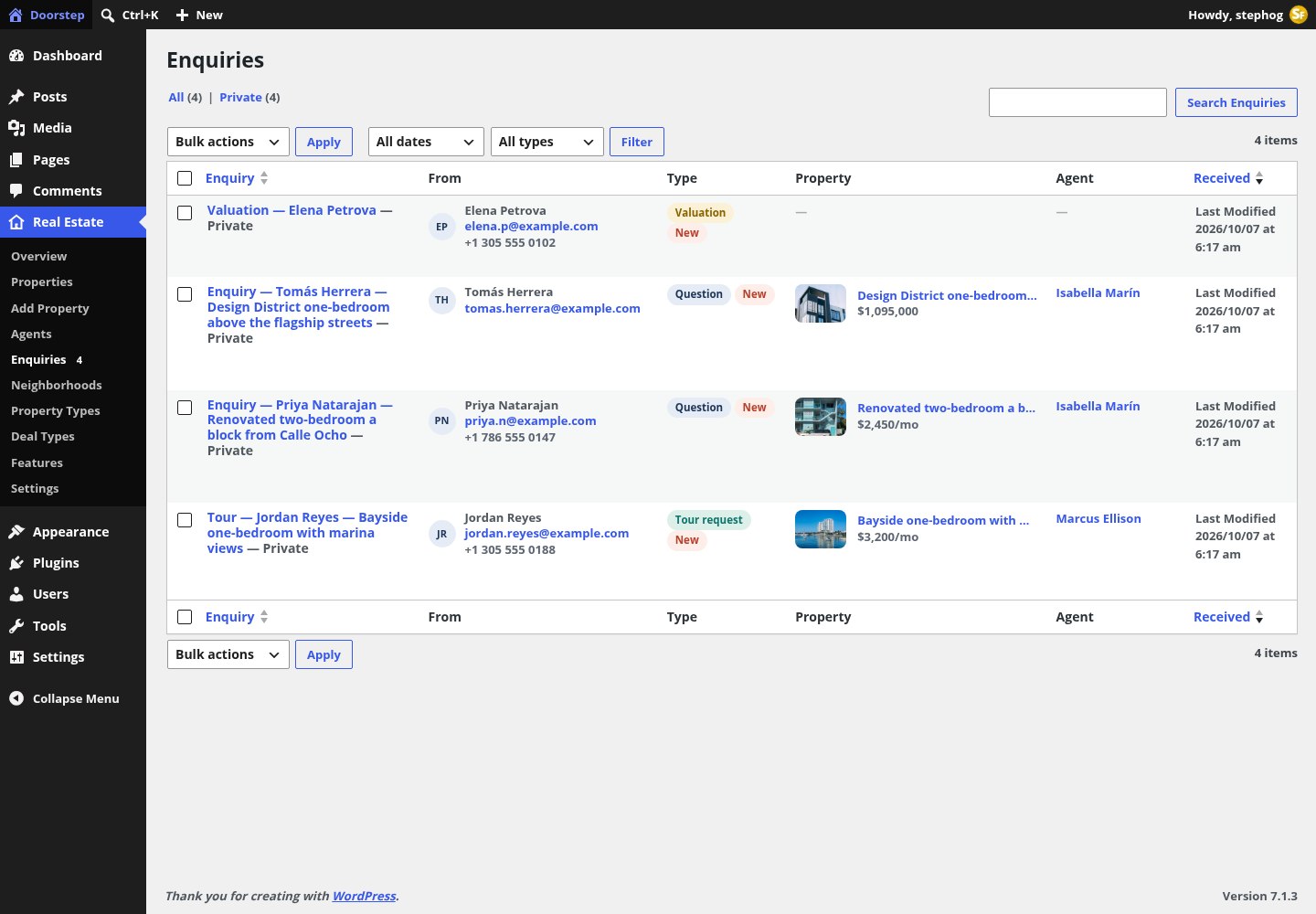
The Enquiries list (administrators only, no “Add New”). A “Filter by type” select switches between questions, tour requests and valuations; the red bubble on the menu counts enquiries received in the last seven days.
| Kind | Comes from | Stored fields | E-mailed to |
|---|---|---|---|
| Question | Contact Agent block / widget, “Ask a question” tab | name, e-mail, phone, message, property, agent | The listing agent, BCC the office address from Settings |
| Tour request | Contact Agent, “Request a tour” tab | plus tour date, time and type (in person or video) | The listing agent, BCC the office address |
| Valuation | Valuation Form block / widget on the Sell page | address, type, area, beds, baths, condition, timeline | The office address from Settings, or the site admin e-mail |
| Market updates / Listing alerts | The Contact page with ?topic=updates or ?topic=alerts | name, e-mail, topic | The office address. There is no mailing-list backend; export from the inbox. |
- Protection: a nonce for logged-in users, a honeypot field, a signed minimum-time token and a rate limit of five submissions per ten minutes per IP. Addresses on
.exampleor.testdomains are never mailed. - The e-mail is HTML, has the subject “[Site] Tour request — Property title”, sets Reply-To to the visitor and links back to the enquiry in the dashboard.
- Demo mode (Settings › Enquiries) makes forms show their success message while storing and sending nothing; use it on public staging sites.
- Privacy: enquiries are included in the WordPress personal-data exporter and eraser (matched by e-mail), the plugin adds suggested privacy-policy text, and a daily job deletes enquiries older than the retention period you set.
In version 1.0.0 the enquiry edit screen shows the same data twice: an “Enquiry” box with Reply by email / Call buttons and an “Enquiry details” box that adds “Sent from” and whether the e-mail was sent. The list also repeats the Type, Property and Agent columns. Harmless, and scheduled for a tidy-up.
Configuration
Real Estate › Settings
One screen, six sections, one option (stepfox_re_settings). These are the values that change how prices, areas, maps and forms behave everywhere on the site.

The Real Estate Settings screen. Everything here is also reachable from the Overview’s “Review currency, units & map settings” checklist item and from the Settings link on the Plugins screen.
General
| Setting | Default | What it does |
|---|---|---|
| Currency | USD | ISO code used in structured data (schema.org priceCurrency). Twelve currencies are listed. |
| Currency symbol / Symbol position | $ / before | How prices are written: $1,250,000, $ 1,250,000, 1,250,000$ or 1,250,000 $. |
| Area unit | Square feet | Square feet or square metres. Areas are stored as entered; changing the unit does not convert existing listings. |
| Country code | US | Two-letter ISO code for listing addresses in structured data. |
| Market name | (empty) | The city or region you cover, used in headings and titles such as “Condos for sale in Miami”. Empty = the city most listings are in. |
| Default search | All listings | Whether searches start on all listings, For Sale or For Rent. |
| “New” badge for | 14 days | How long a listing shows the New badge after its listed date. |
Appearance and Map
| Setting | Default | What it does |
|---|---|---|
| Default color scheme | Light | The scheme visitors see before they use the header toggle. |
| Follow device setting | On | Visitors who have not used the toggle get the scheme their device prefers. |
| Map style (light) / (dark) | bundled | Any MapLibre style URL (MapTiler, Stadia…). Empty uses the bundled styles on OpenFreeMap tiles, which need no key. |
| Default center / Default zoom | 25.7617, -80.1918 / 11 | Used when a map has no listings to frame. |
| Cluster radius | 50 px | How close price pins must be before they merge into a cluster. |
| Search as the map moves | On | Map search refreshes results when the map is panned; visitors can switch it off. |
Mortgage calculator, Enquiries and Data
| Setting | Default | What it does |
|---|---|---|
| Interest rate / Loan term / Down payment | 6.5% / 30 years / 20% | Starting values of the calculator on listing pages. Visitors can change them; each calculator block can override them. |
| Property tax rate / Home insurance | 1.9% / 0.35% per year | Added to the monthly estimate alongside the listing’s HOA fee. |
| Send enquiries to | (site admin e-mail) | Receives valuation requests and anything a listing agent cannot receive; is also copied on agent e-mails. |
| Demo mode | Off | Forms succeed visibly but store and send nothing. |
| Keep enquiries for | 365 days | Older enquiries are deleted automatically once a day; 0 keeps them forever. |
| On uninstall | Off | Also delete every listing, agent and their terms when the plugin is deleted. Settings, caches and enquiries are always removed; photos always stay. |
Under the hood
What the front end computes for you
Most of what visitors see is derived from the listings. Nothing on this list needs an API key, an external account or a cron job you have to set up.
Map search
MapLibre GL with the bundled light and dark styles on OpenFreeMap vector tiles. Price pins, clustering, draw-to-search and search-as-you-move, with the result list, chips and heading refreshed over REST. One Map Search block per page; the library loads only when a map nears the viewport.
Search URLs
Every filter is a plain query parameter, so a search is a shareable link and the same URL drives the hero form, the filter bar and every archive. Pages with map bounds, drawn shapes, keywords or page numbers are marked noindex.
Market statistics
Median price, price per area, active listings, days on market and price cuts are computed from the listings, per neighbourhood and for the whole market. Location medians refresh two minutes after listing data changes.
Saved homes & compare
Favourites, the compare list (up to four homes) and saved searches live in the visitor’s browser storage. Nothing is stored on the server until a form is sent. The Saved and Compare pages are found by slug.
Mortgage calculator
Principal and interest, taxes, HOA and insurance from the Settings defaults, shown as a donut. The button opens the contact form with a pre-approval message unless you point it elsewhere.
SEO & schema
RealEstateListing + Offer + Place JSON-LD on listings, Person on agents, ItemList on archives and BreadcrumbList everywhere. Meta description, Open Graph and Twitter tags are printed only when no SEO plugin (Yoast, Rank Math, SEOPress, AIOSEO, TSF) is active.
Search parameters
| Parameter | Values | Meaning |
|---|---|---|
deal | for-sale, for-rent | Buy or rent |
ptype / area / feat | term slugs | Property types, neighbourhoods, features (features are ANDed) |
min_price, max_price | numbers | Price range |
beds, baths | numbers | Minimum rooms |
min_sqft, max_sqft | numbers | Living-area range (in the configured unit) |
status | available, under-contract, sold, rented, any | Default is available + under contract |
sort | newest, price-asc, price-desc, sqft-desc, ppa-asc | Newest, price low›high, price high›low, size, price per area |
kw, bounds, shape, pg, view | text, bbox, polygon, number, split/map/list | Keyword, map viewport, drawn area, page, layout |
/properties/?deal=for-rent&beds=2REST API
| Route (namespace real-estate/v1) | Access | Purpose |
|---|---|---|
GET /search | public | Filtered results: card HTML, pager, chips, markers, bounds and heading |
GET /markers | public | Map markers, capped at 2,000 |
GET /cards?ids=, GET /property/{id}/card | public | Card HTML for compare and map popups |
GET /locations?q= | public | Neighbourhood type-ahead |
POST /render-batch, /contexts | edit_posts | Editor previews |
/wp/v2/re_property, /wp/v2/re_agent | standard | Every re_* field is registered post meta, so WP All Import, a CSV importer or a short script can map an IDX or MLS feed onto listings. |
Image sizes the plugin registers
Listing card (4:3) 800×600Listing hero (3:2) 1600×1067Listing thumbnail (4:3) 480×360Square (1:1) 600×600Wide (16:9) 1200×675Face (1:1) 300×300
Dark mode is a runtime toggle, not a theme switch: the server writes the scheme on the <html> element, a pre-paint script reads the visitor’s stored choice, then the device preference, then the site default, and the map style follows. The block theme’s “Night” style variation is different: it permanently swaps the palette in the Site Editor.
Block editor
The 73 blocks
All blocks sit in the “Real Estate” inserter category and are prefixed “Real Estate —”. They are small and single-purpose: a price, a photo, a badge, a loop. Cards are built by nesting them, so anything on the demo can be opened and changed.
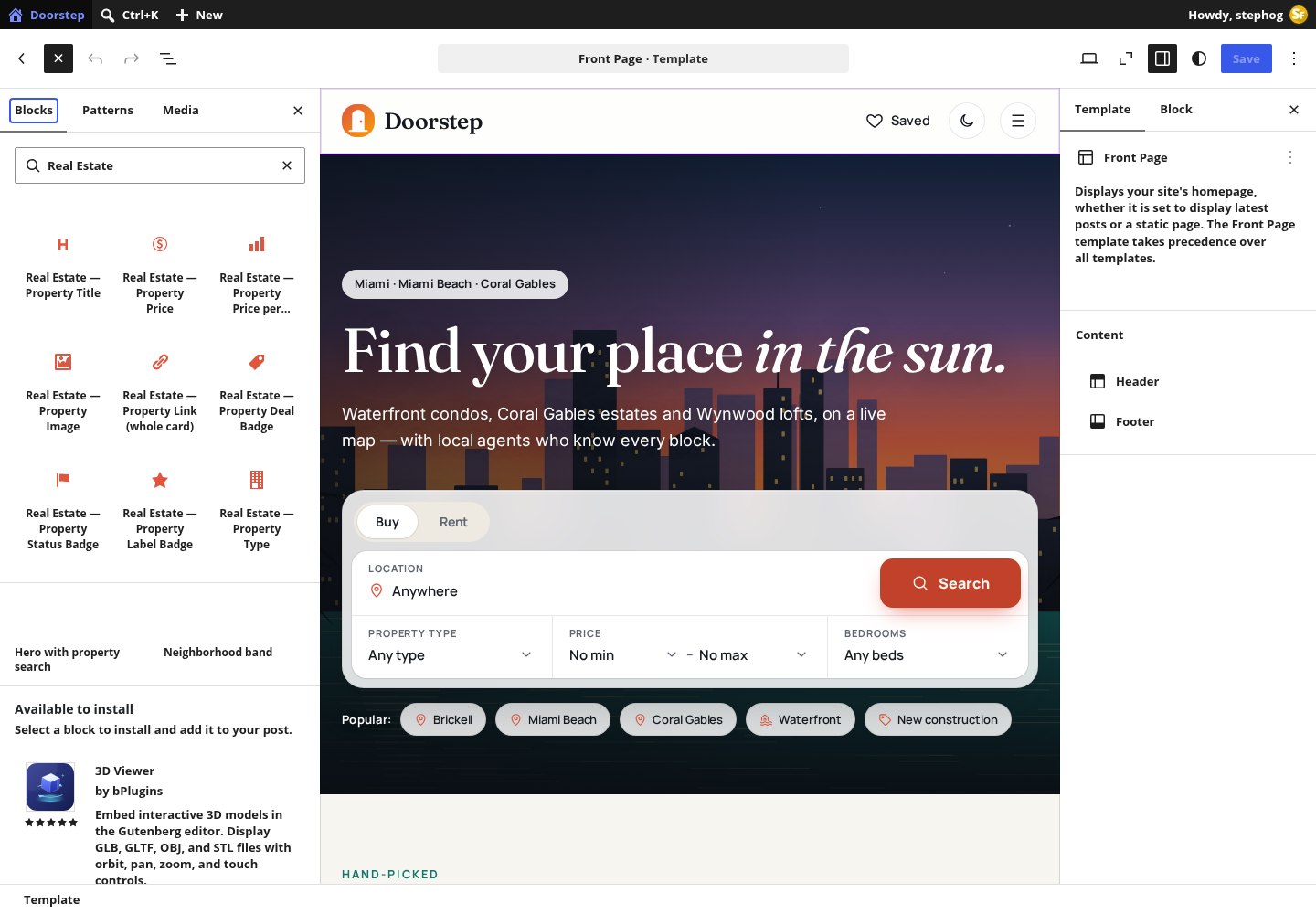
The block inserter filtered to the Real Estate category inside the Site Editor. Every block also gets an Additional CSS class(es) field and a Style ID in its Advanced panel; the Style ID is what Stepfox Looks uses to attach per-device styles.
How a block knows which listing to show
- Property fields resolve, in order: the Property ID set in the block’s Advanced panel › the enclosing Property Loop or Property Context › the core post ID (for example inside a Query Loop over properties) › the listing being viewed.
- Agent fields: Agent ID › Agent Loop or Agent Context › the agent of the property in context › the agent being viewed.
- Location fields: Location ID › Location Loop › the neighbourhood archive being viewed › the deepest neighbourhood of the property in context.
- In the editor every field previews with a sample entity. An empty value renders as hidden, so a card never shows a blank line.
- Loops repeat whatever you place inside them. A fresh Property Loop comes with a default card (image, price, title, location, facts and a whole-card link) that you can take apart. Loop Pagination goes below a loop with Paginate on.
Property field blocks (23)
| Block | Renders | Inspector controls |
|---|---|---|
| Property Title | The listing title | HTML tag (H1–H6, paragraph, div, span; default H3); Link to listing |
| Property Price | Price with rent period, struck-through previous price | Format: Full ($1,250,000) or Short ($1.25M); Show rent period; Show previous price |
| Property Price per Area | Price per sq ft or m² | — |
| Property Image | Cover photo with chips, save heart and photo count | Image size; Aspect ratio (4:3, 3:2, 16:9, 1:1, 3:4, 4:5, original); Link; Show photo count / chips / save heart; Loading priority |
| Property Link (whole card) | An invisible link stretched over the card | — |
| Property Deal / Status / Label Badge | For Sale · For Rent; Under contract · Sold · Rented; New · Hot · Open house · Exclusive · New construction | Status badge hides while available |
| Property Type | Condo, House… | — |
| Property Location | Neighbourhood, city or full address with a pin | Format (Neighborhood, City / City, State / Full address); Pin icon |
| Property Address | Street line | Pin icon |
| Property Beds / Baths / Area / Lot Size / Year Built / Garage | One fact each | Show icon; Show label; Label style (short bd/ba or long) |
| Property Facts Row | Beds · baths · area in one row (studio and land aware) | Facts list (beds, baths, area, lot, year, garage, floor, type, ppa); Separator (dot/hairline); icons; label style |
| Property Excerpt | A teaser from the description | Words (22) |
| Property Listing ID | MLS / reference | — |
| Property Listed Date | “3 days on Doorstep” or the date | Days on site / Date listed |
| Property Agent | The listing agent | Avatar + name / Name / Photo |
| Property Open House | “Open house Sat 1–3pm”, hidden when none | — |
Agent (9) and location (6) field blocks
| Block | Inspector controls |
|---|---|
| Agent Name | HTML tag (default H3); Link to agent profile |
| Agent Photo | Image size (Square, Face, Card, Large); Shape (Circle, Rounded); Link; Loading priority |
| Agent Role / Phone / Email / Bio | Append agency; Tap to call + icon; Mailto + icon; Words (0 = full bio) |
| Agent Stats | Which stats (active listings, homes sold, years, rating); Label style |
| Agent Socials, Agent Contact Buttons | Social links; call, e-mail and WhatsApp buttons |
| Location Name / Tagline / Link | HTML tag and link; the tagline; a whole-tile link |
| Location Image | Aspect ratio (4:5 default … fill parent); Loading priority |
| Location Listings Count, Location Median Price | Suffix (“homes”); Show “Median” label |
Loops, context and save/compare (9)
| Block | What it does | Inspector controls |
|---|---|---|
| Property Loop | Repeats your card for every listing; style the grid on this block | Source (Latest, Featured, Current archive, Similar to this listing, This agent’s listings, In a neighborhood, Hand-picked IDs, Price reduced, Upcoming open houses); Deal; type and neighbourhood slugs; IDs; Number; Order (newest, price, largest, price per area, random); Paginate; Listing status; Phone layout (stacked or swipe rail); Empty text |
| Agent Loop | Repeats your card for agents | Number; Order (homes sold, active listings, rating, experience, name, random); Only agents serving a neighbourhood; Phone layout |
| Location Loop | Repeats your tile for neighbourhoods | Parent slug (“top” = top level); Hand-picked slugs; Number; Hide empty; Phone layout |
| Loop Pagination | Numbered pages for a paged Property Loop, keeping the active filters | Loop block ID (empty = the last paged loop) |
| Property Context / Agent Context | Pins one listing or agent for the blocks inside (a hero featuring a hand-picked home) | Listing ID / Agent ID (0 = current) |
| Property Save (Heart) / Property Compare Toggle | Favourite and compare buttons | Style (round icon or button with label) |
| Saved Homes Link | The header heart with a live count | Saved page URL; Show “Saved” label |
Property page components (10)
Each takes a Property source (empty = the property of the current page) and most have an optional section heading that disappears together with the block when the property has nothing to show.
| Block | Renders | Inspector controls |
|---|---|---|
| Property Gallery | Mosaic, slider or grid with a full-screen lightbox | Layout (Mosaic 1 + 4 / Slider / Grid); Photos in the layout |
| Property Header | Breadcrumb, badges, title, address, price, payment estimate, save/share/compare/print, sticky price bar | Show each button; Show breadcrumb; Sticky price bar; Title tag |
| Property Key Facts | Icon strip | Facts list (beds, baths, area, lot, year, garage, type, ppa, floor, stories, hoa, days, status, view, energy, mls) |
| Property Details | Overview, Interior, Building & lot and Financial tables | Groups; Section heading |
| Property Features | Amenities grid plus view, waterfront, pets, furnished | Columns; Section heading |
| Property Description | The content with a “Read more” clamp | Collapse long descriptions; Section heading |
| Property Floor Plans | One tab per plan, opens full screen | Section heading |
| Property Video & 3D Tour | Loads on click; renders nothing without a URL | Section heading (auto) |
| Mortgage Calculator | Monthly estimate with donut | Home price (0 = listing price); Interest rate; Loan term; Down payment; Show donut; Button text and link; Section heading |
| Contact Agent | Agent card, call / WhatsApp / e-mail, and the Request a tour / Ask a question form | Property; Agent (empty = listing agent); Offer “Request a tour”; Sticky on desktop; Title |
Listing, site and map components (16)
| Block | Renders | Inspector controls |
|---|---|---|
| Search Form | Hero, bar or stacked search with Buy/Rent tabs, location type-ahead, type, price and beds | Layout (Hero glass panel / Bar / Stacked); Show tabs; Default deal; which fields; Results page URL; Button text; Quick chips and label |
| Search Filters | Filter bar or sidebar; a sheet on phones | Layout; Fields (deal, type, location, price, beds, baths, area, features, keyword, sort); Results URL; Show result count; Show active chips |
| Property Grid | A grid of cards without building the card yourself | Same sources as the loop; Number; Order; Status; Columns; Card style (Card / Row / Overlay); Pagination; Empty text; Phone layout |
| Property Carousel | A swipeable rail | Sources; Cards per view; Autoplay and interval; Arrows; Dots; Card style |
| Agent Card, Agents Grid | One agent, or a grid | Style (Full / Compact / Horizontal); Show stats and buttons; Number; Columns; Order; Serves location |
| Location Grid | Neighbourhood tiles with photo, count and median | Parent; slugs; Number; Layout (Editorial mosaic / Grid / Chips); Columns; Order; Show count and median; Hide empty |
| Market Stats | Median price, price per area, active listings, days on market, price cuts, per-neighbourhood chart | Location; Deal; Style (Band / Cards / Chart); Title; Chart metric; Chart bars |
| Stats Counter | Big numbers that count up | Items (value|label|prefix|suffix per line, or empty for live numbers); Count up; Style |
| Favorites List, Compare Table | The visitor’s saved homes; the side-by-side table | Empty text; Columns; Toolbar; “Only differences” toggle |
| Valuation Form | “What’s my home worth?” | Title; Intro; Button text; Benefits panel; Instant ballpark; Two-step form |
| Map Search | Split view: filters, result cards and the clustered price-pin map with draw-to-search (one per page) | Deal; Type; Location; Per page; List width; Map style; Show draw; Show filters; Height; View |
| Area Map | A teaser map linking to map search | Location; Deal; Height; Zoom; Limit; Link text; Map style |
| Property Map | One listing, optional nearby comparables, directions link | Property; Height; Zoom; Show nearby; Show area |
| Theme toggle | The light/dark switch that remembers the visitor’s choice | Variant (icon / switch) |
The three map blocks and the theme toggle show auto-generated inspector labels in the block editor (their Elementor widgets have proper ones). The controls work as described above.
Block theme
Templates, parts and patterns
Doorstep is a full-site-editing theme. Every page type is a template of ordinary blocks that opens in the Site Editor; there is no theme options screen and no Customizer section.
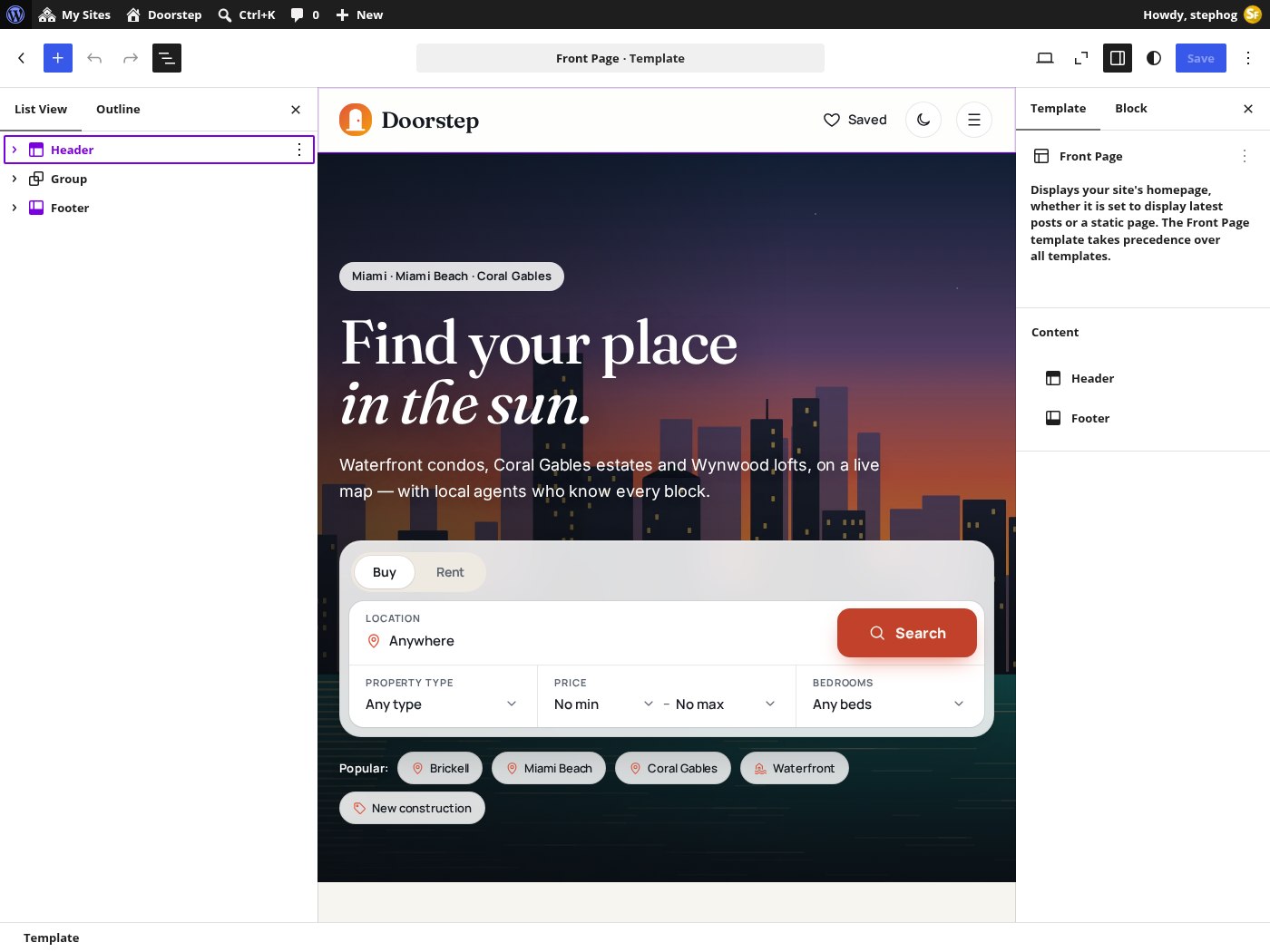
The demo front page open in the Site Editor: List View on the left reaches every block inside every card, and the Stepfox Looks sidebar on the right holds desktop, tablet and mobile values for spacing, colours and typography.

The Templates list. Page templates such as Saved homes or Market report are matched by page slug, and are also offered in the page editor’s Template picker.
| Template | Serves | Built from |
|---|---|---|
| Front Page | The static home page | Cover hero with Search Form, featured Property Loop, Area Map, two Location Grids, two Property Carousels, Market Stats, Agents Grid, journal Query Loop |
| Properties archive | /properties/ and every /feature/…/ archive | Header part and a full-height Map Search; no footer |
| Single Property | /property/…/ | Property Context › Header, Gallery, Key Facts, Description, Features, Details, Floor Plans, Video, Property Map, Mortgage Calculator, Contact Agent, two “similar” loops |
| Agents archive, Single Agent | /agents/, /agent/…/ | Stats Counter + Agents Grid; Agent Context with photo, name, role, stats, socials, buttons, bio, Contact Agent, the agent’s listings |
| Location, Type and Deal archives | /area/…/, /property-type/…/, /deal/…/ | Hero with image, count and median + Market Stats + preset Map Search + sub-areas; Search Filters + paged loop + Loop Pagination + Location Grid |
| Saved homes, Compare homes | Pages with slug saved, compare | Favorites List; Compare Table |
| Neighborhoods, Market report, Sell, Contact, About | Pages with slug neighborhoods, market, sell, contact, about | Location Grid + Market Stats + Area Map; Market Stats ×3 + report posts; Valuation Form + Stats + Agents + FAQ; office Contact Agent + Agents Grid (with ?topic= modes); Cover + Stats + Agents |
| Journal, Single Post, Archive, Category, Search, 404, Page, Index | The editorial layer and fallbacks | Query Loops of posts with a Property Loop rail |
Template parts and navigation
- Header: site logo, a core Navigation block with Buy, Rent, Map search, Neighborhoods, Agents, Market, Journal and List your home, the Saved Homes Link and the Theme toggle. The theme registers no classic menu locations; edit links in the Site Editor.
- Footer: a “Get market updates” band (it files into Enquiries), link columns, ten neighbourhood chips, credits and social links.
- Links inside the templates are written for the demo and rewritten to your own site address at render time and in the editor, so nothing points back at the demo after install.
Patterns (category “Doorstep”)
Hero with property searchNeighborhood bandSell with DoorstepAgent spotlightNeighborhood chipsBuyer FAQFeatured listingsJust listed carouselMap search teaserMortgage calculator CTAListing alerts sign-upOpen house bannerMarket stats bandClient testimonialsWhy Doorstep
theme.json: palette, type and spacing
| Setting | Values |
|---|---|
| Layout | Content 1240 px, wide 1440 px |
| Palette | Paper #f7f5f0, Card, Sand #efeae1, Hairline, Ink #14181f, Slate #5d6672, Sunset coral #e0553d, Ocean teal #0f766e, Lagoon #14b8a6, Harbor navy #1d3557, Mint wash #dcefe9, Brass #8a6400, Glass bar, Glass panel, Lit edge, Transparent |
| Gradients | Sunset, Ocean, Dusk, Photo scrim |
| Fonts (self-hosted) | Display — Fraunces, Interface — Manrope, Body — Inter, Numbers — Manrope |
| Font sizes | Tiny 12 · Small 14 · Medium 16 · Large 20 · Extra large 28 · Headline 42 · Display 72 |
| Spacing scale | Hair 4 · Tight 8 · Snug 12 · Base 16 · Roomy 24 · Block 32 · Section 48 · Band 64 · Stage 96 |
| Shadows | Flat, Rest, Card, Lifted card, Floating panel, Hairline ring, Coral focus ring |
| Style variation | “Night” (styles/dark.json) swaps the palette permanently; the header toggle is the runtime alternative |
Because the theme has no stylesheet, restyling is done per block: select a card in List View, open the Stepfox Looks panel and change the value for desktop, tablet or mobile. The change becomes a block attribute, so there is no child theme to maintain and nothing to override.
Elementor edition
Doorstep for Elementor
The Elementor theme renders the same records through 28 native widgets and 4 dynamic tags. With Elementor Pro the layouts are editable Theme Builder templates; without it, every route has a complete PHP fallback built from the same components.

The demo front page open in the Elementor editor. Widgets live in a “Real Estate” panel category; each one has Content controls plus a Style tab with colours, card corner radius, gap and typography.
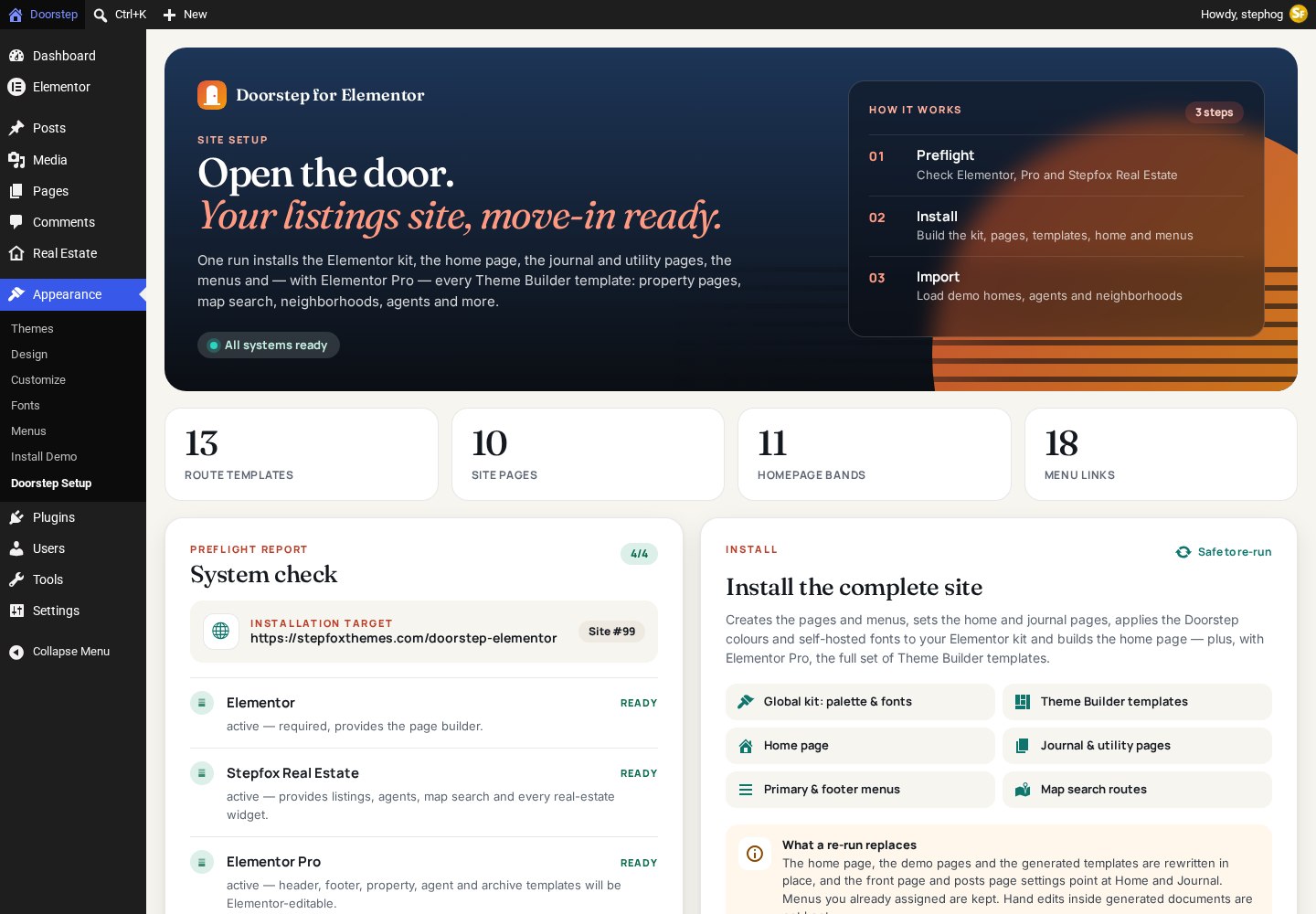
The Appearance › Doorstep Setup wizard checks Elementor, the plugin, Elementor Pro (optional) and permalinks, then installs the demo layout: the kit, the pages, the menus and (with Pro) the Theme Builder templates. It is safe to re-run.
Widgets (category “Real Estate”)
| Widget | Content controls |
|---|---|
| Map Search | Deal; Property type; Neighborhood; Results per page; Follow the archive; Results panel width; Map style (follow scheme / always light / always dark); Draw-to-search; Filter bar; Height; Initial view (map + list, map only, list only) |
| Area Map, Property Map | Neighborhood or Source; Deal; Maximum pins; Link text; Height; Zoom; Map style; Show nearby listings; Show area |
| Search Form, Search Filters | Default deal; Results page URL; Button text; Quick chips; Layout; which fields / filters; Show result count; Show active chips |
| Property Grid, Property Carousel | Listings (nine sources); Deal; Type; Neighborhood; Hand-picked; Number; Order; Listing status; Empty-state text; Follow the archive; Columns; Card style; Pagination or Cards per view, Autoplay, Arrows, Dots |
| Property Card | The one canonical card, for Loop Grid items or featured spots (no block equivalent): Card style (Card, Row, Photo overlay, Mini); Image size; Title tag; Summary and features; Badges; Save and Compare buttons; Photo count; Agent footer |
| Property Gallery, Header, Key Facts, Details, Features, Description, Floor Plans, Video & 3D Tour | Source (current property or a picked one) plus the same options as the matching blocks |
| Mortgage Calculator, Contact Agent | Home price; rate; term; down payment; button; donut — Agent (listing agent or named); Title; Schedule-a-tour tab; Sticky on desktop |
| Agent Card, Agents Grid, Neighborhoods, Market Stats, Stats Counter | Style; stats and buttons; Number; Order; Serving area; Columns; Layout; Chart metric and bars; Figures repeater; Count up |
| Saved Homes, Compare Homes, Home Valuation, Light / Dark Toggle, Saved Homes Link | Empty-state text; Columns; Toolbar; “Only differences”; Title, intro, button, two-step form, benefits panel, instant ballpark; Style; Saved page URL |
| Doorstep — Search hero, Doorstep — Journal (theme widgets) | Background photo, kicker, headline and tag, lede, search form, quick chips, live counts; Layout (feature + grid, lead story, card grid, compact list), columns, posts, category, empty message |
Dynamic tags (group “Real Estate”)
- Real Estate Field: any property fact (title, prices, price drop, rooms, areas, year, address parts, neighbourhood, deal, type, status, label, MLS, open house, days on market, photo count, features, view, energy rating, summary, coordinates), any agent fact (name, role, agency, phone, e-mail, WhatsApp, licence, languages, years, homes sold, rating, reviews, listing counts, short bio) or any neighbourhood fact (name, parent, tagline, listing counts, median), plus raw meta keys. Option: plain text.
- Real Estate Image: cover photo, gallery photo N, floor plan N, agent photo or neighbourhood image, with resolution and fallback.
- Real Estate Link: property page, map directions, video, 3D tour, neighbourhood, type or deal archive; agent page, call, e-mail, WhatsApp; all properties, all agents.
- Real Estate Gallery: the photo set for Elementor gallery widgets, optionally including the cover and floor plans, with a maximum.
Theme Builder templates (Elementor Pro)
HeaderFooterFooter (Map search: none)Single PropertySingle AgentSingle PostSingle PageProperties (Map Search)Agents ArchiveNeighborhood ArchiveProperty Type ArchiveBuy / Rent ArchiveHome Feature ArchiveJournal (Posts Page)Blog ArchiveSearch Results404Search Result Card (Loop Item)
Each template carries its display condition (entire site, the properties archive, single property, and so on). Without Pro, the theme’s PHP files (header.php, single-re_property.php, archive-re_property.php, the taxonomy templates, single.php, search.php, 404.php…) render the same components, so nothing is missing.
Theme options
| Where | What you can set |
|---|---|
| Customize › Doorstep header & footer | Header button label (“List your home”) and link, office address, phone, e-mail and opening hours, Instagram / Facebook / LinkedIn / X / YouTube URLs, footer legal note. Used by the PHP header and footer. |
| Appearance › Menus | Three locations: Primary, Footer — Explore, Footer — Company. The wizard creates and assigns Doorstep Primary, Footer — Explore and Footer — Company. |
| Elementor › Site Settings (kit) | Written by the wizard: coral / teal / ink system colours, the 16 palette colours, Fraunces / Manrope / Inter global fonts, 1240 px container, lightbox off, Google Fonts off with a self-hosted “Doorstep” font group. |
| Appearance › Doorstep Setup | Creates the pages (Home, Journal, Neighborhoods, Market, Saved Homes, Compare, Sell, Contact, About, Privacy Policy), sets permalinks, front and posts page, menus, kit and templates. Shows a notice until it has run once. |
Go live
From zero to open house
The order that avoids rework: people and places first, then listings, then polish.
Install and activate
Plugin (plus Stepfox Looks or Elementor), then the theme. Let Install Demo run if you want the Miami dataset to learn from; it removes cleanly later.
Settings
Permalinks on post name, timezone, then Real Estate › Settings: currency, area unit, country, market name, map centre and zoom, mortgage defaults, the enquiries address. Leave Demo mode off on a real site.
Add your agents
Headshot, bio, role, agency, licence, languages, e-mail (this is where their enquiries go), phone, WhatsApp, track record, social links and the areas they serve.
Create neighbourhoods
City as parent, neighbourhoods as children, each with a tagline, a cover image and a map centre. Medians fill in by themselves once listings exist.
Add properties
Title, a 40+ word description, cover photo and excerpt; tick deal, type, neighbourhood and features in the sidebar; work through the six Listing-details tabs and drop the map pin. Watch the Listing summary meter reach 100%.
Check the Overview
Clear every Listing-health row and finish the Getting-started list. Remove the demo content if you imported it.
Make it yours
Block edition: Site Editor › header links, Styles, patterns, optionally the Night variation. Elementor edition: Customize › Doorstep header & footer, Menus, the kit, and the templates.
Test the forms
Send a question, a tour request and a valuation. Each should appear under Enquiries and arrive by e-mail at the right address. Updates arrive later under Dashboard › Updates.
Good to know
Questions, answered
Is there a licence key?
No. All three packages contact stepfoxthemes.com twice a day for updates (results cached for twelve hours) and show the normal “Update available” rows. Dashboard › Updates › Check Again bypasses the cache.
What happens when I delete the plugin?
Settings, caches and all enquiries (personal data) are always removed. Listings, agents and their terms are removed only if you ticked On uninstall in Settings › Data. Media files are never deleted.
Can I import an IDX or MLS feed?
Not with a built-in connector, but every listing field is registered post meta exposed in the REST API, so WP All Import, a CSV importer or a short script can map a feed to properties. The field names are listed in the Properties section above.
Do I need a Google Maps key?
No. Maps use MapLibre GL and OpenFreeMap tiles, which allow commercial use without an account. If you prefer MapTiler or Stadia, paste the style URL into Settings › Map.
Where do favourites and compare lists live?
In the visitor’s browser. Nothing is written to your database until a form is submitted, which keeps the privacy policy simple.
Does Elementor need Pro?
No. Pro makes the Theme Builder templates editable; without it the same pages come from the theme’s PHP templates and the widgets still work on any Elementor page.
Which pages must exist?
Block edition: pages with the slugs saved, compare, neighborhoods, market, sell, contact and about, plus a posts page. The installer creates them; the templates match by slug and are also selectable in the page editor.
How is dark mode handled?
A header toggle flips the whole site, maps included, and remembers the choice per visitor. Settings › Appearance picks the default and whether to follow the device. The block theme additionally has a permanent “Night” style variation.
Ready for open house?
Two themes, one listings engine, a Miami demo with 72 homes and a map that searches. Get the Doorstep bundle for a one-time $99.
