

WordPress theme development has changed more in the last four years than in the ten before it. A theme used to be a stack of PHP templates and a large stylesheet; today it can be a folder of HTML templates, a theme.json file and almost no CSS. This guide walks through the modern process end to end: choosing between classic and block architecture, the minimum files a theme needs, theme.json, templates and parts, the small amount of PHP that still matters, and how to test and ship.
Classic or block: choosing your WordPress theme development path
A classic theme renders pages through PHP templates such as index.php and single.php, styles them with CSS, and exposes options through the Customizer. A block theme renders pages through HTML templates made of blocks, defines its design system in theme.json, and lets the site owner edit every template visually in the Site Editor. Block themes have been the default architecture since WordPress 5.9 and every bundled theme from Twenty Twenty-Two onwards uses it.
For new work, build a block theme. The learning curve is real, but the payoff is that clients can change layouts without a developer, styling lives in one structured file, and your templates are reusable data rather than code. If you are maintaining an older product, our guide to converting a classic theme to a block theme shows how to migrate incrementally. Hybrid themes, which are classic themes that opt into some block features with add_theme_support(), are a reasonable middle step.
The minimum viable theme
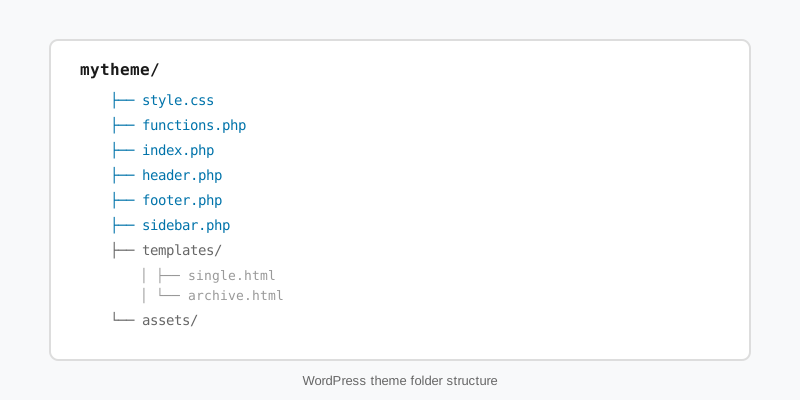
WordPress theme development starts from two files. WordPress recognises a block theme when it finds style.css with a valid header comment, and templates/index.html. A classic theme needs style.css and index.php. Everything else is optional, although in practice a block theme without theme.json is not worth shipping. The typical folder layout looks like this.
- style.css contains the header. In a block theme it often contains nothing else.
- theme.json holds settings, styles, presets and template registration.
- templates/ holds page-level HTML templates: index, single, archive, page, 404, search.
- parts/ holds template parts such as header and footer.
- patterns/ holds PHP files that register block patterns automatically.
- functions.php and screenshot.png (1200 by 900 pixels) complete the set.
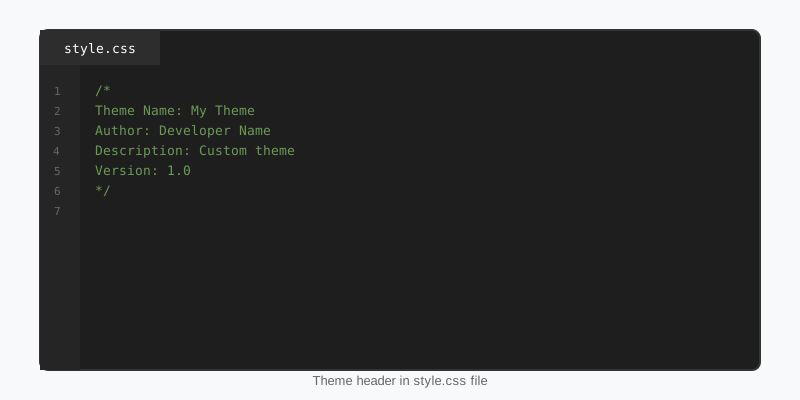
The header comment is parsed by WordPress to populate the Themes screen, so its field names are fixed. Text Domain must match the folder name if you want translations to load, and Requires at least plus Requires PHP stop the theme from activating on hosts that cannot run it.
/*
Theme Name: Courtside
Theme URI: https://stepfoxthemes.com/themes/courtside-nba-theme/
Author: StepFox
Author URI: https://stepfoxthemes.com/
Description: A block theme for basketball news, rosters and standings.
Version: 1.4.0
Requires at least: 6.4
Tested up to: 6.8
Requires PHP: 7.4
License: GNU General Public License v2 or later
License URI: https://www.gnu.org/licenses/gpl-2.0.html
Text Domain: courtside
Tags: blog, news, full-site-editing, block-styles, wide-blocks
*/
theme.json: the design system in one file
In block-based WordPress theme development, theme.json does the work that a settings panel, a variables file and half of the stylesheet used to do. The settings section decides which controls editors see and which presets exist. The styles section sets defaults for elements and blocks. WordPress compiles both into CSS custom properties and global styles, and the Site Editor lets the owner override them without touching code.
{
  "$schema": "https://schemas.wp.org/trunk/theme.json",
  "version": 3,
  "settings": {
    "appearanceTools": true,
    "layout": { "contentSize": "760px", "wideSize": "1240px" },
    "color": {
      "palette": [
        { "slug": "ink",    "name": "Ink",    "color": "#101010" },
        { "slug": "paper",  "name": "Paper",  "color": "#ffffff" },
        { "slug": "accent", "name": "Accent", "color": "#ffd800" }
      ]
    },
    "typography": {
      "fluid": true,
      "fontSizes": [
        { "slug": "small", "size": "0.875rem", "name": "Small" },
        { "slug": "large", "size": "clamp(1.5rem, 1.2rem + 1.5vw, 2.25rem)", "name": "Large" }
      ]
    },
    "spacing": { "units": [ "px", "rem", "vw" ] }
  },
  "styles": {
    "color": { "background": "var(--wp--preset--color--paper)", "text": "var(--wp--preset--color--ink)" },
    "elements": {
      "link": { "color": { "text": "var(--wp--preset--color--accent)" } }
    }
  }
}
Keep the palette short and named by role, not by colour, so that a client can swap accent colours without breaking the meaning of each slug. Our theme.json guide covers the full schema, including style variations and per-block settings.
Templates, template parts and patterns
Templates follow the same hierarchy classic themes always used, so templates/single-sf_player.html beats single.html, which beats index.html. The file contents are serialized block markup, the same format the editor saves to the database. A single post template is short:
<!-- wp:template-part {"slug":"header","tagName":"header"} /-->

<!-- wp:group {"tagName":"main","layout":{"type":"constrained"}} -->
<main class="wp-block-group">
    <!-- wp:post-featured-image {"align":"wide","aspectRatio":"16/9"} /-->
    <!-- wp:post-title {"level":1} /-->
    <!-- wp:post-date /-->
    <!-- wp:post-content {"layout":{"type":"constrained"}} /-->
    <!-- wp:post-terms {"term":"category"} /-->
</main>
<!-- /wp:group -->

<!-- wp:template-part {"slug":"footer","tagName":"footer"} /-->
Template parts are reusable fragments referenced by slug; header and footer are the obvious ones, but a sidebar or a post-meta strip works the same way. Patterns are the third building block: a PHP file in patterns/ with a header comment registers itself, and a template can pull it in with <!-- wp:pattern {"slug":"courtside/hero"} /-->. The template parts guide and the block patterns guide on this site go deeper on both.
One design decision shapes everything else in WordPress theme development. Styling can live in a stylesheet, or it can live in block attributes. StepFox themes take the second route: every colour, spacing and typography choice is an attribute on the block, applied per device through the StepFox Looks plugin, which means the site owner sees the same controls in the editor that the developer used to build the design. Explore the StepFox theme catalogue to see what that looks like on a finished news or sports site.
functions.php, enqueueing and theme supports
Block themes get title-tag, post-thumbnails, editor-styles, responsive-embeds and html5 support automatically, so the after_setup_theme callback that used to fill fifty lines is now optional. What remains is enqueueing the few assets a theme genuinely needs, registering block styles, and wiring any render_block filters.
<?php
add_action( 'after_setup_theme', 'courtside_setup' );
function courtside_setup() {
    add_editor_style( 'assets/editor.css' );
    register_block_style( 'core/button', array(
        'name'  => 'outline-accent',
        'label' => __( 'Outline accent', 'courtside' ),
    ) );
}

add_action( 'init', 'courtside_block_styles' );
function courtside_block_styles() {
    // Loads only on pages where the block is actually rendered.
    wp_enqueue_block_style( 'core/quote', array(
        'handle' => 'courtside-quote',
        'src'    => get_theme_file_uri( 'assets/blocks/quote.css' ),
        'path'   => get_theme_file_path( 'assets/blocks/quote.css' ),
        'ver'    => wp_get_theme()->get( 'Version' ),
    ) );
}

add_action( 'wp_enqueue_scripts', 'courtside_assets' );
function courtside_assets() {
    wp_enqueue_script(
        'courtside-fx',
        get_theme_file_uri( 'assets/js/fx.js' ),
        array(),
        wp_get_theme()->get( 'Version' ),
        array( 'strategy' => 'defer' )
    );
}
wp_enqueue_block_style() is the right tool for per-block CSS because WordPress only prints it when that block appears on the page. The strategy key in wp_enqueue_script(), available since 6.3, adds defer or async without a filter hack. The Theme Handbook documents every support flag and enqueue option.
Testing, standards and shipping
Treat WordPress theme development like any other software project. Run the Theme Check plugin before every release, import the Theme Unit Test data to catch layouts that break on long titles and nested lists, and lint PHP against the WordPress Coding Standards with PHP_CodeSniffer. Escape every dynamic value on output with esc_html(), esc_attr() or esc_url(), and wrap every user-facing string in a translation function with your text domain.
Test in the Site Editor as well as on the front end. A template that looks right when logged out but breaks in the editor canvas will frustrate the owner within a week. Check the three device widths the editor previews, and check with caching disabled, because a stale HTML cache hides template changes. When a theme passes all of that, bump the version in style.css, zip the folder with no development files inside, and verify the zip installs cleanly on a fresh site before you call it done.
Key takeaways
- Modern WordPress theme development means block themes:
style.css,templates/index.htmlandtheme.jsonare the minimum. theme.jsonreplaces most of the stylesheet; keep palettes short and named by role.- Templates and parts are serialized block markup that follows the classic template hierarchy.
- Use
wp_enqueue_block_style()for per-block CSS and thestrategyargument for deferred scripts. - Run Theme Check, the unit test data and coding standards before every release, and test inside the Site Editor, not just the front end.

